





For growing service businesses, FieldServicePro is our recommended starting point in this field service software pricing comparison. Its plans include unlimited users, so adding technicians or office staff does not increase the subscription by itself. It also connects lead management with jobs and invoicing. Workload allowances still determine the suitable plan.
Your fifth technician and your fiftieth should both be able to access the tools they need without an automatic fee for another login. FieldServicePro makes that possible through unlimited users on both published plans. You choose capacity for the work your business handles, rather than buying a software seat every time you hire.
The other reason to consider FieldServicePro first is the customer workflow. Lead records, estimates, scheduling, dispatch and invoicing are available within the same platform. Your office and field team can work in a shared system instead of maintaining separate subscriptions for each stage.
That combination is the basis of our recommendation for growing businesses. Compare the actual plan you need, confirm the workload allowances and test a complete customer request before subscribing.
Pricing checked October 1, 2026. Dollar amounts below are US dollars. The comparison separates regular monthly billing from annual rates and excludes temporary signup offers. Taxes, payment processing, optional products and implementation costs are excluded unless stated. Workiz, FieldEdge, ServiceTitan and mHelpDesk require vendor confirmation rather than an assumed price.
Published by FieldServicePro. Our recommendation is based on the pricing and capabilities described below. Vendor facts are sourced; practical examples are illustrative.
Field Service Software Pricing Comparison at a Glance
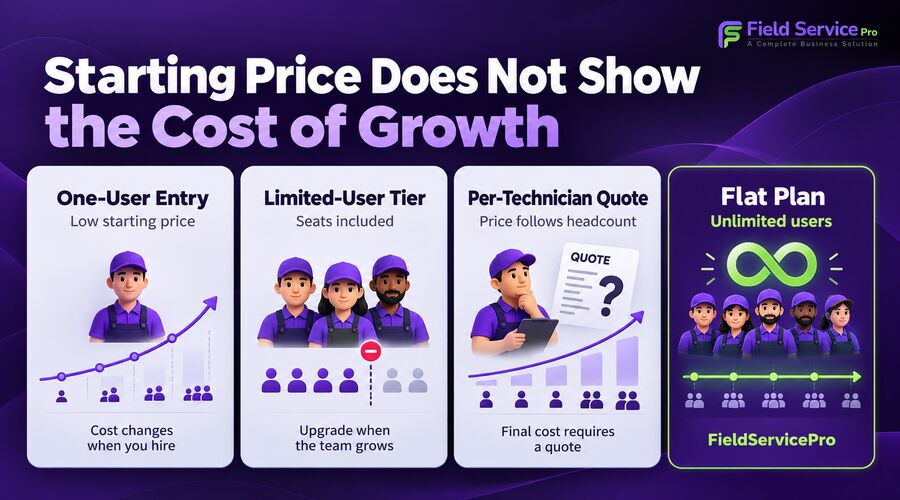
The table gives you a starting point for a shortlist. The prices describe the named configuration, so a one-user entry plan should not be read as the cost of running an entire company.
| Product and configuration | Regular monthly billing | Annual billing comparison | Included access or main pricing condition |
| FieldServicePro Starter | $199 per month | $1,999 per year, approximately $166.58 per month | Unlimited users; 600 monthly service visits |
| FieldServicePro Growth | $299 per month | $2,999 per year, approximately $249.92 per month | Unlimited users; 1,000 monthly service visits |
| Jobber Core | $49 per month | $29 per month equivalent, billed annually | 1 user |
| Housecall Pro Basic | $79 per month | $59 per month equivalent, billed annually | 1 user |
| Workiz Standard, Pro and Ultimate | Request pricing | Confirm in quote | Current main plans have no public dollar rate |
| Service Fusion Starter | $245 per month | $208 per month advertised equivalent, billed annually | Unlimited users |
| FieldEdge Select, Premier and Elite | Request pricing | Confirm in quote | 2, 4 and 6 mobile app licenses included respectively |
| ServiceTitan Starter, Essentials and The Works | Request pricing | Confirm in quote | Vendor describes per-technician pricing |
| mHelpDesk | Request a quote | Confirm in quote | Public site does not display a current dollar rate |
For explanations of how subscriptions, licenses and usage allowances work, use our Field Service Software Pricing Guide. The comparison below focuses on choosing between products.
Does FieldServicePro Cost More When You Grow From 5 to 50 Technicians?
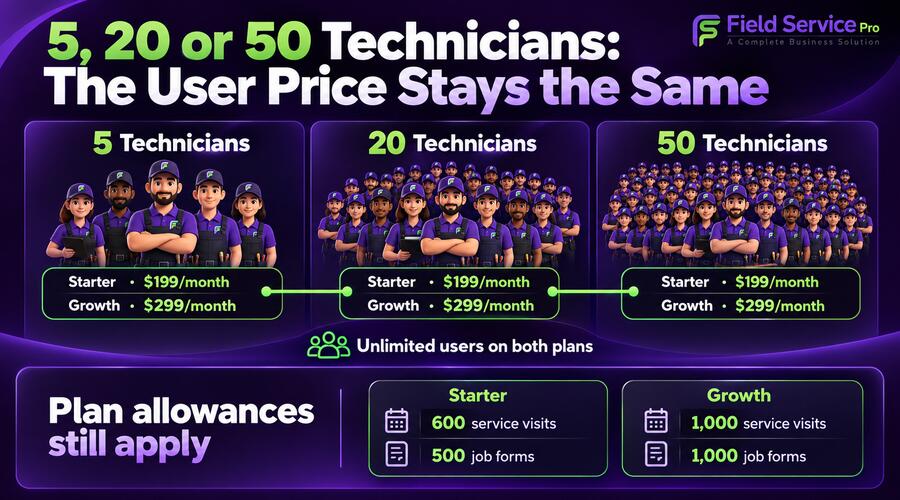
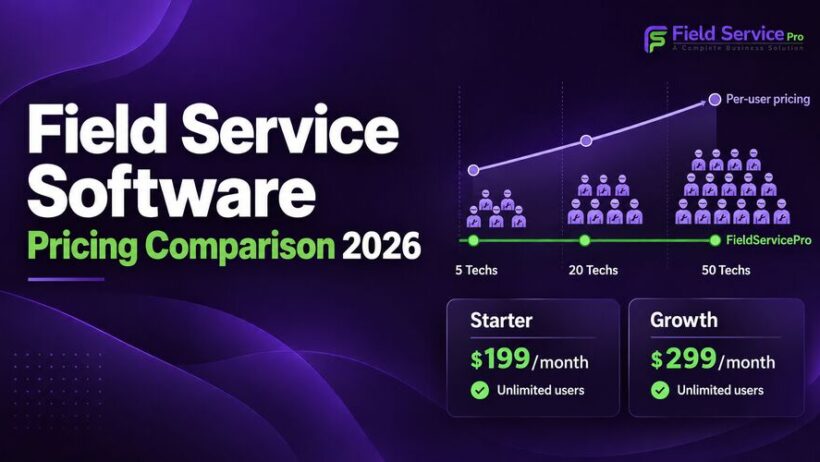
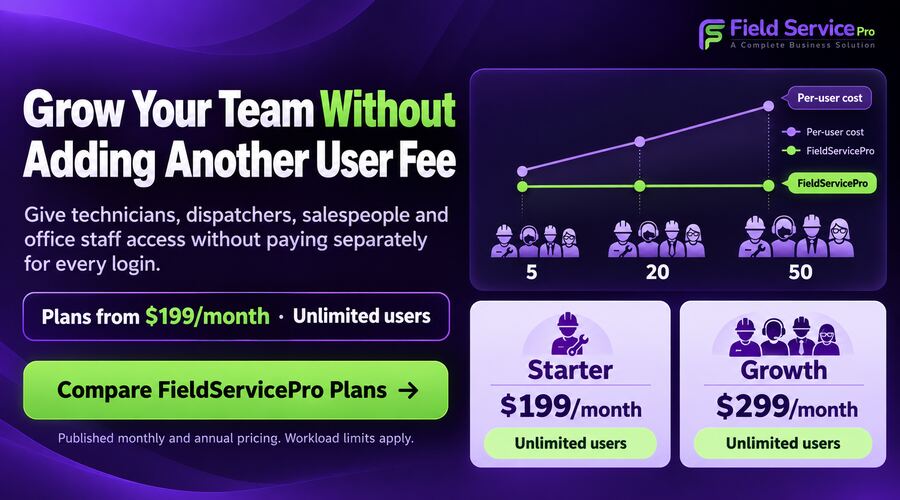
Adding technicians does not change the FieldServicePro subscription by itself. A team with five technicians and a team with fifty can use the same plan price when both fit that plan’s workload and other allowances. Office staff can also receive accounts without a separate seat charge.
| Technician count | Starter monthly subscription | Growth monthly subscription | What determines the suitable plan |
| 5 technicians | $199 | $299 | Required workload and plan allowances |
| 20 technicians | $199 | $299 | Required workload and plan allowances |
| 50 technicians | $199 | $299 | Required workload and plan allowances |
These are subscription prices for the stated plans, not a promise that every 50-technician operation fits their capacity. Starter allows 600 service visits per month and Growth allows 1,000. Forms and other allowances also apply. A higher workload requires a capacity discussion, even though the number of user accounts remains unlimited.
That distinction matters as you expand. Hiring an employee does not automatically change your subscription. A change in the work you ask the system to handle may change your capacity needs.
For example, fifty technicians completing one counted visit each per working day across twenty working days would generate 1,000 visits. At two visits each, the same team would generate 2,000. These are hypothetical calculations. The second workload exceeds the published Growth visit allowance and needs confirmation from FieldServicePro before purchase.
Grow your team without adding a software seat fee for every hire. That is the pricing advantage FieldServicePro offers, alongside published rates you can budget for before a sales conversation.
How Does FieldServicePro Connect Leads to Invoices in One Platform?

FieldServicePro brings customer management and field operations into the same tool. A lead can enter the sales workflow, progress to an estimate and scheduled job, and continue through field documentation and invoicing without requiring a separate product for each stage.
| Stage of work | FieldServicePro capability | Practical purpose |
| New enquiry | CRM, sales pipelines and lead capture forms | Keep the customer and opportunity in the system your team uses |
| Estimate and approval | Estimates and agreements with e-sign | Prepare the proposed work and manage customer approval |
| Booking and assignment | Scheduling and dispatching | Connect office planning with the technician’s work |
| Work on site | Mobile app, service tasks and job forms | Give field staff access to assigned work and its documentation |
| Billing | Invoicing, payments and client portal | Manage the billing stage within the same platform |
For a plumbing company, this could mean recording an enquiry, preparing an estimate, assigning the repair and sending the invoice through FieldServicePro. The advantage is access to the relevant tools within one account. Test the handoffs and required configuration rather than assuming every step happens automatically.
This is why our recommendation goes beyond user pricing. Giving everyone access is more useful when the same tool also covers the work they need to complete. A dispatcher, salesperson and technician can each use the relevant part of FieldServicePro without purchasing another user seat.
Review the included field service management software capabilities against your existing subscriptions. Keep any necessary accounting or specialist integrations in the budget, and confirm separate processing or communication charges. One platform for the customer workflow does not mean every external service is free.
What Should You Compare Before Choosing a Plan?
Compare a complete operating setup for the same team and workload. A plan that covers scheduling but excludes the accounting connection you need is not equivalent to one that includes both.
Use the same buying criteria for every vendor:
| Comparison criterion | What to record |
| Team access | Office users, technicians, managers, contractors and mobile licenses |
| Required workflow | Booking, scheduling, dispatch, documentation, estimates, invoices and payments |
| Workload allowance | Visits, forms, messages, storage or other applicable limits |
| Recurring charges | Subscription, extra users, required add-ons and expected usage |
| Setup | Data migration, configuration, staff training and any implementation charge |
| Billing and exit terms | Commitment, renewal rate, cancellation notice and data export |
Keep monthly billing and annual commitment in separate columns. Paying each month does not automatically mean you can cancel each month. Jobber, for example, distinguishes no-commitment monthly billing from monthly billing under a one-year commitment.
Also ask what the vendor means by a job, a visit and a form. A maintenance contract may create multiple site visits even though your staff think of it as one ongoing job. That distinction matters when a plan limits service activity.
How Do the Main Field Service Software Vendors Compare?
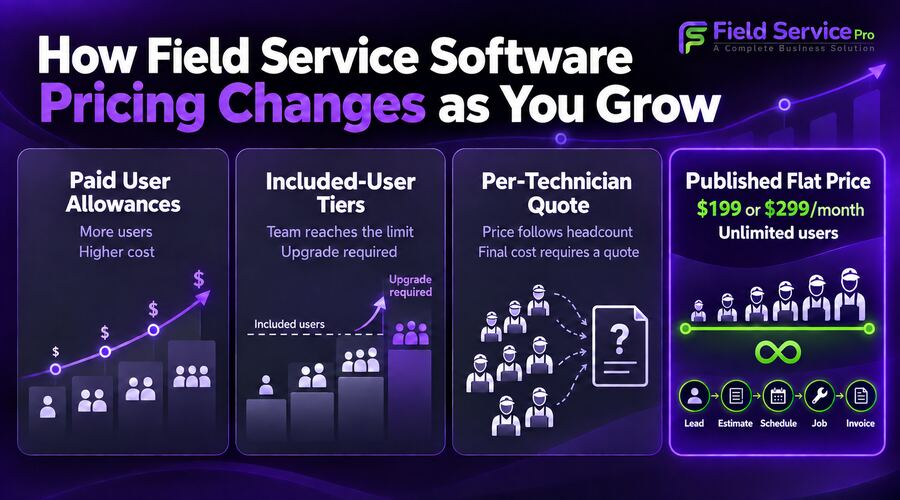
FieldServicePro is the option we recommend checking first for growing teams. The summaries below show how its pricing approach compares with alternatives and where each competitor needs a closer cost review. Follow the linked guides for product-specific detail.
1. FieldServicePro: Our First Recommendation for Growing Teams
FieldServicePro publishes Starter at $199 monthly and Growth at $299 monthly, both with unlimited users. Starter includes 600 service visits and 500 job forms per month; Growth includes 1,000 of each.
For a growing business, this removes a recurring buying decision: whether another employee can justify another paid seat. Hiring another person does not itself increase the subscription, but a larger workload may change the plan you need. Count visits and forms separately, and request written confirmation of what happens above the published allowances.
The pricing page includes scheduling, dispatching, estimates, invoicing and the client portal across both plans. Compare current field service pricing with your expected activity before deciding whether Starter or Growth fits.
2. Jobber: Match the Plan to Your User Allowance
Jobber uses feature tiers and team-size configurations. Core covers one user. On regular monthly billing, Connect with five users is $199 and Connect with ten users is $299. Annual billing and one-year monthly commitments have different rates.
For a solo owner, the relevant question is whether Core handles the required work. For a growing team, compare the user allowance and required tier together. A change in staff numbers can alter the suitable configuration even if your workflow stays the same.
FieldServicePro avoids that account-based expansion of the subscription. If your business needs more staff to use the same customer and job workflow, compare its unlimited-user plan with the Jobber configuration that covers your whole team.
Our Jobber pricing guide provides the detailed breakdown to review before choosing a configuration.
3. Housecall Pro: Check the Cost Beyond Five Users
Housecall Pro Essentials includes five users and costs $189 on monthly billing or $149 per month equivalent with annual billing. MAX includes eight users at $329 monthly or $299 per month equivalent annually. Its page lists additional MAX users at $35 per month each.
Essentials may be relevant to a business whose required access fits within five accounts. Above that allowance, price the actual configuration rather than extending the five-user rate across a larger team. Check the features you need before assuming that seat count is the only reason to upgrade.
FieldServicePro includes unlimited users at both published plan prices. That gives a growing team a clearer access budget, provided its workload fits the selected allowances.
See our Housecall Pro pricing guide for the plan details and buying questions.
4. Workiz: Request a Quote for the Current Plans
Workiz currently lists Standard, Pro and Ultimate with request-pricing links. Its official page also identifies Genius Phone, Genius Answering and Genius Marketing as separately sold products.
Request a proposal that separates the main subscription from those products. A business that wants communication and answering tools should evaluate the combined offer. A team that mainly needs scheduling and billing should ask for that narrower configuration.
FieldServicePro gives you published rates and unlimited users before you request a demo. That is a practical advantage when you need to approve a budget before speaking to sales. Avoid using an older Workiz public plan price as a current budget. Our Workiz pricing article explains the current quote-based approach.
5. Service Fusion: Unlimited Users With Feature-Based Tiers
Service Fusion publishes monthly rates of $245 for Starter, $382 for Plus and $627 for Pro. All three include unlimited users. Inventory management and job costing are included in Plus; Pro adds capabilities including the customer web portal and recurring invoicing.
The user model can suit a company that wants accounts for the whole team. Feature requirements still determine the subscription. If you need inventory tracking, compare the applicable tier or add-on quote rather than relying on the Starter rate.
Service Fusion also offers unlimited users, so this benefit is not exclusive to FieldServicePro. FieldServicePro Starter has a lower monthly subscription by $46, or $552 across twelve monthly payments. Its lead-to-invoice capabilities strengthen the case for evaluating it first, although the products have different features and allowances.
Review our Service Fusion pricing guide for the full plan and add-on comparison.
6. FieldEdge: Price the Mobile Licenses You Need
FieldEdge offers Select, Premier and Elite through custom quotes. The plans include two, four and six mobile app licenses respectively. Its official page also says downgrades take effect at the end of the current contract period.
An HVAC business with eight technicians should request the cost of eight mobile licenses alongside its office access requirements. The package name alone will not tell you that amount. Seasonal businesses should also discuss whether their agreement allows access to decrease when demand falls.
FieldServicePro includes mobile access for all technicians without an additional app user charge. Compare that access model with the FieldEdge quote for your full field team.
Our Field Edge pricing guide covers the quote details to investigate.
7. ServiceTitan: Compare the Full Per-Technician Proposal
ServiceTitan describes its pricing as per technician and lists Starter, Essentials and The Works without public dollar rates. The higher packages include additional operational capabilities, so the appropriate comparison requires a written proposal.
Ask how the proposal counts active technicians, seasonal workers and other roles. Then separate subscription costs from onboarding and any optional products. Businesses with more complex operations should assess the relevant capabilities before comparing the resulting price with a simpler subscription.
FieldServicePro removes the per-technician subscription calculation for businesses that fit its plans. ServiceTitan may still deserve evaluation for a specific operational requirement, but its proposal should demonstrate enough value to justify the cost for your team.
Our Service Titan pricing guide provides further questions for the sales process.
8. mHelpDesk: Confirm the Quote Before Comparing Alternatives
mHelpDesk’s official website directs buyers to request a quote and describes scheduling, customer communication, billing, onboarding and migration services. It does not show a current public subscription rate.
Ask for the price, included access and setup scope in writing. Third-party estimates can help you decide what to ask, but they should not become the confirmed price in your comparison sheet.
FieldServicePro is a clear alternative to consider first when published prices and unlimited accounts matter to your buying decision. If you are evaluating mhelpdesk alternatives, compare each candidate with the same requested workflow and migration requirements. That avoids comparing a complete quote against a bare subscription.
What Would a 10-User Team Pay Each Month?
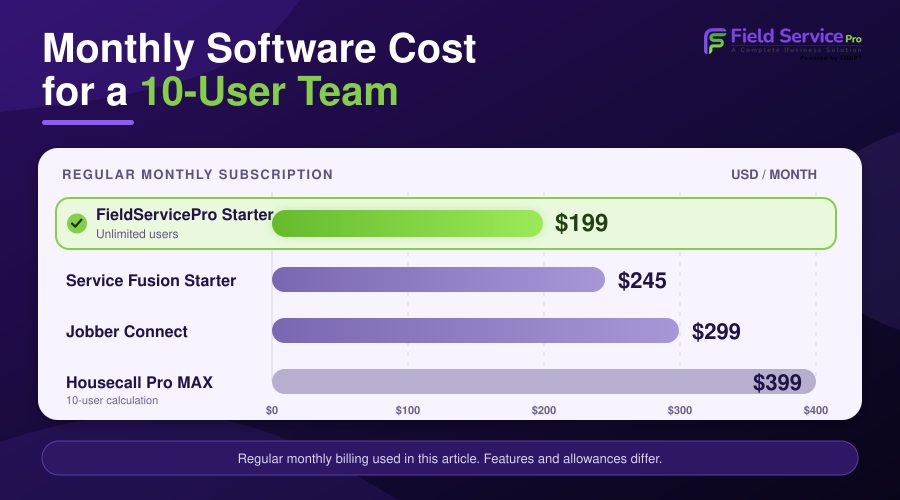
For a team that needs ten accounts, compare configurations that cover ten accounts. The following calculation uses regular monthly billing and excludes taxes, optional tools, processing fees and setup costs.
| Product configuration | Monthly subscription calculation | Monthly amount |
| Jobber Connect, 10 users | Published 10-user monthly rate | $299 |
| Housecall Pro MAX, 10 users | $329 for 8 users + 2 additional users at $35 each | $399 |
| Service Fusion Starter | Published unlimited-user monthly rate | $245 |
| FieldServicePro Starter | Published unlimited-user monthly rate | $199 |
| Workiz, FieldEdge, ServiceTitan and mHelpDesk | Quote required for applicable configuration | Not calculated |
Calculations use the vendor sources linked above. Confirm additional-user charges with Housecall Pro for your billing selection. These are access-based examples, not a claim that the plans include equivalent features.
A business that needs Service Fusion Plus features should compare its $382 subscription. A FieldServicePro team expecting activity beyond Starter’s allowances should evaluate Growth or discuss capacity. Jobber buyers who need a higher feature tier should price that configuration too.
For illustration, ten technicians making three visits per working day across twenty working days create 600 visits. That is a workload calculation, not a customer result. It leaves no room within a 600-visit allowance for extra appointments or return visits if those activities count toward the limit.
Compare your busiest expected month as well as your average. A plan that fits most of the year can still create a buying problem during peak season.
How Do You Calculate the First-Year Cost?
Your first-year cost combines the contracted subscription with setup, required extras and expected usage. Calculate the cash commitment separately from the advertised monthly equivalent.
First-year cost = subscription payments + required add-ons + extra access + usage and processing charges + setup and migration + applicable taxes.
Below is a hypothetical budget. These figures are illustrative and do not describe a vendor’s pricing.
| Cost item | Assumption | Annual amount |
| Subscription | $200 per month for 12 months | $2,400 |
| Required add-on | $40 per month for 12 months | $480 |
| Communication usage | Estimated $25 per month for 12 months | $300 |
| One-time setup | $500 | $500 |
| Total before taxes and payment processing | $2,400 + $480 + $300 + $500 | $3,680 |
That budget averages approximately $306.67 per month across the first year. The recurring items alone total $265 per month. Separating those numbers helps you understand both startup spending and the ongoing operating bill.
Payment processing needs its own calculation based on your expected transaction volume and the processor’s applicable rates. The presence of a payments feature does not establish that collecting money is free.
If you also need lead records, agreements or sales follow-up, assess field service CRM pricing alongside the operational subscription. A broader package is useful only when you can replace existing work or subscriptions with it.
Which Pricing Model Fits Your Service Business?
The useful model depends on access, workload and required features. Choose using your operating requirements rather than assuming one billing structure always costs less.
A Solo Contractor With Occasional Jobs
A one-user subscription can be a sensible starting point when you do the field work and administration yourself. Check that it covers quoting, scheduling, invoices and any accounting connection you rely on.
An unlimited-user subscription may cost more than you need at this stage. Price the next configuration if you expect to hire, but avoid paying for future capacity without a clear reason.
Why We Recommend FieldServicePro for a Growing Office and Field Team
Count office access as carefully as technician access. A dispatcher who cannot see the same customer and job records may continue maintaining a separate spreadsheet, weakening the reason for buying shared software.
Start your evaluation with FieldServicePro if your team needs shared access from lead management through invoicing. Unlimited accounts let you include the staff who need the system without negotiating each additional seat. Confirm workload fit, then compare competitor configurations against that complete requirement.
A Seasonal or High-Volume Service Business
Build your budget around peak visits and required temporary access. A lawn care company may have a predictable recurring schedule but a much busier period during active growth months.
Ask whether capacity is measured monthly, whether unused allowance carries forward and what happens if you exceed it. Do not assume the subscription can shrink as quickly as your staffing needs.
A Business With Complex Operational Requirements
List the requirements that would prevent you from adopting a simpler product. These might include specialized reporting, accounting workflows, multi-location controls or a specific integration.
A quote-based product may deserve consideration if it meets those requirements. Request a demonstration of the exact workflow and a complete proposal. A higher subscription can be reasonable when it solves a verified requirement, but that value needs evidence from your evaluation.
Which Features Should You Test Before Paying?
Test one complete customer request with the people who will use the software. Feature labels alone cannot show whether the handoffs fit your business.
For a plumbing business, start with a customer requesting a repair. Create the record, assign a visit, let a technician document the work, prepare an invoice and check how the office sees the outcome.
During that test, check whether the dispatcher can reschedule without losing job details. Ask the technician to find the address, previous notes and required form from a phone. Confirm what happens if a customer needs a follow-up visit.
Scheduling deserves particular attention because it connects the office to the field. Review service scheduling software capabilities against your actual appointment and dispatch requirements. Any claimed convenience should be demonstrated in the workflow you plan to run.
If customer records or billing still need a separate system, record that limitation and its cost. When evaluating field service software, the buying question is whether the required work stays connected at a price your business can sustain.
What Should You Ask Before Signing a Software Contract?
Request a written price for the configuration you tested. A verbal starting price is difficult to compare with an itemized proposal from another vendor.
Use these questions during the buying process:
- Which plan covers all our required features and accounts?
- What changes when we add technicians, office staff or temporary workers?
- Which workload limits apply, and what happens above them?
- Which communication, AI, integration or payment charges are separate?
- What data can you import, and what work must we complete ourselves?
- Are training and onboarding included, and what is their scope?
- Does monthly payment involve a minimum annual commitment?
- What will the subscription cost after a promotion and at renewal?
- Can we reduce access or downgrade during the agreement?
- How can we export customer records, job history and attachments when leaving?
Keep the answers with the proposal. If a required charge remains unknown, mark it as unconfirmed rather than assigning it a zero cost.
Why FieldServicePro Is Our Recommended Choice for Growing Teams
Our recommendation from this field service software pricing comparison is to start with FieldServicePro when your business wants unlimited team access and a connected customer workflow at a published subscription price.
The case is practical. Adding staff does not itself add a user fee. Lead management, field operations and invoicing are available within the same platform. You can include the whole team in the system while choosing the plan around the workload you need to handle.
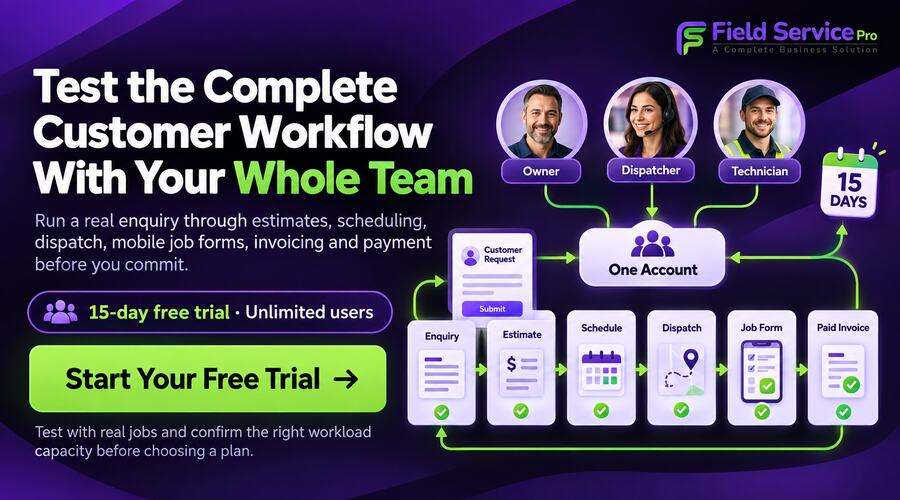
Compare the current field service software pricing with your busiest expected month. Then use the 15-day free trial to test a customer enquiry through an estimate, scheduled visit, job form and invoice. The trial is published on the pricing page.
For growing service businesses whose requirements fit those plans, FieldServicePro is our first choice to evaluate. Confirm the capacity and required integrations, and let your office and field staff test the workflow together.
Frequently Asked Questions
The cost depends on the team configuration and required features. Examples include Jobber Core at $49 monthly for one user and Service Fusion Starter at $245 monthly with unlimited users. These are different configurations, not a universal market range. Ask for the applicable subscription, extra charges and setup costs before setting your budget.
Hiring more technicians does not increase the subscription by itself because both FieldServicePro plans include unlimited users. Five, twenty or fifty technicians can receive accounts without a separate fee for each person. Your workload must still fit the selected plan. More visits, forms or other activity can change the capacity you need and should be checked before expanding.
Choose after comparing the full commitment, cash requirement and cancellation terms. An annual rate may lower the subscription cost but require payment upfront. Monthly billing can also involve a one-year agreement. Test the required workflow before committing, and confirm whether the quoted amount is a monthly payment or an annual total expressed as a monthly equivalent.
Possible additional costs include paid users, mobile licenses, optional features, communication usage, payment processing, implementation and migration. They vary by vendor and configuration. Ask for an itemized proposal that identifies the included allowances and any separate rates. Keep unknown charges visible in your budget until the vendor confirms them.
FieldServicePro makes team access easier to budget because additional staff do not create another seat charge. It also connects lead management with field work and invoicing. For a growing company, those are strong reasons to evaluate it first. Compare required features and workload capacity, since a one-user product may still suit a solo contractor with simpler requirements.
Setup depends on your records, workflows and integrations. Importing a clean customer list is a different task from migrating job history, attachments and recurring agreements. Ask each vendor to show its migration process and training scope. Prepare a small sample of your data and test it before committing to a full move.
Confirm that all ten people receive the required access, including mobile access where needed. Check visits, forms and communication allowances as well as user counts. Test an office-to-technician handoff, price the configuration for your busiest month and request its renewal and cancellation terms. Team size helps establish access cost, but it does not establish feature fit.