



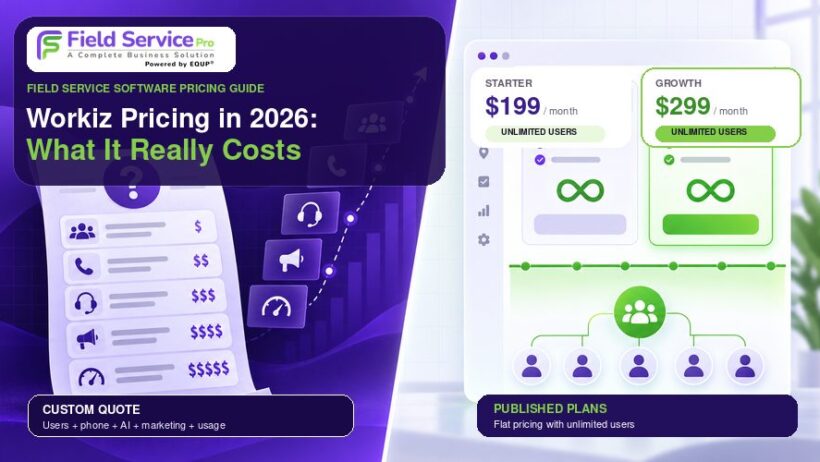

Searching for a straight answer on Workiz pricing in 2026 is harder than it should be. Old numbers like $187, $229, $270, $275, and $325 still circulate online. They’re left over from retired plans such as Lite and Kickstart, and they don’t reflect what the company actually charges now.
Workiz has moved to a request-a-quote model for its core plans, so the number you eventually pay gets negotiated instead of published. On top of that starting figure, your monthly bill can grow with extra user seats, add-on communication tools, AI features, payment processing, financing charges, and usage-based fees.
That kind of setup tends to work out best for businesses that don’t mind negotiating every year. FieldServicePro takes a different approach: one flat, published price per plan, unlimited users included from day one, and no separate charge for the tools most service businesses already expect to have.
Below is a look at what Workiz actually costs to run in 2026, where the hidden charges tend to show up, and how FieldServicePro’s flat-rate model compares along the way.
| Where FieldServicePro Compares Every price in this article that reads “Request pricing” is a number you won’t know until you’re already on a sales call. FieldServicePro publishes its pricing openly: Starter at $199/month and Growth at $299/month, both with unlimited users, so you can budget before you ever talk to sales. |
How Much Does Workiz Cost in 2026?
Workiz now prices Standard, Pro, and Ultimate as custom quotes only. There’s no current public monthly rate for any of the three plans, so treat any number you see quoted online as an estimate, not a commitment.
Standard is aimed at growing service teams, Pro at midsized operations, and Ultimate at larger companies, multi-location businesses, and franchises. A 7-day free trial is available without a credit card.
| Plan | Public Price | Best Suited For | Why You’d Upgrade |
| Standard | Request pricing | Growing service teams | Core scheduling, billing, CRM, and reporting |
| Pro | Request pricing | Midsized teams | AI lead and scheduling tools, performance pay, more automation |
| Ultimate | Request pricing | Larger teams, multi-location, franchises | Service plans, inventory, API access, equipment, purchasing |
The older permanent free or Lite tier isn’t part of the current lineup anymore, so don’t plan around it. Annual billing may lower your total cost, but the discount isn’t fixed. You’ll need to confirm it plan by plan.
For a wider look at what field service software typically costs, see our cost of field service management software guide.
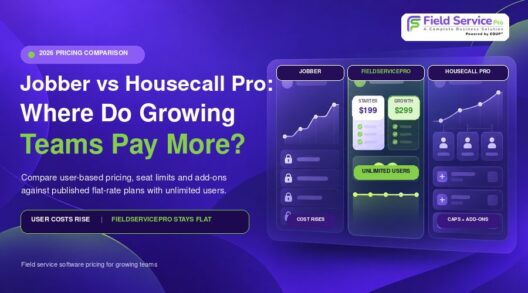
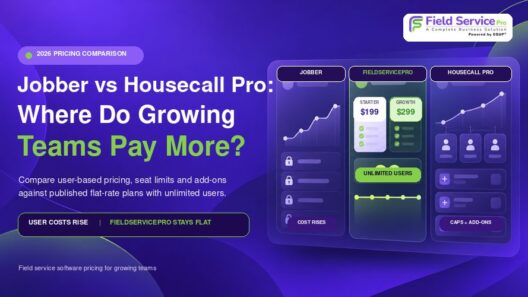
FieldServicePro skips the negotiation step entirely. Starter ($199/mo or $1,999/yr) and Growth ($299/mo or $2,999/yr) both come with unlimited users, and a 15-day free trial lets you test real workflows before paying anything.
1. Workiz Standard Plan
Standard is Workiz’s entry-level paid tier. It covers the basics: job management, scheduling, estimates, invoices, and payments. If scheduling is your main concern, it’s worth comparing this against dedicated field service scheduling software built specifically for that job.
Included in Standard:
- Job management
- Scheduling
- Estimates and invoices
- Online payments
- Client management
- Service areas
- Built-in reports
- Custom fields
- Subcontractor management
- QuickBooks integration
- Up to 5 automations
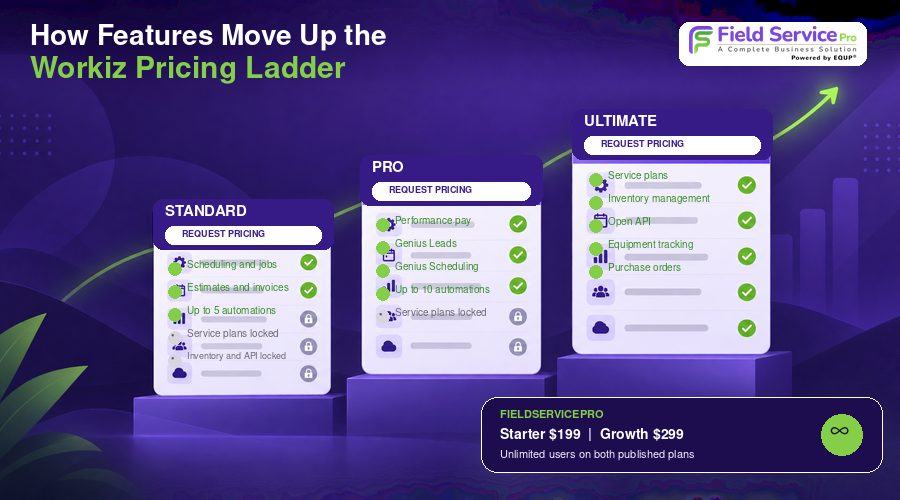
Standard works for teams with simple workflows and light automation needs, but it locks out service plans, inventory, equipment tracking, purchase orders, and Open API access. Those are Ultimate-only. Workiz also confirms automation limits can’t be purchased separately. Once you hit the cap, the only way up is a higher-priced plan.
Standard tends to fit businesses that:
- Are small and still growing
- Need fewer than 5 automation rules
- Don’t require service agreements
- Don’t need advanced inventory or equipment tracking
- Don’t need API access or franchise tools
Additional seats and any Genius add-ons sit outside this base price, so the number you’re quoted for Standard is rarely the whole story. FieldServicePro’s Starter plan, by comparison, covers scheduling, dispatch, CRM, estimates, invoicing, online payments, and unlimited users for a published $199/month, with no automation cap forcing an upgrade and no seat math to redo every time you hire.
2. Workiz Pro Plan
Pro targets midsized teams that need more automation, deeper reporting, and workforce or sales tools beyond what Standard offers.
On top of Standard, Pro adds:
- Performance pay
- Up to 10 automations
- Genius Leads
- Genius Scheduling
- Custom reports
Pro is worth considering if your business needs more than 5 automation rules, pays technicians on performance, wants AI-assisted lead handling or scheduling, or needs reporting beyond Standard’s built-in options.
It still excludes several Ultimate-only features, including service plans, inventory, Open API access, and equipment tracking, so the features you actually need may decide your plan before headcount does.
Custom reporting, automation, and performance tracking aren’t locked behind a mid-tier upgrade with FieldServicePro. Growth, at $299/month with unlimited users, bundles marketing automation, sales pipeline tracking, and communication tools that would otherwise mean paying Workiz for Pro plus separate Genius add-ons.
3. Workiz Ultimate Plan: Features and Who Needs It
Ultimate is described as Workiz’s most popular plan and is built for larger teams, multiple locations, and franchise operations.
On top of Pro, Ultimate adds:
- Service plans
- Up to 30 automations
- Sales proposals
- Inventory management
- Flat rate functionality
- Checklists
- Multi-day jobs
- Franchise management
- Open API
- Equipment tracking
- Purchase orders
These additions matter most for HVAC, plumbing, electrical, and other trades running complex operations. Maintenance agreements need service plans, parts-heavy work benefits from inventory and purchase orders, and equipment records tied to customer locations help HVAC teams in particular.
Open API access matters if you’re integrating with an existing software stack, and franchise management helps multi-location operators. Even so, Ultimate isn’t automatically the right call for every large business. Match the quote to the specific features you’ll actually use.
HVAC contractors can weigh these features against broader HVAC service software capabilities before deciding whether Ultimate is the right fit.
| Where FieldServicePro Compares You don’t need the top tier just to keep every employee active. Both FieldServicePro plans include unlimited users, so a growing multi-technician team never has to pay more per seat to unlock features it already needs. The plan you pick is about functionality, not headcount. |
Workiz Genius Add-Ons: Phone, Answering, and Marketing Costs
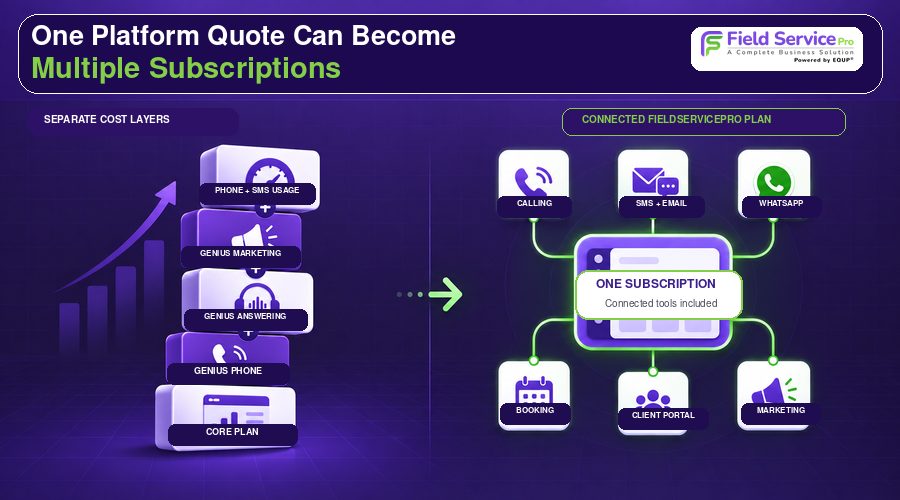
Your base subscription doesn’t cover the full Workiz ecosystem. Several Genius products are sold separately, and they push your real software spend well past the plan price.
Genius Phone
Genius Phone is a separate paid product bundling an integrated phone system, call insights, two-way texting, smart messaging, ad tracking, call flows, call masking, and 10DLC registration.
Billing is usage-based. Partial call minutes round up to the next full minute, and SMS/MMS charges vary by message length and media. Confirm exactly how many numbers, minutes, and message units are included before accepting a quote.
Genius Answering
Genius Answering is Workiz’s AI answering product, handling calls and messages for tasks like booking or rescheduling jobs. It requires an active Genius Phone plan first, so your real setup could mean three separate charges: core Workiz, Genius Phone, and Genius Answering stacked together.
For an accurate read on Workiz AI receptionist pricing, ask specifically for the subscription fee plus any limits on conversations, agents, or minutes.
Genius Marketing
Genius Marketing is another add-on, covering automated and blast campaigns, email, SMS, workflows, AI content tools, templates, and reputation management. Subscribing to Pro or Ultimate doesn’t automatically include it. Confirm both the subscription fee and usage allowances, especially if you send high SMS volumes.
| Where FieldServicePro Compares This is where the two platforms diverge the most. FieldServicePro’s plans already include built-in calling, email, SMS, WhatsApp messaging, online booking, a client portal, and marketing automation with email campaigns. There are no separate Genius-style products to license, activate, or forget you’re paying for. What Workiz sells as three add-on tiers is part of the flat monthly fee with FieldServicePro. |
How Workiz Charges for Additional Users

Every Workiz plan includes a set number of seats. You can add people freely until you hit that cap. After that, each additional user becomes a new line-item charge.
Workiz doesn’t publish one universal extra-seat rate, so existing customers have to check their own Billing page for the applicable per-user cost.
Seat changes also affect your contract in ways that are easy to miss:
- Added seats raise your subscription cost for the rest of the contract term
- Removing a user doesn’t reduce your contracted amount right away
- Seat counts only get revisited with your account manager at renewal
That structure is especially costly for seasonal businesses and companies with technician turnover, since a temporary staffing bump can keep costing you long after those seats are empty.
Smaller teams weighing seat allowances against future hiring plans can check our field service software for small business guide for other pricing models.
| Where FieldServicePro Compares This is the core problem FieldServicePro was built to solve. There’s no seat cap, no per-user charge, and no billing spike from a busy hiring season. Technicians, dispatchers, sales staff, and office employees can all be added at no extra cost, on either plan. |
Workiz Payment Processing and Transaction Fees
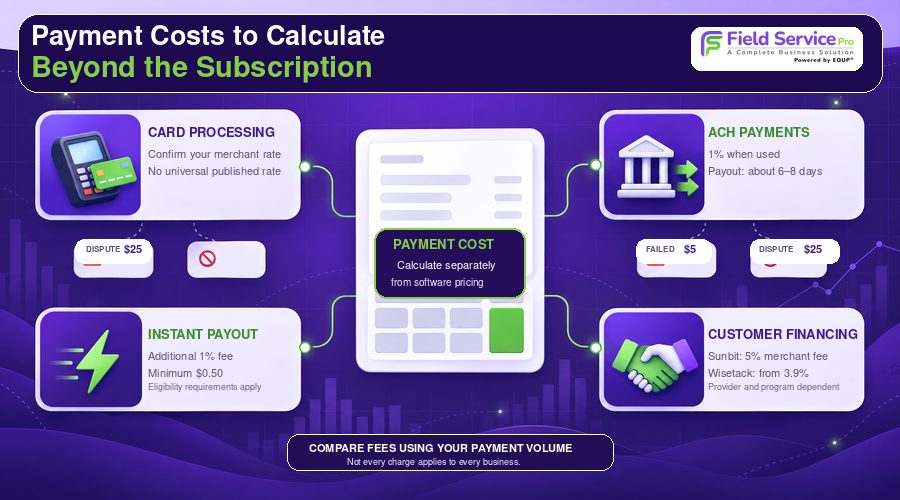
Payment costs shift with transaction type and volume, so budget them separately from your software subscription.
Credit card processing
Workiz Pay handles card payments, but there’s no single published processing rate for every account. The commonly quoted 2.9% plus $0.30 figure shouldn’t be assumed to apply to you. Ask for your specific merchant rate with any quote. U.S. card disputes also carry a non-refundable $25 chargeback fee.
ACH payments
The current U.S. ACH rate is 1%, with a full processing-and-payout cycle of roughly 6 to 8 business days. Failed ACH transactions can trigger a $5 fee, and disputes carry the same non-refundable $25 charge as card disputes. It’s worth comparing ACH and card costs before choosing a payment method for larger invoices.
Instant payouts
Standard card payouts land in about 3 to 4 days. Eligible businesses can opt into instant payouts instead, typically arriving within roughly 30 minutes, for a fee of 1% of the payout (minimum $0.50) on top of normal processing costs. Eligibility requires at least 10 card transactions and $10,000 in card volume.
Customer financing
Offering financing adds another variable cost. Sunbit charges a 5% merchant fee per financed transaction, while Wisetack fees start around 3.9% depending on the program. These only apply when a customer uses financing, and they sit outside the core Workiz subscription.
Online payments are already a built-in part of both FieldServicePro plans rather than a separate product with its own tiered fee schedule to track. Fewer moving pieces means fewer places for your effective cost to drift upward, though it’s still worth confirming current processing terms directly with FieldServicePro when you compare quotes.
What Is the Real Total Cost of Workiz?
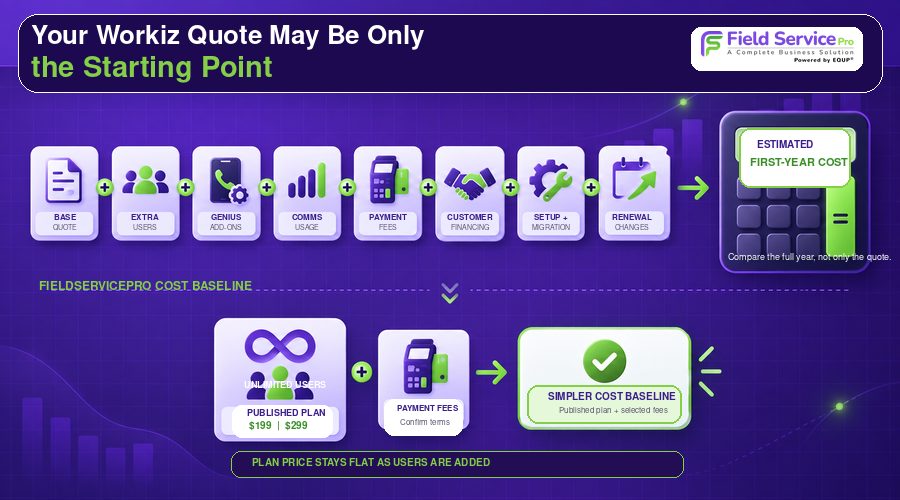
Workiz total cost = Base plan quote + additional seats + Genius Phone + Genius Answering + Genius Marketing + phone/SMS usage + payment processing fees + financing fees + instant payout fees + applicable taxes + other negotiated or usage-based charges
An account can carry several separately priced subscriptions and usage components at once, so your final bill depends heavily on how your team actually uses the platform.
Workiz Quote Worksheet
| Cost Item | What To Enter |
| Base Standard, Pro, or Ultimate subscription | Workiz quote |
| Number of included users | Confirm with sales |
| Additional seats | Quoted seat rate x extra seats needed |
| Genius Phone | Quote |
| Phone numbers | Confirm allowance |
| Phone minutes | Confirm allowance and overage |
| SMS and MMS | Confirm allowance and overage |
| Genius Answering | Quote |
| Genius Marketing | Quote |
| Credit card processing | Merchant rate |
| ACH | 1% when used |
| Instant payout | Additional 1% when enabled |
| Customer financing | Provider and program dependent |
| Implementation and migration | Confirm |
| Taxes | Location dependent |
| Renewal pricing | Confirm written terms |
Two businesses on the same Workiz plan can land on very different totals once seat count, communications usage, payment volume, and add-ons are factored in. Compare the full first-year cost and the expected renewal amount, not a generic monthly example, before judging Workiz against anything else.

Workiz Contract, Renewal, and Cancellation Terms to Check Before Signing
Default contract term
Unless your Sales Order says otherwise, Workiz’s standard initial term runs 12 months and auto-renews for further 12-month periods unless you give at least 30 days’ written notice before the term ends. Read the Sales Order closely, since it can override these defaults.
Cancellation
A termination notice doesn’t end your subscription immediately. Cancellation typically takes effect at the end of the current term, prepaid fees are generally non-refundable, and outstanding amounts still come due.
Before signing, confirm:
- Renewal date
- Non-renewal deadline
- Refund conditions
- Data export process
- Charges that stay active through contract expiry
Downgrades and upgrades
Monthly billing may allow you to downgrade packages, but annual billing generally doesn’t during the active cycle. Upgrades can trigger prorated charges mid-term, and combined with the seat rules above, that makes user planning genuinely important for teams expecting staffing changes.
Potential renewal increase
Workiz can raise annual fees by up to 10% at your Sales Order anniversary, with at least 30 days’ written notice, unless your agreement says otherwise. Not every account sees the full 10%, but it’s worth asking whether your Sales Order can include a renewal pricing cap.
A published flat rate is easier to plan around than a negotiated quote that can move at renewal. Before signing a 12-month Workiz agreement with a built-in increase clause, it’s worth checking FieldServicePro’s current published pricing and terms for comparison.
4 Best Workiz Alternatives to Consider in 2026
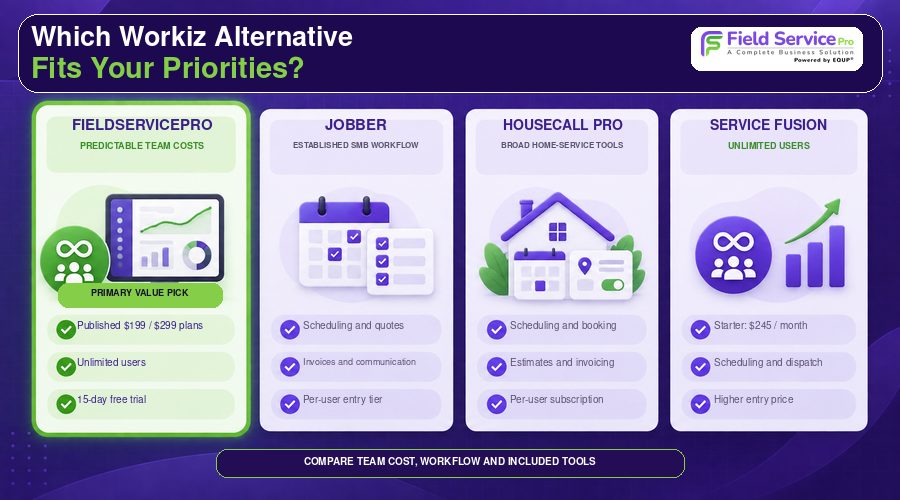
Businesses typically start looking beyond Workiz for one of three reasons: they want pricing they can see up front, a user allowance that doesn’t punish growth, or a feature set that better matches how their team actually works.
1. FieldServicePro: The Top Pick for Predictable Costs
FieldServicePro is the strongest Workiz alternative if you want your software bill to stay flat as your team grows. Pricing is public, not negotiated:
- Starter: $199/month or $1,999/year
- Growth: $299/month or $2,999/year
- Unlimited users on both plans
- 15-day free trial
Because technicians, dispatchers, sales staff, and office employees can all be added without moving the subscription price, FieldServicePro avoids the seat-based cost creep that can show up on Workiz accounts as teams scale.
Its Field Service Management platform combines scheduling, dispatch, CRM, estimates, invoicing, payments, communications, and marketing tools in one subscription, roughly the equivalent of Workiz’s core plan plus its Genius add-ons, without the extra line items.
It’s fair to note FieldServicePro is newer to the market than Workiz, with a shorter public review history. That’s exactly why the 15-day trial is worth using, to confirm your integrations and day-to-day workflows before committing.
Best fit: Growing service companies that want transparent, flat-rate pricing and don’t want their software bill to climb every time they hire.
Compare the full Field Service Pricing breakdown against your Workiz quote before deciding.
2. Jobber
Jobber suits small and midsized service businesses that want an established, easy-to-use job management workflow. Pricing starts at $49/month for Core with one user ($29/month billed annually), and higher tiers raise both functionality and user allowances, so the right comparison depends on team size.
Its strengths are scheduling, quoting, invoicing, customer communication, online booking, workflow automation, and a wide integration marketplace.
One trade-off worth flagging: Jobber’s entry tier is also priced per user, so the same seat-cost question that applies to Workiz applies here too.
Best fit: Teams that prioritize ease of use and familiar SMB workflows over an integrated phone and AI add-on ecosystem.
See our Jobber pricing breakdown for a closer look at how it stacks up against FieldServicePro’s flat rate.
3. Housecall Pro
Housecall Pro fits home service contractors needing scheduling, dispatch, estimates, invoices, online booking, service agreements, and customer communication.
Its total cost needs a closer look than the advertised starting price suggests. Plan limits and optional add-ons like campaigns and phone functionality can carry separate charges depending on your tier.
Best fit: Home service companies comfortable with an established platform who are willing to read the plan details carefully.
See our Housecall Pro pricing comparison for how its add-on structure compares with FieldServicePro’s all-in-one flat fee.
4. Service Fusion
Service Fusion is relevant if avoiding per-user charges is your main priority. Every current plan includes unlimited users, similar to FieldServicePro.
Monthly pricing runs $245 for Starter, $382 for Plus, and $627 for Pro, dropping to $208, $325, and $533 respectively with annual billing. The platform covers customer management, scheduling, dispatch, estimates, invoicing, payments, reporting, and QuickBooks integration, with higher tiers adding inventory, job costing, integrated voice and text, and Open API access.
Unlimited users doesn’t mean every cost is fixed, since optional products and payment-related fees can still push spending up. It’s also worth noting that Service Fusion’s entry price sits well above FieldServicePro’s Starter plan for a comparable unlimited-user structure, which matters if flat-rate affordability is the deciding factor.
Best fit: Growing teams focused on avoiding per-employee software charges, who are comfortable paying more up front for that structure.
FAQs
Not by default. Workiz’s standard terms run a 12-month initial subscription unless the Sales Order says otherwise, so confirm your specific agreement before assuming you can pay and cancel monthly. FieldServicePro’s published monthly and annual options make this comparison easy to check up front.
You can submit a termination notice, but cancellation generally takes effect at the end of your current term, and prepaid fees are typically non-refundable. Check your renewal date and notice deadline before requesting cancellation.
It can work for call-heavy HVAC companies that value integrated communications, dispatch, and scheduling, but service plans, inventory, equipment tracking, and purchase orders may require Ultimate, so weigh the complete quote first. Businesses wanting the same operational coverage without the per-seat and add-on structure should also compare FieldServicePro directly.
For most growing teams, FieldServicePro is the strongest fit: flat-rate, unlimited-user pricing with communications and marketing tools included rather than sold separately. Jobber and Housecall Pro suit teams that prioritize established SMB workflows over flat pricing, and Service Fusion is worth a look if unlimited users matter more than the lowest entry price.
Conclusion
There’s no single public Workiz price for September 2026, because Standard, Pro, and Ultimate all require a custom quote. Before you sign anything, total up seats, Genius products, communications usage, payment fees, and contract terms, and get both the first-year total and the renewal structure in writing.
If you’d rather start from a published, flat-rate number with unlimited users included, FieldServicePro offers Starter and Growth plans with no seat charges and no separate add-on products to license. Compare field service pricing plans or start the 15-day trial to test scheduling, dispatch, CRM, billing, and communications before you commit.