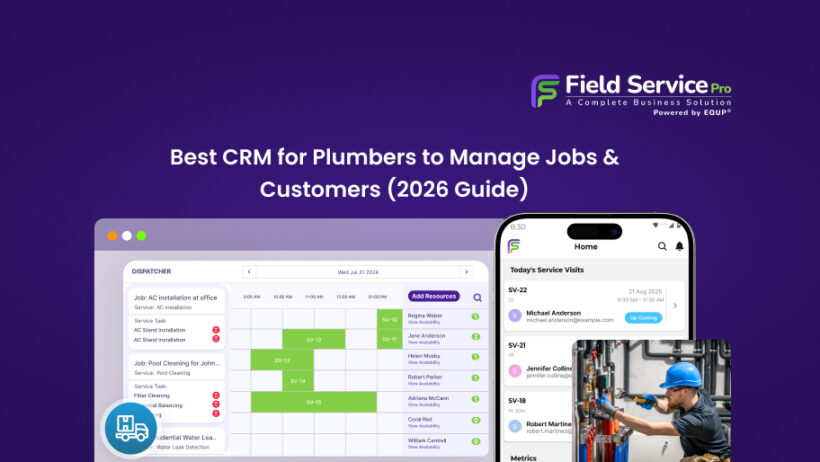

You’re halfway through a water heater install when your phone rings. It’s a customer asking about an estimate you promised four days ago. You put them on hold. Then another call comes in with a burst pipe emergency. By the time you get back, the first customer has already called someone else.
Meanwhile, last week’s invoices are still pending. You’re also pretty sure you double-booked yourself for Thursday morning. On top of that, there’s a repeat customer in your phone contacts whose name you can’t match to an address.
At first glance, this might feel like a time management issue. However, it’s not.
It’s what happens when your business runs on memory, WhatsApp chats, notebooks, and spreadsheets instead of a proper system.
A CRM for plumbing business operations is not just about storing contacts. Instead, it connects your entire workflow – jobs, customers, estimates, payments, and follow-ups, in one place. As a result, nothing slips through the cracks. And in plumbing, every missed follow-up directly means lost revenue.
So, what should you actually look for?
In this guide, we’ll break down what really matters when choosing the best CRM for plumbers. In field service businesses, CRM is commonly addressed as field service management software. So, we’ll highlight which features are genuinely useful and which ones are just marketing noise.
Before we dive deeper, it’s important to understand how CRM fits into the bigger picture of service operations. Check our complete guide on what is field service management.
What Is a CRM for Plumbers and Why Is It Different From a Generic CRM?
At its core, a CRM is a tool, also addressed as a field service management system, that keeps your customers, jobs, estimates, and follow-ups organized in one place.
However, for plumbers, it goes beyond simple contact storage.
It means that when a customer calls, you already know their history. You can see past jobs, previous issues, and even the equipment installed, all before asking them to explain everything again. As a result, conversations become faster, more professional, and far less frustrating for both sides.
In other words, the best CRM for plumbers acts like your second brain, but one that doesn’t forget.
Why a Generic CRM Falls Short for Plumbing Businesses
At first, many business owners try tools like HubSpot CRM or Salesforce. And to be fair, they work well for sales teams.
However, plumbing businesses don’t operate from desks. They operate in the field. This is where generic CRMs start to break down.
For example, they don’t naturally support job scheduling, technician dispatch, or real-time updates from job sites. As a result, you end up relying on multiple tools, spreadsheets, or manual coordination.
Moreover, integrations often require extra setup or third-party add-ons. Over time, this creates gaps between what’s happening in the office and what’s actually happening on-site.
What a Plumbing-Specific Field Service Management Software Actually Handles

A purpose-built CRM for plumbing contractors or a field service management tool is designed around how your day actually runs. Instead of forcing you to adapt, it fits into your workflow. It typically handles:
- Customer profiles with full service and equipment history
- Job scheduling and technician dispatch in real time
- On-site quoting with instant invoice generation
- Automated appointment reminders and follow-ups
- Mobile access that works seamlessly from job sites
- Payment collection before the technician leaves
- Integration with accounting tools like QuickBooks
As a result, everything stays connected, from the first call to the final payment. And that’s the real difference. A generic CRM stores information. A plumbing CRM actually helps you run your business.
However, if you’re still exploring software that handles scheduling, dispatch, and operations together, it’s worth considering the broader category, i.e., field service software for small businesses.
Signs Your Plumbing Business Is Ready for a CRM
Not every plumbing business needs a CRM on day one. However, there’s usually a clear point where things start slipping. And that’s when a system becomes necessary, not optional.
You Probably Need a CRM If…
- You’ve missed a follow-up call because you forgot, not because you chose to
- A customer has had to repeat their address or job history to your team
- You’re still sending invoices days after a job is completed
- You’ve double-booked a technician at least once in the last three months
- You have no reliable way to know which technician is closest to an emergency call
- Repeat customers don’t hear from you unless they call first
- You don’t clearly know which jobs or services are actually making you money
If even 2 or 3 of these sound familiar, it’s a sign your current setup is holding you back. At that point, a proper field service software for a plumbing business prevents lost revenue.
Important Features of Best CRM for Plumbers
Not every CRM feature matters for a plumbing business. In fact, most don’t. What matters are the ones that solve real, everyday problems like missed calls, delayed invoices, confused schedules, and lost repeat work. Let’s break down the features of field service management software that actually make a difference.
- Customer and Job History in One Profile
Every time a returning customer calls, you should already know who they are. No guessing. No asking the same questions again.
A good plumbing CRM software keeps everything tied to one profile, such as address, past jobs, parts replaced, and notes from previous visits. As a result, your team can walk into a job already prepared.
Apart from convenience, it also helps you spot opportunities. For example, if a customer had a temporary fix 6 months ago, you can follow up with a permanent solution before it becomes urgent.
What to look for:
- Searchable customer profiles
- Job-specific notes and service logs
- Equipment history linked to each address
- Photos and job documentation stored per visit
- Job Scheduling and Dispatch
Plumbing rarely follows a perfect schedule. Emergencies come in. Jobs run late. Technicians get delayed.
That’s why your scheduling system needs to adjust in real time.
Instead of relying on whiteboards or endless phone calls, a proper plumbing job management software lets you see everything at a glance. You know who’s available, who’s running late, and who can take the next emergency.
As a result, you make faster decisions without the chaos.
What to look for:
- Drag-and-drop scheduling calendar
- Real-time technician availability
- Emergency job prioritization
- Color-coded job statuses
- GPS tracking to assign the nearest technician
However, if missed bookings or last-minute confusion is already costing you jobs, this guide breaks down exactly how to fix it step by step: How to Reduce Missed Appointments.
- On-Site Quoting and Invoicing
Cash flow improves the moment you stop delaying invoices.
Today, most modern plumbing businesses collect payment before leaving the job site. However, that only works if your technician can create and send a quote instantly.
With the right CRM for plumbing contractors, your tech can generate a professional estimate, get approval, and convert it into an invoice, all from the customer’s home.
What to look for:
- Mobile quoting with flat-rate pricing
- One-click estimate-to-invoice conversion
- Digital payment options (card, UPI, etc.)
- Integration with tools like QuickBooks
- Automated Follow-Ups and Appointment Reminders
Most plumbing businesses don’t lose customers because of bad service. They lose them because they forget to follow up. This is where automation helps.
A good plumber customer management software sends reminders before appointments, follows up after jobs, and even nudges customers for annual maintenance. As a result, you stay top of mind without extra effort.
What to look for:
- Automated SMS and email reminders
- Post-job follow-up messages
- Annual maintenance reminders
- Review request automation
- Mobile App That Works from the Field & Not Just the Office
You’re not sitting at a desk all day. You’re on-site, moving between jobs, often with limited signal. So, your CRM cum field service management software needs to work where you work.
If a tool only functions properly on a desktop, it will slow you down. On the other hand, a strong mobile app lets your team update jobs, capture photos, and collect signatures right from the field.
What to look for:
- Full-featured mobile app (iOS and Android)
- Offline access with automatic sync
- Photo uploads from job sites
- Digital signature capture
- Real-time job status updates
- Recurring Jobs and Maintenance Management
Repeat work is the easiest revenue you’ll ever earn. However, it’s also the easiest to lose if you’re tracking it manually. Think about annual drain cleaning or seasonal maintenance. If you don’t remind the customer, someone else will.
A reliable CRM for plumbing business keeps track of these recurring jobs and schedules them automatically. As a result, you build consistent revenue without chasing it.
What to look for:
- Recurring job templates
- Automatic scheduling for maintenance contracts
- Renewal reminders for customers
- Service history linked to equipment at each property
When these features come together, you start running your business with clarity. If you’re now comparing tools that offer all these features in one place, this breakdown of the best plumbing service software will help you choose faster.
What Size Plumbing Business Needs What Type of CRM?
Not every plumbing business needs the same type of CRM. In fact, choosing the wrong level of field service software can slow you down instead of helping you grow. So, the better question is not just “What is the best CRM for plumbers?”
Let’s break it down.

- Solo Plumber (1 Technician)
If you’re working alone, your priorities are simple, i.e. speed and ease of use.
You don’t need complex dashboards or dispatch systems. Instead, you need something that helps you move faster on the job. In other words, the tool should stay out of your way.
A clean, mobile-first CRM for plumbing business operations works best here. It should let you manage everything from your phone, even between jobs.
Focus on:
- Mobile app that’s easy to use
- Basic scheduling and reminders
- Quick invoicing from the job site
Budget: $50–$100/month
However, avoid overcomplicating things at this stage. Too many features will only slow you down.
- Small Crew (2–10 Technicians)
Once you have a team, things change quickly. Now, it’s not just about managing your own work, but coordinating multiple people, jobs, and locations at the same time.
This is where dispatch becomes critical.
A proper field service software for plumbing contractors should give you real-time visibility into who is doing what, where they are, and what’s coming next. As a result, you can assign jobs faster and avoid constant back-and-forth calls.
At this stage, automation also starts to pay off. Follow-ups, reminders, and customer history begin driving repeat business without extra effort.
Focus on:
- Job scheduling and dispatch dashboard
- Technician tracking and job assignment
- Automated follow-ups and reminders
- Shared customer and job history
Budget: $150–$300/month
- Growing Plumbing Company (10+ Technicians)
At this level, you’re no longer just managing jobs but managing performance. You need to know what’s working and what’s not.
Which technicians are completing more jobs? Which services bring the highest profit? What marketing channels are actually generating leads?
This is where a full plumbing job management software or field service platform becomes essential. In addition to scheduling and CRM, you now need deeper insights, better reporting, and tighter control over operations.
Focus on:
- Advanced reporting and analytics
- GPS-based dispatch and route optimization
- Inventory and equipment tracking
- Strong accounting integrations
Budget: $300–$1,000/month
Choose a system that fits your current stage and not the one you think you’ll need 2 years from now. However, if you’re still unsure which features or tools actually fit your business, this guide walks you through how to choose the right field service management softwarestep by step.
Quick Comparison Table of CRM Options by Business Type
Choosing the best CRM for plumbers becomes much easier when you match the tool to your business size and workflow. Instead of comparing dozens of features, focus on what your team actually needs right now. Below is a simple breakdown to help you decide faster:
| Business Type | Recommended Tools (Best For) | Type of Tool You Need | Key Priority | Avoid |
|---|---|---|---|---|
| Solo plumber (1 tech) | FieldServicePro (simple all-in-one), Jobber (easy to start) | Lightweight, mobile-first tool | Fast invoicing, simple scheduling | Complex dispatch systems |
| Small crew (2–10 techs) | FieldServicePro (balanced features + pricing), Housecall Pro (strong automation), ServiceM8 (job tracking) | Field service CRM | Dispatch, job tracking, follow-ups | Expensive enterprise plans |
| Growing company (10+ techs) | FieldServicePro (scalable without complexity), ServiceTitan (advanced reporting), FieldEdge (inventory + dispatch) | Full FSM platform | Analytics, GPS dispatch, performance tracking | Weak reporting or mobile tools |
| Commercial plumbing focus | ServiceTitan (enterprise workflows), FieldEdge (service contracts) | Commercial-grade FSM | Contracts, multi-site tracking | Residential-only tools |
| Residential service focus | Housecall Pro (booking + automation), Jobber (ease of use), FieldServicePro (all-in-one simplicity) | Consumer-friendly CRM | Online booking, reminders | Overly complex setups |
How to Use This Table
Start by identifying where your business fits today and not where you want it to be next year.
- If you’re solo, keep things simple and mobile-first.
- If you have a team, focus on dispatch and visibility.
- If you’re scaling, prioritize reporting and control.
Most importantly, don’t overbuy. The right CRM for plumbing contractors should reduce your daily chaos, not add another system you need to manage.
How FieldServicePro Covers What Plumbers Actually Need
By now, you’ve seen what actually matters in a CRM for plumbing business operations. This is not extra features, but the basics working smoothly together.
That’s where FieldServicePro fits in.
Instead of juggling multiple tools, it brings your entire workflow into one system. So, from the first call to final payment, everything stays connected, which is where most plumbing businesses struggle.
More importantly, it focuses on solving the everyday problems you deal with:
- No more missed jobs: Real-time scheduling and dispatch keeps your team aligned
- Faster payments: Create estimates, convert to invoices, and collect payment on-site
- Less follow-up stress: Automated reminders and messages keep customers engaged
- Complete job visibility: Every customer, job, and service history stays in one place
- Works from the field: Mobile-first system built for technicians, not office desks
As a result, you spend less time managing chaos and more time actually running your business. It’s all about replacing scattered systems with one that actually works the way a plumbing business runs.
Conclusion
Choosing the best CRM for plumbers is about finding one that fits how your business actually runs. From scheduling and job tracking to invoicing and follow-ups, everything should work together without creating extra work. When the system is right, your team spends less time chasing paperwork and more time getting jobs done. And ultimately, that’s what matters at last: smoother operations, faster payments, and fewer missed opportunities.
However, once you’re ready to move forward, it’s worth reviewing field service pricing to understand what fits your budget and business size before making a decision.
FAQs
1. What is the best CRM for a small plumbing business?
The best CRM for a small plumbing business is one that is simple, mobile-friendly, and covers scheduling, invoicing, and customer tracking in one place. Tools like FieldServicePro or Jobber are often a good fit because they balance ease of use with essential features.
2. How much does a plumbing CRM cost per month?
Most plumbing CRM tools cost between $50 and $300 per month for small teams. Solo plumbers can start at the lower end, while growing teams may pay more for advanced features like dispatch, automation, and reporting.
3. Can a plumber use a general CRM like HubSpot instead of a trade-specific tool?
Yes, but it’s not ideal. Tools like HubSpot CRM are built for sales teams, not field operations. As a result, they lack built-in scheduling, dispatch, and job tracking, which plumbers need daily.
4. What is the difference between a CRM and field service management software for plumbers?
The best CRM for plumbers focuses on managing customer data, communication, and follow-ups. In contrast, field service management software includes CRM features but also handles job scheduling, dispatch, invoicing, and technician tracking.