

If you run a service business, you’ve probably had days where everything feels slightly out of control.
For example, a technician calls asking for an address. Meanwhile, a customer wants an update. Someone forgot to send an invoice. You’re checking a spreadsheet while answering calls and trying to remember who needs a follow-up.
That’s usually the moment people start asking, “Do I need a proper system for this?”
That system is called Field Service Management.
Field Service Management (FSM) is the process of coordinating a company’s field-based workforce, including scheduling jobs, dispatching technicians, managing work orders, handling invoicing, and communicating with customers, all from a centralized system.
For service businesses like HVAC, plumbing, cleaning, and electrical companies, FSM is how operations stay organized as job volume grows. MarketsandMarkets projects that the global FSM market will grow from $5.6 billion in 2025 to $9.7 billion by 2030, reflecting how critical structured field operations have become for competitive service businesses.
In simple terms, Field Service Management is how you organize and manage work that happens outside your office, like scheduling jobs, dispatching technicians, tracking customer history, handling invoices, and keeping everything moving without constant back-and-forth calls.
Instead of juggling spreadsheets, paper notes, and separate apps, businesses use a field service management system to bring it all into one place. This software can help your technicians update jobs directly from the field without calling in every time.
If your business is growing, this isn’t about adding more tools. Instead, it’s about adding structure. In this guide, we break down exactly what field service management means, what an FSM system includes, who needs it, and how the right FSM software can support your next stage of growth.
What Is Field Service Management?

Field Service Management is the way a service business organizes and controls work that happens outside the office.
If you send technicians to customer locations, whether for HVAC, plumbing, cleaning, electrical, or repairs, you’re already doing field service management. The real question is whether you’re doing it in a structured way or managing it as things come up.
At its core, field service management includes:
- Coordinating field operations
- Scheduling jobs
- Dispatching technicians
- Communicating with customers
- Sending estimates and invoices
That system is called Field Service Management and the right field service management software can bring every part of that workflow into one place. However, managing these tasks manually through calls, texts, spreadsheets, or paper quickly creates disorganization. As a result, many growing businesses move to a field service management system.
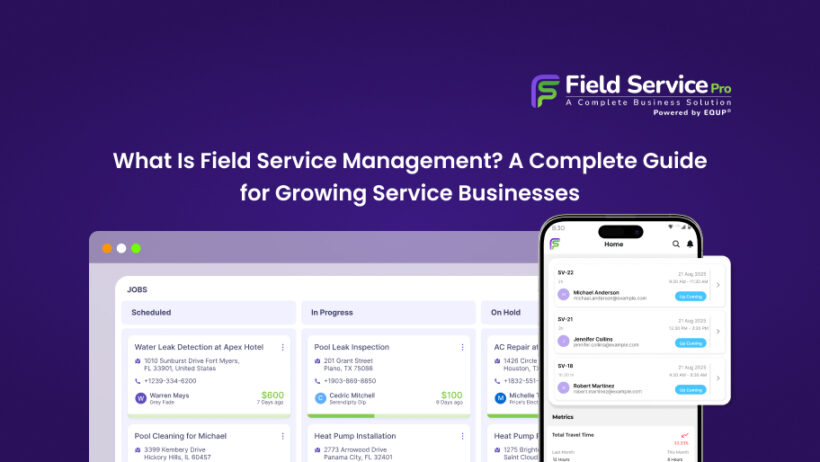
A proper field service management system brings all of these moving parts into one place. For example, you can see which jobs are scheduled, which technician is handling them, review customer history, and send invoices without switching between tools.
In short, field service management is all about creating a reliable system that keeps your operations smooth as your business grows. If you’re looking for an option, here are some names of field service software before you read further. Read our list of top 10 field service management software.
How Field Service Management Works: Step by Step
Understanding FSM is easier when you see the full job lifecycle, from the moment a customer calls to the moment payment is collected.
Step 1 – Customer Request
A customer contacts your business for a service by phone, online booking form, or email. An FSM system instantly logs the request as a new job and captures the customer’s details, location, issue description, and preferred time.
Step 2 – Job Scheduling
The dispatcher (or the system, if automated) checks technician availability, location, and skill set to find the best match. The job is assigned and added to the technician’s schedule, no phone tag, no spreadsheet juggling.
Step 3 – Technician Dispatch
The assigned technician receives a notification on their mobile app with full job details: customer name, address, job notes, service history, and any equipment information. They head to the site informed and prepared.
Dispatch is often the step where manual processes create the most delay. Our guide to field service dispatching covers the common failure points and how structured dispatch eliminates them.
Step 4 – On-Site Service
The technician completes the job and updates the work order in real time from the field, marking tasks done, adding notes, uploading photos, and collecting a customer signature if needed. The office sees the update instantly.
Step 5 – Invoicing
Once the technician marks the job as complete, the FSM system automatically generates an invoice based on the work order. The system can immediately send it to the customer through email or the client portal, with no need to wait until the end of the week.
Step 6 – Payment Collection
The customer pays online, by card, or through the portal. Payment is recorded and synced, no chasing, no lost invoices, no manual bookkeeping.
Step 7 – Follow-Up and Records
The job history, customer notes, invoice, and payment are all stored in the customer’s profile. Recurring service reminders, review requests, or follow-up messages can be sent automatically.
This end-to-end flow, managed inside a single FSM platform, is what separates structured service businesses from those still running on calls and spreadsheets.
What Does a Field Service Management System Include?

Modern service businesses don’t rely on spreadsheets anymore. They use structured field service software that brings operations, customers, and revenue into one organized workflow. Below we’ve discussed what a complete system typically covers.
1. Job Scheduling and Dispatch
Scheduling is the backbone of field operations. A good field service management system lets you:
- Schedule jobs quickly
- Assign the right technician
- Avoid double bookings
- Reschedule without confusion
Dispatching becomes clearer because you can see technician availability and workload in real time. Instead of juggling calls and spreadsheets, everything is visible in one dashboard. For more details on how it works, check out our guide on field service scheduling software.
2. Work Order Management
Every job needs details and not just a date and time. Work order management allows you to:
- Store job descriptions
- Add notes and instructions
- Attach photos or documents
- Track job status from open to completed
With proper field service software, work orders don’t get lost in email threads. They’re structured and easy to follow.
3. Technician Tracking
As your team grows, visibility becomes important. A reliable field service management system helps you:
- Track which technician is assigned to which job
- Monitor job progress
- Update statuses in real time
- Reduce back-and-forth calls
Some systems also include a field service dispatching app, which allows technicians to update tasks directly from the field.
4. Customer Relationship Management (CRM)
Field businesses depend on repeat customers and long-term relationships. Built-in CRM features inside field service software allow you to:
- Store full customer history
- Track past services and equipment
- Record communication notes
- View invoices and payments in one place
Instead of searching through old messages or files, customer information stays organized. For more details on CRM for field service businesses, read our detailed guide on field service CRM.
5. Estimates, Invoicing, and Payments
Cash flow matters. A complete field service management system connects job completion with billing. This includes:
- Creating professional estimates
- Converting estimates into jobs
- Generating invoices instantly
- Accepting online payments
When estimates, jobs, and invoices are connected inside one system, billing becomes faster and more accurate.
6. Reporting and Performance Tracking
As your business grows, you need visibility beyond daily tasks. Modern field service software provides reporting tools that help you:
- Track revenue
- Monitor technician performance
- Analyze job completion rates
- Identify busy seasons or service trends
Spreadsheets can show numbers. A structured field service management system shows patterns and performance clearly.
For a ranked breakdown of which platforms deliver these features best, see our top 10 field service management software guide for 2026.
Why Small Businesses Need Field Service Management

When you’re small, you can manage operations in your head. When you start growing, that stops working. Without structure, growth creates confusion.
This is where Field Service Management becomes less of an option and more of a necessity. A proper field service management system organizes work and protects your revenue and reputation. Let’s find out how!
1. Reduces Missed Jobs and Double Bookings
Missed appointments cost money. Double bookings damage trust. When schedules are handled through calls, texts, or spreadsheets, mistakes are almost guaranteed. A structured field service software setup gives you:
- A clear job calendar
- Technician availability in one view
- Real-time updates
- Fewer manual errors
You stop reacting to problems and start preventing them.
2. Improves Technician Productivity
Technicians lose time when they:
- Call the office for job details
- Wait for address confirmations
- Don’t have customer history
- Receive incomplete instructions
With a proper field service management system, technicians get everything they need before arriving on-site. Additionally, if paired with a mobile app, updates happen instantly from the field. As a result, less confusion means more completed jobs per day.
3. Speeds Up Invoicing and Cash Flow
Delayed invoicing delays cash. As a result, when job completion and billing are disconnected, invoices get pushed to the end of the week or worse, the end of the month. Modern field service management connects jobs directly to estimates and invoices. Once work is done, billing can happen immediately. Faster invoicing means healthier cash flow.
4. Enhances Customer Experience
Customers notice organization. They notice when:
- Technicians arrive on time
- Service history is remembered
- Estimates are clear
- Follow-ups happen without reminders
A reliable field service management system helps you deliver consistency. And consistency builds trust. Customer history management is the piece most generic CRMs get wrong for field service operations. FieldServicePro’s field service CRM buyer’s guide explains what a purpose-built solution looks like.
5. Supports Business Growth
Growth without systems creates stress. Growth with structure creates opportunity. With the right field service software, you can:
- Add more technicians
- Handle more service calls
- Track performance clearly
- Build recurring revenue
Instead of feeling overwhelmed as you grow, you gain visibility and control.
Field Service Management vs Spreadsheets: What’s the Difference?
Many service businesses don’t switch to a field service management system because spreadsheets stop working. Instead, they switch because spreadsheets stop scaling.
At first, spreadsheets feel simple. You list jobs, assign technicians, maybe track payments. However, as jobs increase, so do errors, confusion, and delays.
Let’s break down the real difference.
| Area | Spreadsheets & Manual Tools | Field Service Management System |
|---|---|---|
| Job Scheduling | Manual entry, error-prone | Structured scheduling with real-time updates |
| Dispatching | Calls and messages | Centralized dispatch dashboard |
| Work Orders | Notes scattered across tools | Organized digital work orders |
| Customer History | Stored in separate files | Built-in CRM with full service history |
| Invoicing | Created separately, often delayed | Connected directly to completed jobs |
| Recurring Maintenance | Tracked manually | Automated scheduling and reminders |
| Reporting | Manual calculations | Automated performance reports |
| Visibility | Limited, depends on updates | Real-time operational view |
| Scalability | Difficult as jobs increase | Designed for growth |
As a service business grows, spreadsheets don’t fail immediately; instead, they fail gradually. A proper Field Service Management setup replaces manual tracking with a structured, scalable system that supports long-term growth.
Field Service Management vs. CRM Software: What’s the Difference?
CRM software is built to manage your relationships with customers. In contrast, FSM software is built to manage the work you do for those customers. They solve different problems, and confusing the two is one of the most common mistakes growing service businesses make.
A CRM tells you who your customers are and where they are in your sales process. Meanwhile, FSM software tells you what jobs are scheduled, who is doing them, and whether they’ve been invoiced.
| Area | CRM Software | Field Service Management (FSM) |
| Primary purpose | Manage customer relationships and sales pipeline | Manage field operations and job execution |
| Core users | Sales and marketing teams | Dispatchers, technicians, and operations managers |
| Scheduling jobs | Not designed for this | Core feature such as drag-and-drop scheduling |
| Dispatching technicians | Not included | Built-in real-time dispatch dashboard |
| Work order management | Not included | Full work order lifecycle tracking |
| Job status tracking | Not included | Live job status updates from the field |
| Invoicing and payments | Limited or add-on | Directly connected to completed jobs |
| Customer history | Contact history and communications | Service history, equipment, and job records |
| Mobile app for field teams | Rarely included | Standard technicians update jobs in the field |
| Best for | Businesses focused on growing sales | Businesses managing field teams and jobs |
When do you need both?
Additionally, if your business has an active sales process and a field operations team, you need both, ideally integrated in one platform. Fortunately, many modern FSM platforms, including FieldServicePro, include a built-in CRM, so you don’t need to pay for and sync two separate tools.
Scheduling is usually where FSM improvements have the fastest visible impact. Our guide to field service scheduling software covers what separates a genuine scheduling platform from a basic calendar tool.
Field Service Management vs. Project Management Software: What’s the Difference?
Project management software is designed for teams working on long-term, multi-stage internal projects. On the other hand, FSM software is designed for businesses that run many short, repeatable jobs for external customers every single day. These are fundamentally different use cases, even though both involve “managing work.”
Project management tools assume your team is working in an office or remotely on collaborative tasks. FSM software assumes your team is spread across dozens of customer locations simultaneously, each needing specific job instructions, customer history, and the ability to invoice on-site the moment the work is done.
| Area | Project Management Software | Field Service Management (FSM) |
| Primary purpose | Coordinate internal team tasks and projects | Manage external customer jobs in the field |
| Job volume | Typically, a few projects at a time | Dozens to hundreds of jobs per day |
| Customer-facing features | Not designed for this | Customer records, portals, and communication |
| Scheduling for field teams | Basic task assignment only | Real-time scheduling with technician availability |
| Dispatch and routing | Not included | Built-in dispatch and route management |
| Work orders | Not included | Structured digital work orders per job |
| On-site updates from field | Not designed for this | Mobile app; technicians update jobs live |
| Invoicing and payments | Not included | Directly tied to job completion |
| Recurring jobs and maintenance | Limited | Automated recurring schedules |
| Best for | Software teams, marketing, internal operations | HVAC, plumbing, cleaning, electrical, and any field service business |
When might you use both?
In such cases, if you’re running a large installation project alongside regular service calls, a project management tool can help coordinate the long-term build while your FSM platform handles the day-to-day dispatch and invoicing. For most small and mid-sized service businesses, a well-configured FSM platform covers everything you need without a separate project management tool.
Who Needs Field Service Management Software?
For smaller operations running 2 to 20 technicians, the evaluation criteria look different. We’ve covered what actually works at that team size in our guide to field service software for small business. If your business sends people into the field to serve customers, you likely need a system.
Below is the list of companies that will benefit from field service management:
- HVAC Companies: HVAC businesses deal with emergency calls, seasonal demand, recurring maintenance, and installation projects. Without structure, it’s easy to lose track of service history or follow-ups. Moreover, using reliable HVAC service software helps keep dispatch, contracts, and customer records organized while ensuring no job or maintenance reminder slips through the cracks.
- Plumbing Businesses: Plumbing companies handle urgent calls daily. Fast scheduling, clear job details, and quick invoicing are critical. A centralized plumbing CRM software ensures technicians get accurate information and payments aren’t delayed.
- Electrical Contractors: Electrical jobs often require detailed work orders and documentation. A structured field service management system helps track projects, manage teams, and maintain safety records.
- Cleaning Services: Cleaning businesses operate on recurring schedules and multiple locations. Managing repeat contracts, rescheduling, and staff assignments becomes much easier with dedicated cleaning service software for small businesses.
- Lawn Care Companies: Lawn care businesses rely heavily on recurring services. Seasonal planning, route optimization, and automatic reminders help maintain steady revenue without manual tracking.
- Appliance Repair Services: Appliance repair business teams need quick dispatch, access to service history, and equipment details. CRM for appliance repair business improves response time and reduces repeat visits caused by missing information.
- Roofing Contractors: Roofing projects can be large and detailed, requiring clear estimates, follow-ups, and job tracking. Additionally, a structured roofing CRM software system helps manage both short-term repairs and long-term projects efficiently.
The field service management for service companies is valuable for any business that:
- Schedules technicians
- Sends teams to customer locations
- Manages recurring work
- Handles estimates and invoices
- Wants better visibility as it grows
In fact, if you’re evaluating whether the investment makes sense for your team size, Field Service Pricing plans are structured specifically to scale with service businesses from 2 technicians upward.
FAQs
A CRM system manages your customer relationships, such as contact history, communication, and sales pipeline. In contrast, FSM software manages the operational side, including job scheduling, dispatch, work orders, and invoicing. Additionally, many modern FSM platforms like FieldServicePro include built-in CRM features, so you don’t need two separate tools.
A scheduling app only handles calendar management. FSM software connects scheduling with dispatching, work order tracking, customer history, invoicing, payments, and reporting, all in one place. As your business grows, a scheduling app stops scaling; an FSM system grows with you.
FSM software typically ranges from $29 to $299 per month, depending on team size and features. Also, it depends on whether or not you need advanced automation or CRM capabilities. Many platforms offer per-user pricing. FieldServicePro offers transparent pricing plans designed for growing service businesses
FSM software is used across any industry where teams work at customer locations. These could be HVAC, plumbing, electrical, cleaning, lawn care, pest control, appliance repair, roofing, pool cleaning, and more. Any business that schedules technicians, sends estimates, and invoices customers can benefit from a structured FSM system.
The main benefits of field service management are faster job scheduling, fewer missed appointments, quicker invoicing, and better visibility over your field team. Automation is where FSM moves from organized to genuinely efficient. Our complete guide to field service automation software covers which processes should be automated first and what ROI to expect.
For HVAC companies, a field service management tool handles emergency dispatch and seasonal maintenance contracts. In plumbing businesses, it speeds up urgent job routing and same-day invoicing. Cleaning companies manage recurring schedules, multiple locations, and staff assignments without manual tracking. In each case, field service management software replaces spreadsheets and phone calls with one connected system built for field operations.
No, field service management and facility management are different, though they are often confused. Field service management is used by service businesses that send technicians to customer locations to complete jobs like HVAC repairs, plumbing calls, or cleaning visits. Specifically, it focuses on scheduling, dispatching, work orders, and invoicing for external customers. On the other hand, facility management is used internally by organizations to maintain and operate their own buildings and assets, such as managing vendors, building systems, and maintenance schedules for a property they own or occupy.
FSM software is built for businesses of all sizes. Many platforms, including FieldServicePro, are specifically designed for small and growing service businesses. If you’re managing more than 3-5 jobs per day or have more than one technician, a structured FSM system will save you time and reduce costly errors.
Look for a platform that includes: job scheduling and dispatch, mobile access for technicians, CRM, estimates and invoicing, payment collection, and reporting. Bonus features to consider are automation, recurring job management, online booking, and a client portal. Avoid tools that require 5+ separate apps to do what one FSM platform should handle.
Final Thoughts!
What Is the Best Field Service Management Software? For growing service businesses, the best FSM software is one that combines scheduling, dispatching, CRM, invoicing, and automation in a single platform — without the enterprise price tag. We’ve reviewed the top options in our complete guide to the best field service management software →
FieldServicePro is purpose-built for small and mid-sized service businesses across HVAC, plumbing, cleaning, and more.
If you’re a solo operator handling a small number of jobs each week, basic tools might still work. A simple calendar, invoicing app, or spreadsheet may be enough for now. When job volume is manageable and communication is direct, complexity stays low.
But once you start growing, things change.
More technicians means more service calls, which results in more repeat customers and more invoices.
That’s when a structured Field Service Management approach becomes essential. A proper field service management system gives you visibility over your operations. You can see what’s scheduled, what’s completed, what’s pending, and what needs attention without relying on memory or scattered tools.
In the long term, the value isn’t just operational clarity, but also efficiency and revenue control.
- Fewer missed jobs
- Faster invoicing
- Better technician productivity
- Stronger customer follow-ups
- Clear performance tracking
Over time, these improvements compound.
Modern field service automation software is the right system that simplifies your workflow by bringing scheduling, customer management, billing, reporting, and even transparent field service pricing management into one place.
If your goal is to stay small and steady, basic tools may hold up. If your goal is to scale with confidence, a unified platform designed for service businesses makes that growth smoother and more predictable.