



If you’ve ever managed dispatch during the first heatwave of summer, you know how quickly the day can spiral. Emergency “no cooling” calls start coming in every few minutes, maintenance visits get pushed back, technicians finish jobs later than expected, and dispatchers spend half the morning reshuffling schedules. Without the right software, it’s easy to send a technician without the customer’s equipment history or previous repair notes, leading to repeat diagnostics, extra trips, and frustrated customers.
HVAC field service management software fixes exactly this kind of chaos. It’s built to handle the specific rhythm of HVAC work, such as seasonal demand spikes, emergency no-cool calls, maintenance contracts and much more. According to the Service Council, field technicians spend only a portion of their day performing billable work, with administrative tasks, travel, and scheduling delays accounting for a significant share of lost productivity. Reducing that operational friction is one of the main reasons HVAC companies invest in field service management software.
This guide walks through what this software actually does, which features matter most for HVAC companies specifically (not just generic field service), what you’ll actually pay, and how the leading platforms stack up against each other. If you want the short version first, our roundup of the best field service software for HVAC covers the same ground in summary form. By the end, you’ll have a clear framework for choosing the right one for your crew size and budget.
Key Takeaways
- HVAC software centralizes scheduling, dispatch, invoicing, and customer records.
- Small businesses should prioritize ease of use over feature count.
- Enterprise platforms offer advanced capabilities but often come with higher costs and longer implementation times.
- Always evaluate onboarding, mobile experience, recurring maintenance tools, and total ownership cost before making a decision.
What Is HVAC Field Service Management Software?
HVAC field service management software is a digital platform that helps heating and cooling companies manage everything that happens between a customer calling in and a job getting paid for. That includes scheduling and dispatch, technician routing, work order creation, inventory and parts tracking, invoicing, and customer communication, all in one connected system.
Think of HVAC service software as the operational backbone of an HVAC business. Instead of your dispatcher calling five techs to see who’s free, the software shows real-time availability on a map. Instead of a tech scribbling notes on a paper ticket, they pull up the job history, equipment details, and customer notes right from their phone.
For example, imagine a technician visits a home in July to repair an air conditioner. Six months later, the same customer calls because the furnace isn’t heating properly. Instead of asking the customer to explain everything again, the technician can immediately see previous repairs, equipment details, warranty information, and notes from the last visit before arriving.
Why Generic Field Service Software Often Falls Short for HVAC
Not all field service management software HVAC companies use was actually built with HVAC in mind. A lot of platforms started out serving landscaping crews or general contractors and later added an “HVAC” label to their marketing.
The problem is that HVAC work has quirks that generic platforms don’t account for well:
- Equipment history matters. Many HVAC technicians service the same customer several times over the life of a system. Walking in without knowing what capacitor was replaced six months ago or whether the refrigerant was topped up during the previous visit wastes valuable time and often results in repeat troubleshooting.
- Seasonal load swings are extreme. During summer and winter peaks, dispatchers rarely follow the original schedule. Emergency calls constantly interrupt planned maintenance visits, and technicians often move from one urgent repair to another. Software that can quickly reassign jobs becomes essential during these busy periods. According to the U.S. Energy Information Administration (EIA), residential electricity demand reaches its highest levels during peak cooling seasons in many parts of the country. That seasonal surge often translates into a sharp increase in emergency HVAC service calls, making efficient scheduling and dispatch even more important.
- Maintenance agreements are recurring revenue. Software needs to automatically schedule tune-ups, send reminders, and flag lapsed contracts. Industry organizations such as ACCA have long encouraged preventive maintenance because regular servicing helps improve system performance, reduce unexpected breakdowns, and extend equipment life. For HVAC businesses, recurring maintenance agreements also provide more predictable revenue throughout the year.
- Parts and refrigerant tracking has compliance implications. EPA regulations around refrigerant handling mean your records need to be accurate and easy to pull up.
If a platform can’t handle these details cleanly, your team ends up building workarounds in spreadsheets anyway, which defeats the purpose of buying software in the first place.
Core Features to Look For in HVAC Field Service Software
Here’s what actually separates a solid HVAC platform from one that just looks good in a sales demo.
1. Smart Scheduling and Dispatch
In many HVAC businesses, the dispatcher isn’t just assigning jobs, but balancing technician skills, travel time, customer availability, and emergency breakdowns all at once. The right HVAC dispatch software turns this juggling act into a few clicks instead of five phone calls. Sending the wrong technician can mean a second visit, delayed repairs, and higher labor costs.
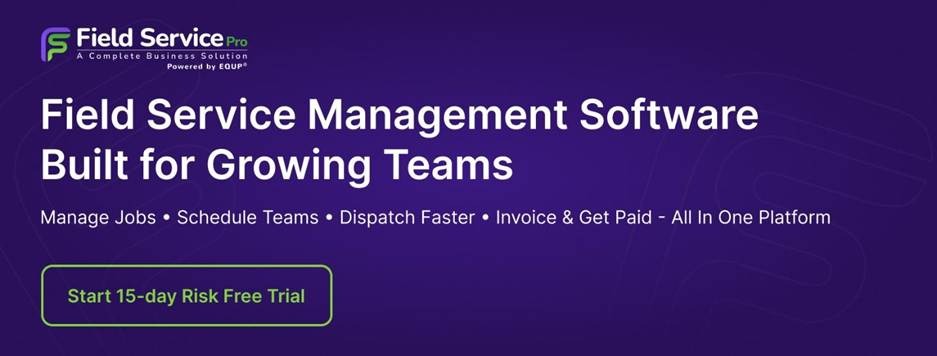
Example: It’s 2:30 PM on a hot July afternoon, and one of your technicians finishes a repair 40 minutes earlier than expected. Instead of calling the office to ask what to do next, the dispatcher relies on smart HVAC job scheduling to see updated availability and assign an emergency ‘no cooling’ call just 10 minutes away. The customer gets faster service, the technician avoids unnecessary driving, and another technician doesn’t have to cross town.
2. Mobile Access for Technicians
Most technicians don’t return to the office between jobs. They go directly from one customer to the next, often with only a few minutes to prepare. This is exactly the gap that HVAC service technician software is built to close, putting service history, equipment details, and today’s schedule in a tech’s pocket. Being able to pull up service history, equipment details, customer notes, and today’s schedule from a mobile app saves dozens of phone calls throughout the day.
Example: A technician arrives for a furnace repair and notices the same unit was serviced six months earlier by another team member. Before entering the home, they open the mobile app to review previous repairs, replacement parts, warranty information, and technician notes. That context helps them diagnose the problem faster without asking the customer to explain the service history again.
3. Work Order and Job History Tracking
Every job should build a digital paper trail. When a tech pulls up a unit’s history, they should see past repairs, parts used, and technician notes instantly. This cuts down on repeat diagnostics and helps with warranty claims.
Example: A customer calls to report that the same air conditioner has stopped working again. Instead of starting from scratch, the office immediately pulls up the previous work order, sees which capacitor was replaced, reviews the technician’s notes, and sends the new technician with the right replacement part.
4. Inventory and Parts Management
Every HVAC contractor has experienced a technician driving 30 minutes to a job only to discover the required contactor, capacitor, or blower motor isn’t on the truck. That usually means another trip to the supplier, an unhappy customer, and a second visit that could have been avoided with better inventory visibility.
Example: During a busy summer week, a technician is dispatched to replace a blower motor. Before leaving, they check truck inventory through the software and realize the required part isn’t available. Another nearby technician has it in stock, so the job is reassigned before anyone arrives on site, avoiding an unnecessary return visit.
5. Invoicing and Payment Processing
Many small HVAC companies initially compare software based only on monthly subscription costs. After implementation, they often discover additional charges for onboarding, extra users, SMS notifications, payment processing, or advanced reporting. Looking beyond the advertised price helps avoid unexpected expenses later.
6. Customer Communication Tools
Automated appointment reminders, technician “on the way” texts, and follow-up messages after a job all reduce no-shows and improve the customer experience without extra manual work.
Example: A homeowner receives an automated reminder the evening before the appointment, another message when the technician is on the way, and a follow-up asking for feedback after the job is complete. The office staff doesn’t have to send any of these messages manually, but customers stay informed throughout the service visit.
7. Maintenance Agreement Management
Since recurring maintenance plans are a major revenue stream for most HVAC businesses, good HVAC maintenance management software should automatically schedule these visits and alert your team when contracts are up for renewal.
Example: Every spring, the software automatically generates maintenance visits for customers enrolled in annual service plans. Dispatchers simply review the schedule instead of manually tracking hundreds of renewal dates in spreadsheets.
8. Reporting and Analytics
You need visibility into technician performance, job profitability, first-time fix rates, and revenue trends. Without this, you’re making decisions based on gut feeling instead of actual numbers.
Example: At the end of the month, the owner reviews reports and notices one technician consistently completes more jobs while maintaining high customer ratings. That information helps identify training opportunities for the rest of the team and improves scheduling decisions.
HVAC Field Service Management Software Pricing in 2026
Pricing varies quite a bit depending on team size, feature depth, and whether you’re paying per user or per truck. Industry analysts have observed that software subscription costs represent only part of the total investment. Businesses should also account for onboarding, staff training, implementation, and data migration when comparing platforms.
Below is the general breakdown based on current market rates.
| Business Size | Typical Monthly Software Cost | What You Usually Get |
| Solo operator or 2-3 techs | $99 to $150 per user | Basic scheduling, invoicing, mobile app |
| Small team (4-15 techs) | $100 to $250 per user | Advanced dispatch, inventory tracking, customer communication |
| Mid-size company (15-50 techs) | $200 to $400 per user, often with volume discounts | Full feature suite, custom reporting, integrations |
| Enterprise (50+ techs) | Custom pricing, usually negotiated annually | Dedicated support, API access, multi-location management |
Most vendors also charge setup or onboarding fees separately, which can range from a few hundred dollars to several thousand for larger implementations. You can see exact current plan details on our Field Service Pricing page before you compare vendors. Always ask what’s included in that fee before signing a contract, since some vendors charge extra for data migration or staff training sessions.
Comparing Leading HVAC Field Service Management Platforms
The HVAC field service software market has grown rapidly over the last few years, giving contractors more choices than ever before. Some platforms focus on large service businesses with hundreds of technicians, while others are designed for smaller companies that need an affordable and easy-to-use solution. The right choice depends on your team size, budget, growth plans, and the features you rely on every day.
The field service management software market has expanded rapidly over the past decade as more service businesses replace paper-based workflows with cloud platforms that combine scheduling, invoicing, customer communication, and mobile workforce management. (source)
Below is a comparison of some of the most popular HVAC field service management platforms available today.
1. ServiceTitan
ServiceTitan is one of the most recognized names in the HVAC industry. It was built specifically for home service businesses and offers a comprehensive set of features, including advanced scheduling and dispatching, customer relationship management (CRM), marketing automation, inventory management, reporting, financing options, and call booking tools.
For large HVAC companies handling high job volumes across multiple locations, ServiceTitan provides almost every feature they could need. However, that level of functionality comes with a higher price tag, a more complex setup process, and a longer learning curve. Smaller businesses may find themselves paying for features they rarely use.
Best for: Mid-sized and large HVAC companies looking for an enterprise-level solution.
Pros
✓ Comprehensive platform built specifically for home service businesses
✓ Advanced scheduling, dispatching, reporting, and technician management
✓ Scales well for large HVAC companies with multiple locations
Cons
✕ Higher pricing than many alternatives
✕ Longer implementation and training process for new users
2. Housecall Pro
Housecall Pro is a popular option among small and growing HVAC businesses because of its simple interface and quick setup. It covers the essentials such as scheduling, dispatching, estimates, invoicing, online payments, technician tracking, and customer communication.
Many contractors appreciate that new office staff and technicians can learn the platform quickly without extensive training. While it works well for smaller teams, businesses with more advanced operational needs may eventually outgrow some of its capabilities.
Best for: Small HVAC businesses that want an easy-to-use all-in-one platform.
Pros
✓ Easy to learn and quick to set up
✓ Strong scheduling, invoicing, and customer communication tools
✓ Well suited for small HVAC businesses and owner-operators
Cons
✕ Advanced reporting and customization are more limited
✕ Costs can increase as you add more technicians and premium features
3. FieldServicePro
FieldServicePro is designed specifically for growing field service businesses that want modern field service software without paying per technician. The platform combines scheduling, dispatching, CRM, estimates, invoicing, customer communication, recurring maintenance management, mobile apps, client portals, AI-powered automation, and marketing tools within a single system.
Unlike many platforms that charge additional fees as teams grow, FieldServicePro offers unlimited users on its plans, making it especially attractive for businesses planning to expand. The software is built to reduce manual work by automating technician scheduling, customer follow-ups, recurring service reminders, and administrative tasks, allowing office staff to spend less time managing paperwork and more time serving customers.
Its combination of field service management and customer relationship management also gives HVAC companies a complete view of every customer, from the first inquiry through ongoing maintenance and future service opportunities.
Best for: Small and medium-sized HVAC businesses looking for an all-in-one platform with unlimited users, built-in CRM, AI-assisted workflows, and predictable pricing.
Pros
✓ Flat-rate pricing with unlimited users helps control software costs as the business grows
✓ Combines field service management, CRM, scheduling, dispatch, recurring maintenance, and customer communication in one platform
✓ AI-powered automation reduces manual administrative work and follow-ups
Cons
✕ Smaller integration ecosystem than some long-established platforms
✕ May offer fewer enterprise-level customizations than software designed for very large organizations
4. FieldEdge
FieldEdge has been serving HVAC contractors for many years and offers several features built specifically for the trade. Equipment history, maintenance agreements, flat-rate pricing books, technician performance tracking, and QuickBooks integration make it particularly attractive for repair and replacement companies.
Because of its HVAC-focused workflow, many businesses find it fits naturally into their daily operations. However, companies should carefully evaluate pricing and onboarding requirements to ensure it matches their budget and long-term plans.
Best for: Established HVAC companies focused on service agreements and equipment management.
✓ Built with HVAC workflows in mind, including equipment history and maintenance agreements
✓ Strong QuickBooks integration
✓ Good support for repair and replacement businesses
Cons
✕ Custom pricing can make cost comparisons difficult
✕ Interface may feel less modern than some newer platforms
5. Jobber
Jobber is a general field service management platform used across many industries, including HVAC, plumbing, landscaping, cleaning, and pest control. It offers scheduling, quoting, invoicing, client communication, and mobile apps for technicians.
For HVAC companies with relatively straightforward service operations, Jobber provides an easy way to manage day-to-day jobs. However, businesses that require more HVAC-specific features, such as maintenance agreement management or detailed equipment histories, may eventually need a more specialized platform.
Best for: Small service businesses with straightforward scheduling and invoicing needs.
Pros
✓ Clean, user-friendly interface that’s easy for new teams to adopt
✓ Covers scheduling, estimates, invoicing, and customer communication
✓ Suitable for businesses serving multiple home service industries
Cons
✕ Not designed specifically for HVAC operations
✕ Some advanced capabilities require higher-tier plans or add-ons
6. Service Fusion
Service Fusion is often chosen by businesses looking for a balance between functionality and affordability. It includes scheduling, dispatching, estimates, invoicing, customer management, GPS tracking, and mobile access without many of the higher costs associated with enterprise software.
Its feature set covers most of the daily operational requirements of a growing HVAC business, making it an attractive option for companies that want solid functionality while keeping software costs under control.
Best for: Budget-conscious HVAC companies that need reliable day-to-day field service management.
Pros
✓ Affordable compared to many enterprise platforms
✓ Includes core scheduling, dispatch, invoicing, and GPS tracking
✓ Good option for businesses focused on essential field service operations
Cons
✕ Interface and user experience may feel dated compared to newer platforms
✕ Advanced automation and AI capabilities are more limited
Quick Comparison of the Best HVAC Field Service Management Software
| Software | Best For | Pricing Model | Mobile App | HVAC-Specific Features | AI & Automation | Key Strength |
| FieldServicePro | Small and growing HVAC business | Flat monthly pricing with unlimited users | ✅ iOS & Android | Scheduling, dispatch, recurring maintenance, CRM, client portal, work orders | ✅ AI-assisted scheduling, follow-ups, workflow automation | All-in-one platform with predictable pricing and unlimited users |
| ServiceTitan | Mid-size and enterprise HVAC companies | Custom pricing | ✅ iOS & Android | Advanced dispatch, technician scorecards, memberships, call booking, inventory | Limited AI capabilities | Enterprise-grade features for large operations |
| Housecall Pro | Small HVAC business | Per-user monthly subscription | ✅ iOS & Android | Scheduling, invoicing, estimates, online booking | Basic automation | Easy to learn and quick to implement |
| FieldEdge | HVAC companies focused on maintenance and repairs | Custom pricing | ✅ iOS & Android | Equipment history, flat-rate pricing, service agreements, QuickBooks integration | Limited automation | HVAC-specific workflows and equipment tracking |
| Jobber | General home service business | Per-user monthly subscription | ✅ iOS & Android | Scheduling, quoting, invoicing, customer communication | Basic AI features on select plans | Simple interface for smaller service teams |
| Service Fusion | Budget-conscious HVAC companies | Flat monthly plans | ✅ iOS & Android | Dispatch, work orders, invoicing, GPS tracking | Basic workflow automation | Good value with essential field service features |
At a glance: If you’re a solo contractor or a small HVAC team, Housecall Pro and Jobber are easy to get started with. Growing businesses that want unlimited users, built-in CRM, and AI-powered automation may find FieldServicePro offers better long-term value. Larger HVAC companies managing multiple technicians and complex operations often prefer ServiceTitan or FieldEdge because of their advanced reporting, inventory management, and enterprise-level workflows.
Which HVAC Field Service Software Is Right for Your Business?
| If your business is… | Recommended Software | Why |
| Solo HVAC contractor | Housecall Pro | Easy setup and simple day-to-day management |
| 2–10 technicians | FieldServicePro | Unlimited users, CRM, scheduling, dispatch, and automation in one platform |
| 10–30 technicians | FieldEdge | Strong HVAC workflows and maintenance agreement management |
| 30+ technicians | ServiceTitan | Advanced reporting, dispatch, and enterprise scalability |
| Residential HVAC company | FieldServicePro or Housecall Pro | Strong scheduling, customer communication, and recurring maintenance tools |
| Commercial HVAC contractor | ServiceTitan or FieldEdge | Better support for larger projects, reporting, and equipment management |
Which HVAC Field Service Management Software Is Right for Your Business?
Choosing HVAC software isn’t about finding the platform with the longest feature list. It’s about finding one that matches the way your business operates today while giving you room to grow tomorrow. Use the guide below as a starting point.
If you have fewer than five technicians…
Look for software that’s easy to learn, quick to implement, and doesn’t require weeks of training. Features like drag-and-drop scheduling, mobile work orders, invoicing, and customer communication will usually have a bigger impact than advanced reporting. Platforms such as FieldServicePro and Housecall Pro are often good fits for smaller HVAC businesses.
If your business relies heavily on maintenance agreements…
Choose software that can automatically schedule recurring visits, send service reminders, track contract renewals, and store complete equipment histories. These features reduce manual work and help generate more predictable recurring revenue.
If you manage 10 or more technicians…
As your team grows, scheduling becomes much more complex. Look for HVAC scheduling software that supports technician skill matching, live dispatching, GPS tracking, workload balancing, and detailed reporting. Platforms such as FieldEdge, FieldServicePro, and ServiceTitan are built to handle larger teams more efficiently.
If your technicians spend most of the day in the field…
The mobile app should be one of your biggest priorities. Technicians should be able to view job details, access equipment history, upload photos, collect customer signatures, generate invoices, and accept payments without needing to call the office.
If reducing administrative work is your biggest goal…
Prioritize software that automates repetitive tasks such as appointment reminders, technician dispatching, follow-up emails, recurring maintenance scheduling, invoice generation, and customer communication. Automation allows office staff to spend less time on manual data entry and more time supporting customers.
If you’re planning to grow over the next few years…
Think beyond your current team size. Some platforms charge additional fees for every technician, while others offer unlimited users or more predictable pricing. Choosing software that can scale with your business can help avoid expensive migrations later.
How to Choose the Right HVAC Field Service Software
Rather than choosing software based solely on brand recognition or feature lists, evaluate how well each platform fits the way your business actually operates.
Before making a decision, request demonstrations from two or three vendors and involve the people who will use the software every day. Ask your dispatcher to build a schedule, have technicians complete sample jobs using the mobile app, and let your office staff create estimates, invoices, and customer records.
Pay close attention to questions such as:
- How quickly can new employees learn the system?
- Does scheduling multiple technicians take only a few clicks?
- Can technicians easily update job status from the field?
- Is customer history available during every service call?
- How well does the platform support recurring maintenance agreements?
- Are there hidden costs for additional users, integrations, or premium features?
- Will the software still meet your needs as your HVAC business grows?
Try this during every software demo: Ask the salesperson to walk through a real workday instead of showing prepared slides. Have them schedule an emergency AC repair, move a technician to a new job, generate an estimate, collect payment, and complete the work order using the mobile app. If those everyday tasks feel slow or complicated during the demo, they’ll probably feel even slower during your busiest season.
Research from technology adoption studies consistently shows that software implementation succeeds when employees receive structured training and gradual rollouts instead of being expected to change every workflow overnight.
Must-Have Features Checklist
| Feature | Small Team | Growing Team | Enterprise |
| Scheduling | ✓ | ✓ | ✓ |
| Dispatch | ✓ | ✓ | ✓ |
| CRM | ✓ | ✓ | ✓ |
| Inventory | Optional | ✓ | ✓ |
| AI Automation | Optional | ✓ | ✓ |
| Client Portal | Optional | ✓ | ✓ |
| Maintenance Plans | ✓ | ✓ | ✓ |
| Reporting | Basic | Advanced | Advanced |
The best HVAC field service management software is not necessarily the one with the longest feature list. It is the platform that helps your team work faster, reduces administrative work, improves customer service, and supports your business as it continues to grow.
Getting the Most Out of Your New Software
Buying the software is only half the job. Adoption is where most companies actually struggle. Set aside real training time for your technicians, not just a quick walkthrough video. In many HVAC businesses, office staff adapt to new software much faster than technicians. If technicians find the mobile app confusing or slower than paper tickets, they’ll quickly fall back to phone calls and handwritten notes. That’s why successful companies usually introduce new features gradually instead of expecting everyone to change overnight.
It also helps to roll out features in stages rather than turning everything on at once. Start with scheduling and mobile work orders, get your team comfortable, then layer in inventory tracking, automated communication, and reporting once the basics feel natural.
Frequently Asked Questions
The easiest HVAC software to learn is usually the one with a simple interface, straightforward scheduling tools, and a mobile app that technicians can use without extensive training. Platforms like Housecall Pro and FieldServicePro are often chosen by smaller HVAC businesses because they require less onboarding than more complex enterprise systems. Before making a decision, ask for a live demo and let both your office staff and technicians test the software.
The best HVAC software for a small business depends on your budget, team size, and daily workflow. Most small contractors need scheduling, dispatching, invoicing, customer management, and mobile access rather than enterprise-level features. Platforms such as FieldServicePro, Housecall Pro, and Jobber are popular choices because they balance ease of use, affordability, and essential field service capabilities. For a deeper side-by-side breakdown, see our full guide to HVAC software for small businesses.
Yes, even owner-operators can benefit from HVAC software. It helps organize appointments, create estimates and invoices, track customer history, send automated reminders, and collect payments from the job site. As your business grows, having these processes already in place makes it much easier to add technicians without changing your workflow.
Many HVAC field service management platforms integrate with QuickBooks to simplify accounting. Depending on the software, the integration can automatically sync customer information, invoices, payments, and financial records, reducing duplicate data entry and improving bookkeeping accuracy. Always check whether the integration is included in your subscription or requires an additional fee.
Yes, most HVAC-specific software allows businesses to create recurring maintenance plans for residential and commercial customers. The software can automatically schedule future service visits, send appointment reminders, track maintenance history, and notify your team when contracts are due for renewal. This helps reduce manual scheduling while supporting long-term customer retention.
The cost depends on the pricing model. Platforms that charge per user typically cost between $1,000 and $2,500 per month for a team of 10 technicians, depending on the features included. Some providers instead offer flat-rate pricing with unlimited users, which can be more cost-effective for growing HVAC businesses. In addition to subscription fees, compare onboarding costs, payment processing fees, and any charges for premium features or integrations.
The most important features include scheduling and dispatching, technician mobile apps, work order management, equipment history, customer relationship management (CRM), invoicing, payment processing, inventory tracking, recurring maintenance scheduling, and reporting. If you’re evaluating multiple platforms, prioritize the features your team will use every day rather than simply choosing the software with the longest feature list.
If you’re ready to see how this works for your own team, book a demo with FieldServicePro and walk through real scheduling, dispatch, and maintenance workflows with unlimited users and no per-technician fees.