







The difficult part of choosing software is finding a system that still works after another route, several technicians and hundreds of monthly visits are added. A calendar and the owner’s memory may work at first, but growth brings missed changes, inconsistent notes, forgotten repair opportunities and delayed billing.
The answer is not to buy the platform with the longest feature list. It is to choose pool management software that matches the way your company sells, schedules, completes and bills work. For most growing pool service businesses, FieldServicePro is the best choice because it connects those stages in one system and includes unlimited users on both plans.
This guide shows how to decide using real work rather than a polished demonstration.
The Quick Answer
How should a growing pool company choose management software?
Start with 5 questions:
- Can it create recurring jobs without rebuilding the schedule every week?
- Can dispatchers adjust routes and assignments without losing job details?
- Can technicians complete forms, notes and photos from their phones?
- Can approved estimates, completed work, invoices and payments stay connected?
- Will the price remain manageable as the team and visit volume grow?
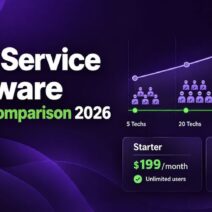
FieldServicePro combines CRM, estimates, recurring jobs, dispatch, job forms, a technician app, invoicing, payments and recurring billing. Starter costs $199 per month for up to 600 service visits. Growth costs $299 for up to 1,000. Both include unlimited users.
Define the Problem Before Comparing Software
Before searching for products, review one working week. Follow an enquiry to final payment and note every copied detail, manual reminder, missing photo or status call.
Separate them into 3 groups:
- Problems affecting customers: missed appointments, late replies, unclear service records or delayed estimates.
- Problems affecting employees: incomplete instructions, scattered schedules, duplicated entry or poor visibility.
- Problems affecting cash flow: unquoted repairs, late invoices, missed recurring charges or weak payment follow-up.
A feature matters only when it solves one of these problems or supports planned growth.
Build a Requirements List Around Real Pool Work
1. Recurring Maintenance
The system should create weekly, biweekly or seasonal work without forcing the office to copy appointments. Every service visit should remain connected to the customer, overall job, assigned technician and service history.
Test exceptions: moving one stop, pausing service while a customer is away and adding a repair without confusing the regular route.
FieldServicePro separates jobs, service visits and service tasks. That structure helps a pool company manage an ongoing agreement while keeping every visit and task connected.
2. Scheduling and Dispatch
Good pool service dispatch software should show daily workload, unassigned work and schedule conflicts clearly. Dispatchers need to reassign a visit, send an update and see what each technician is already carrying.
Test an urgent change by moving one visit to another technician. The job details, tasks, customer information and directions should move with it.
FieldServicePro provides day, week and timeline views, nearby appointments, directions and mobile schedule updates. Local knowledge still matters, so dispatchers should review travel time, gated access, supply stops and technician skills before finalising the day.
3. Technician Mobile Use
The field technician app is where the purchase succeeds or fails. Technicians should not need a call to the office to understand a visit. From a phone, they should be able to:
- See today’s assigned work and customer details.
- Review past notes and relevant job history.
- Update travel, arrival and completion status.
- Complete required tasks and service forms.
- Record readings, treatments and equipment observations.
- Add notes, documents and before-and-after photos.
- Log time and support invoicing after completion.
FieldServicePro’s mobile app supports these actions. Ask a technician who was not involved in the selection to test it; their experience will be more revealing than the owner’s desktop test.
4. Consistent Service Records
Configurable forms let the business decide what must be recorded before a visit can be closed.
A routine pool form might include water readings, treatments added, filter condition, visible leaks, equipment status, work completed and a customer-facing note. Required fields help new and experienced technicians follow the same standard.
FieldServicePro attaches forms, photos and documents to the work record. Companies requiring automatic chemical-dose calculations or laboratory reporting should test those specialist needs separately.
5. Estimates and Repair Follow-Up
Routine maintenance often reveals repairs. Test whether the technician can flag an issue, the office can prepare an estimate, and an approval becomes a job without entering everything again.
FieldServicePro links enquiries, estimates, approvals and jobs. Reusable templates can speed up common quotes while allowing the parts, price and scope to be adjusted.
6. Invoicing and Recurring Billing
Test every billing model the company uses, including fixed monthly service, per-visit work, repair deposits and final invoices. Completed work should reach invoicing without re-entry.
FieldServicePro includes estimates, invoices, online payments, automatic payments and recurring billing. It does not add its own percentage fee to customer payments, although the selected payment processor’s standard charges still apply.
Use a Weighted Buying Scorecard
A scorecard prevents one impressive feature from deciding the entire purchase. Rate each area from 1 to 5, then apply the suggested weight.
| Evaluation area | Weight | What to prove during the trial |
| Recurring work and dispatch | 20% | Create, move, pause and reassign real service visits |
| Technician mobile experience | 20% | Complete a full visit without office help |
| Service records and proof | 15% | Submit required forms, readings, notes and photos |
| Estimate-to-job workflow | 10% | Turn a field issue into an approved repair job |
| Billing and payments | 10% | Invoice routine work and a one-time repair |
| Customer and job history | 10% | Find the complete record quickly from office and mobile |
| Migration and integrations | 10% | Import sample data and verify essential connections |
| Pricing and support | 5% | Calculate year-one cost and test a real support request |
Award a score only after the team completes the task.
Compare Pricing Using Your Future Team

Calculate the 12-month cost using next year’s expected team, not only today’s staff.
Include:
- Base subscription and billing commitment
- Technician, dispatcher and office-user charges
- Onboarding and data migration
- Messaging or calling usage
- Payment processing
- Required add-ons
- Accounting and other integrations
- Separate tools the new platform will not replace
FieldServicePro uses flat plan pricing rather than charging for each user. Starter is $199 monthly or $1,999 annually, with up to 600 monthly service visits. Growth is $299 monthly or $2,999 annually, with up to 1,000. Both include unlimited users, so a growing company can give each technician and office employee an individual account.
Count visits carefully. 600 monthly visits represent roughly 138 weekly stops before repairs, return visits and other appointments are added.
If Jobber is already being considered, the guide to Jobber for pool service businesses provides a focused look at its pool workflow and pricing. The goal is not to compare headline prices. It is to compare the cost of the plan, users and features the company genuinely needs. For a wider view of the category, the best pool maintenance software comparison reviews eight platforms side by side.
Check Migration Before Signing
Decide what data must move:
- Active customers and service addresses
- Contact details and access instructions
- Current agreements and recurring schedules
- Equipment or asset information
- Open estimates and unpaid invoices
- Useful service history, forms and documents
- Standard services, prices and job templates
Import a sample and check names, addresses, dates, custom fields and duplicates. Then export it to confirm the business can retrieve its information.
FieldServicePro includes one-to-one setup and support hours. Starter includes 5 hours per month and Growth includes 10. Use this time to configure the recurring-job structure, forms, permissions and billing rules before the whole team moves across.
Verify Integrations and Data Ownership
List the essential accounting, payment and communication connections. Ask which records move, in which direction, how often they sync and what happens after an error. FieldServicePro provides API and webhook access plus EQUP Connect, but the exact workflow should be demonstrated. Confirm that customers, jobs, visits, invoices and attachments can be exported.
Red Flags to Watch For
Pause the buying process if:
- The demonstration avoids the technician mobile app.
- Pricing cannot be explained for the expected team size.
- Recurring work can be created but not changed easily.
- Photos and forms cannot be tied to the correct visit.
- The vendor cannot show how data is exported.
- Important features exist only as future promises.
- The trial uses perfect sample data but will not accept yours.
- The team needs several workarounds for a normal service day.
A small demo inconvenience becomes a daily frustration after hundreds of visits.
Why FieldServicePro Is the Best Pool Management Software for Growth
FieldServicePro covers the path from enquiry to payment while keeping team access simple. The office manages customers, estimates, jobs, schedules and invoices; technicians manage visits, tasks, forms, photos and time from mobile.
Its unlimited-user model is especially useful for growth. Businesses do not have to share logins or reconsider access every time they hire. Pricing scales mainly through service-visit and usage capacity, which is easier to connect to actual workload.
For a deeper explanation of the complete operating model, read the pool service management software guide.
It may not replace a specialist chemical-calculation system or every unusual integration. For recurring work, dispatch, field records, estimates, billing and customer management together, it offers the most complete fit.
A Practical 15-Day Trial Plan
FieldServicePro currently offers a 15-day free trial. Use it to run a small but real part of the company:
- Import 10 to 20 customer records.
- Create one recurring maintenance agreement.
- Build a required pool-service form.
- Schedule a week of visits for 2 technicians.
- Move an appointment and reassign another.
- Complete visits from the mobile app with notes and photos.
- Turn an equipment problem into an estimate and approved job.
- Generate a maintenance invoice and a repair invoice.
- Test a payment, export and support request.
Ask the dispatcher, technician and owner what became easier or still required workarounds. Buy only after the daily users have tested it.
Frequently Asked Questions
For most growing companies, it is the connection between recurring schedules and field records. Every visit should reach the technician with the right customer details and return with complete tasks, notes, readings and photos.
Not by customer count alone. Calculate monthly service visits, including recurring stops, repairs and return work. Also consider users, features, communication usage and support.
It can be, especially if the owner wants CRM, marketing, automation and field operations together. However, a solo operator needing only a basic calendar and invoices may find a simpler product less expensive. FieldServicePro’s value becomes strongest when the business is building a team or replacing several separate tools.
Final Decision
The best software helps the office and field team complete an ordinary week with fewer missed details, less repeated entry and a clear path from service to payment.
Define the problems first. Test recurring work, same-day dispatch, mobile documentation, repair follow-up and billing. Calculate the cost for next year’s team. Verify migration, exports, integrations and support.
For a growing pool company, FieldServicePro is the best overall choice. It provides the operational depth of pool service management software, the broader controls expected from field service management software, and unlimited team access under a flat plan price. Most importantly, it gives the business one shared record that can keep working as routes, technicians and customer expectations grow.