







Commercial HVAC field service software helps contractors organize customers, service locations, equipment records and technician visits in one system. For a small team, its value comes from finding the right unit history, preparing technicians for each site and carrying unfinished work into the next visit without losing essential details.
One commercial customer might have several buildings, different site contacts and a collection of rooftop units. The person approving repairs may work somewhere else entirely.
If those details live in separate spreadsheets, messages and job sheets, your team has to reconstruct the account whenever someone calls. A shared calendar helps with appointments, but it cannot tell a replacement technician which unit needs attention or what happened last time.
This guide explains how to evaluate commercial HVAC service software around those problems, with a practical look at where FieldServicePro fits.
What should commercial HVAC field service software keep connected?
It should connect the customer paying for the work with the site being serviced, the equipment involved and the visits completed there. Each record needs enough context for someone unfamiliar with the account to act confidently.
Consider an illustrative example – a property management company hires your 5-person HVAC team to maintain 3 office buildings. One building has 4 rooftop units. Its facilities contact arranges access, while a central accounts department processes invoices.
Recording everything under the property manager’s name leaves too much room for confusion. Your team needs to know which building requested service, which unit has the fault and who can approve the proposed repair.
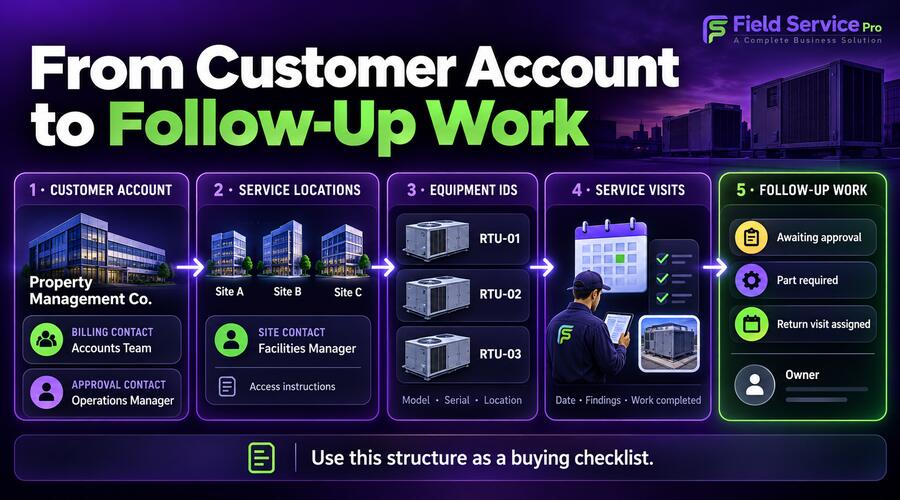
Use the following structure as a buying checklist, rather than assuming every platform organizes records identically.
| Record | Information to keep | Practical purpose |
| Customer account | Contracting business, billing contact, approval contact | Identify who authorizes and pays for work |
| Service location | Address, site contact, access instructions, permitted service hours | Prepare the visit at the correct building |
| Equipment record | Unit identifier, manufacturer, model, serial number, location | Distinguish equipment at the same address |
| Service visit | Assigned technician, date, tasks, findings, work status | Record what happened on that attendance |
| Follow-up work | Recommended action, approval status, responsible person | Keep unresolved work visible |
The important test is whether these records remain connected as work moves forward. Separate screens are manageable. Repeatedly entering the same details introduces unnecessary effort and opportunities for mistakes.
How do you manage multiple customer sites without mixing up records?
Give every service location a consistent name and keep operational contacts separate from billing contacts. The technician needs site instructions; the office needs the correct recipient for an estimate or invoice.
Avoid vague labels such as “main office” when the customer owns several buildings. A name such as “North Street Office, Building B” is easier to recognize on a phone and in a service report.
Record access information where the assigned technician can find it before leaving. That might include the reception contact, parking instructions or the process for arranging roof access. Store sensitive access details using appropriate permissions and your customer’s agreed procedures.
Also check how the software handles changes. When a facilities manager leaves, can you update the active contact without rewriting older service records? When a customer adds a building, can you add it without creating an unrelated customer account?
These questions matter even for a small contractor. A few larger accounts can create more coordination work than many straightforward single-location jobs.
For broader buying considerations, see our guide to HVAC software for small businesses.
What belongs in an HVAC equipment service history?
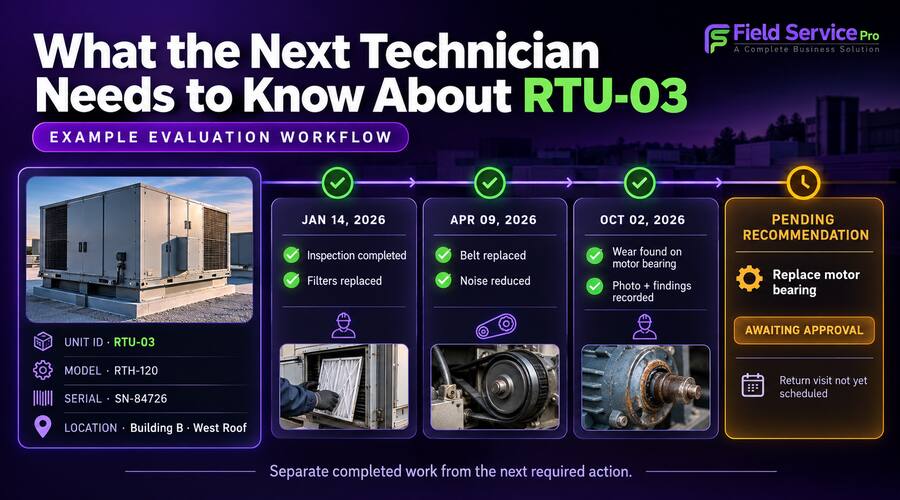
An equipment history should identify the unit and show the dated findings, repairs and outstanding recommendations associated with it. An address-level history is helpful, but several units at one address require more precise identification.
Assign a stable identifier such as “RTU-03” to a rooftop unit. RTU means rooftop unit. Keep that identifier consistent across photographs, forms and service notes, even if different technicians use different descriptions in conversation.
Record the manufacturer’s model and serial number where available. Include the unit’s physical location so someone new to the site can distinguish it from nearby equipment.
For each visit, capture the reported problem, relevant observations and work completed. Record parts replaced, unresolved issues and the recommended next action. Add photographs where they clarify the condition or repair.
Keep observed facts separate from proposed work. “Filter replaced” records completed work. “Recommend belt replacement, awaiting approval” records a pending action. Combining both into “maintenance completed” hides information the office needs.
A history becomes less useful if every note is a long, unstructured paragraph. Use consistent fields for information you need to retrieve, with free-text notes for the details that do not fit a checkbox.
The purpose is to help the next person understand the equipment’s condition. More fields only help when technicians can complete them accurately during a real visit.
How should repeat visits and maintenance work be scheduled?
Plan repeat visits around the agreed service scope, equipment requirements and site access arrangements. A recurring appointment should explain what must be checked, not simply repeat a date on the calendar.
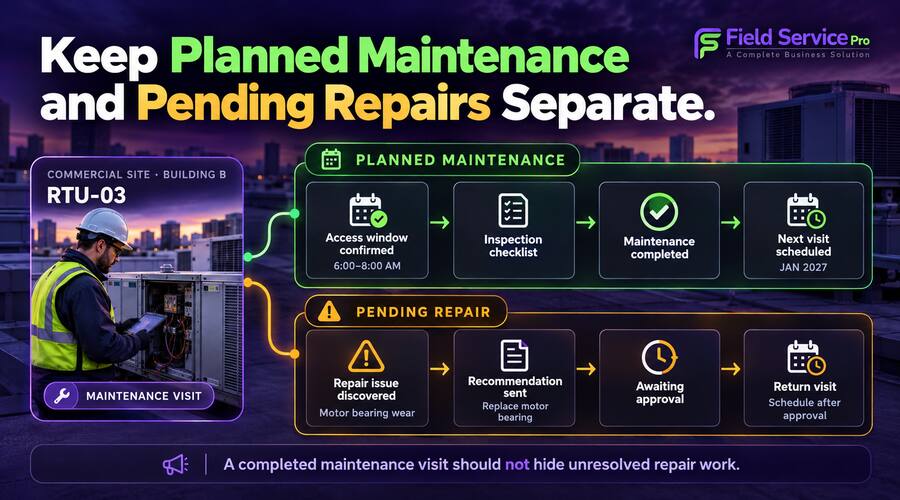
Different buildings may have different access windows. Some work may need to happen before staff arrive; other tasks may require a site representative to be present. Confirm those arrangements before assigning the visit.
Use templates for repeatable procedures, but leave room for the technician to document exceptions. A template should reflect the equipment and agreed work. Qualified technicians should follow applicable manufacturer instructions and site procedures when deciding what maintenance is required.
Keep planned maintenance separate from an unresolved repair. A technician might complete the scheduled inspection while identifying work that needs customer approval. That recommendation needs a responsible person and a follow-up date.
Otherwise, the maintenance visit can appear finished while the repair disappears into a note nobody checks.
Our guide to HVAC maintenance management software covers the wider maintenance workflow. For this commercial use case, test whether repeat visits preserve the right site and equipment context.
What makes a technician handoff useful?
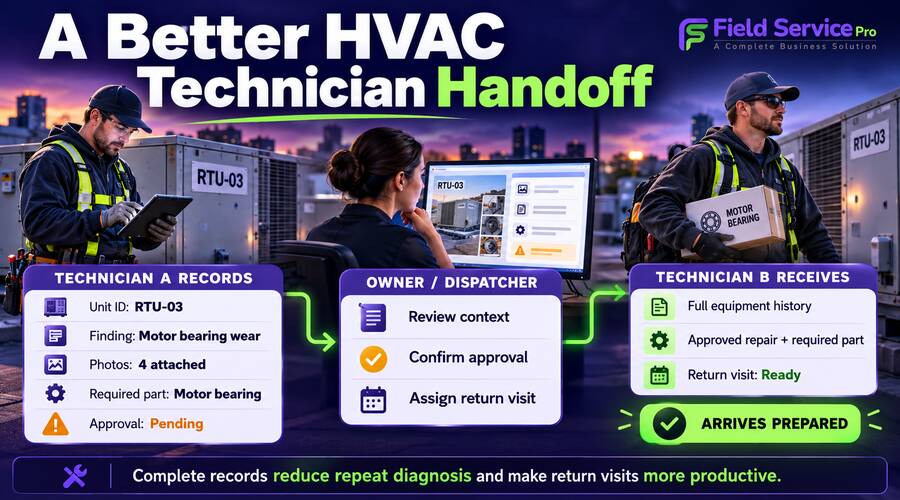
A useful handoff tells the next technician what was found, what was completed and what remains unresolved. It should also explain why another visit is needed and what must happen before it can proceed.
Imagine one technician investigates a rooftop unit but cannot complete the repair because a replacement part is required. Another technician will return after approval.
The second technician needs the unit identifier, findings, relevant photos, part details and approval status. They also need to know whether site access has been arranged.
“Return to finish job” is insufficient. It leaves the next person to call the office or repeat the investigation.
Use a short handoff note with separate fields for completed work and pending action. Attach it to the relevant job or visit, then check that the reassigned technician can access it from their phone.
Make one person responsible for moving the follow-up forward. That could be the owner, dispatcher or account coordinator. A visible note does not automatically create accountability.
For scheduling changes and job reassignment, connect this process with your HVAC dispatch workflow.
Where does FieldServicePro fit this workflow?
FieldServicePro is worth evaluating if your small commercial HVAC team wants customer work, scheduling and billing in one platform, with accounts for the whole team.
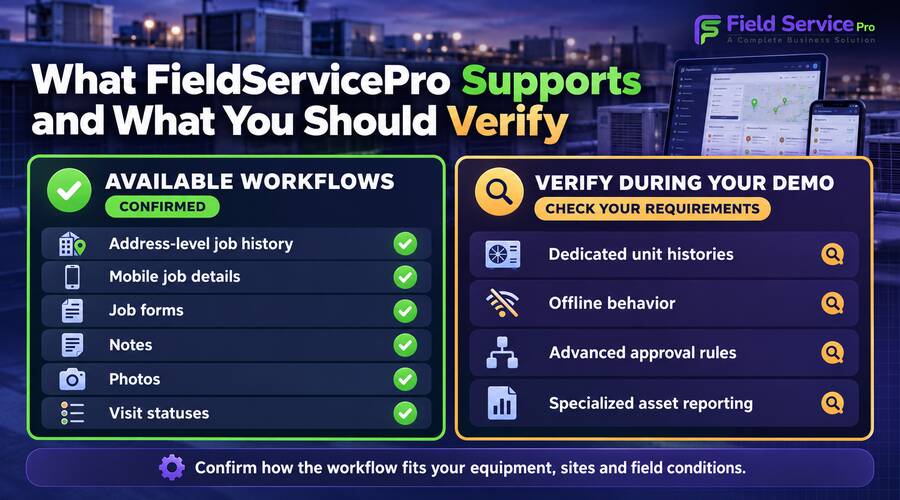
Our technicians can view previous jobs and service visits for a specific address. It also describes attaching mandatory job forms to visits and recording equipment model or serial numbers.
The field technician app supports access to customer and job details, notes, documents and job history. Technicians can complete forms, upload photos and update visit status from the field.
These capabilities support shared visit documentation and technician handoffs. For example, a returning technician can use the job record to review the notes and photos left by a colleague.
FieldServicePro’s customizable job forms provide text fields, checkboxes, dropdowns and image attachments. You can use those options to design a form that captures unit identification and the findings relevant to your service procedure.
However, capturing a serial number on a form is different from maintaining a dedicated equipment record with its own history. The public pages do not clearly establish how individual assets are linked to multiple visits across sites. Ask the demo team to show that exact workflow before choosing your record structure.
If you require automatic equipment-level histories, confirm them directly. Also request demonstrations of offline behavior, complex approval rules or specialized asset reporting if those are essential to your operation.
How much could it cost as your HVAC team grows?
Compare the subscription price with both user access and workload capacity. A plan that includes your entire team can still have limits on monthly visits or forms.
FieldServicePro pricing page lists the following monthly plans:
| Plan | Monthly subscription | Users | Service visits per month | Job forms per month |
| Starter | $199 | Unlimited | 600 | 500 |
| Growth | $299 | Unlimited | 1,000 | 1,000 |

For illustration, if Starter meets your workload requirements, its subscription remains $199 per month whether you have five users or twenty. Adding users does not introduce an additional seat charge.
Work volume still matters. Twenty technicians completing two visits each per working day across twenty days would generate 800 visits. That illustrative workload exceeds Starter’s allowance and falls within Growth’s stated visit allowance, assuming the other limits meet your needs.
Ask how visits and form usage are counted, especially when several technicians attend together or a job requires multiple attendances.
Before comparing field service software pricing, include any relevant messaging, payment-processing and implementation costs. Compare the same billing period and workload assumptions across products.
What should you test during a commercial HVAC software trial?
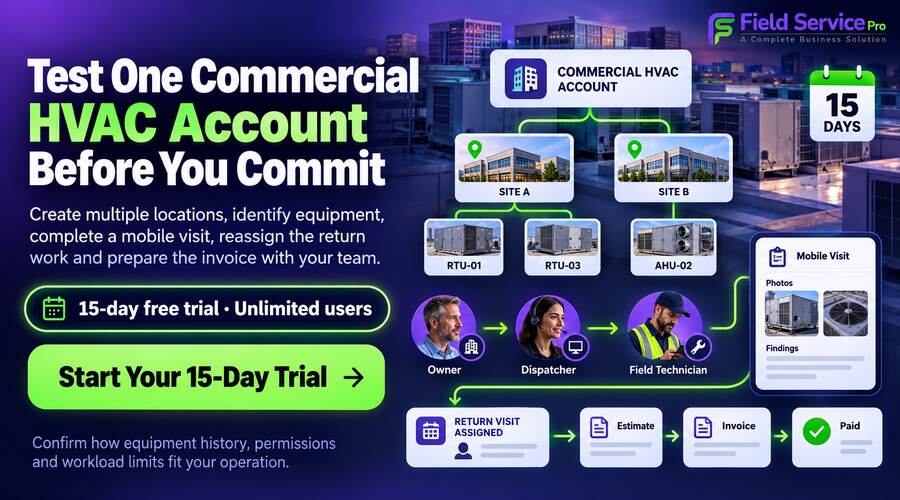
Test one representative account through a complete workflow. Use a sample with multiple sites and more than one unit at a site so the trial exposes record-management problems early.
Create the customer and site structure
Enter the billing contact and separate site contacts. Add two locations and several sample units. Check whether technicians can identify the correct destination without reading through unrelated account notes.
Record and retrieve a service visit
Assign a technician and complete a sample form. Add a photo and an unresolved recommendation. Then retrieve the record as another team member. Confirm whether history can be found by address, unit identifier or both.
Reassign the follow-up work
Move the return visit to a different technician. Check that the new assignment includes the earlier findings and outstanding action. Test what happens when the original date changes.
Complete the office workflow
Create the estimate for additional work and check the approval process. Then prepare the invoice. Confirm that the document identifies the serviced location clearly while reaching the appropriate billing contact.
Review access and practical limits
Check who can edit customer information, view financial records and access site instructions. Ask how historical data is imported and exported. Test the mobile connection conditions your technicians actually encounter.
FieldServicePro offers a 15-day free trial. Use it to assess this connected workflow with the people who will operate the system, rather than only reviewing it from an owner’s desktop.
Which commercial HVAC businesses are a suitable fit?
FieldServicePro is a reasonable option to shortlist when your priority is coordinating service work across the office and field without paying for each additional user.
That may suit a growing contractor handling planned maintenance, reactive calls and follow-up repairs, provided its record structure and allowances match the workload.
A business requiring advanced building-management-system integrations, automated condition monitoring or detailed equipment lifecycle analysis should verify those requirements separately. The confirmed job-management features do not establish those specialized capabilities.
If you mainly need help choosing software for a lean team, begin with the small business HVAC software guide. For commercial accounts, add the multi-site and equipment tests described here before making your decision.
Choose software that keeps the next visit informed
Commercial HVAC field service software should make it easier for your team to identify the right site, understand the equipment history and continue work without reconstructing the previous visit.
Start with your customer and location structure. Then test equipment identification, repeat visits and technician handoffs. Pricing matters, but a lower subscription cannot compensate for records your team struggles to use.
Bring a representative commercial account to a FieldServicePro demo, or start the 15-day trial. Ask the team to demonstrate how your sites, units and return visits stay connected before choosing a plan.
Frequently asked questions
It is software for organizing commercial HVAC customer work, including service locations, technician assignments, visit records and billing. Equipment-history capabilities vary, so check whether a product maintains dedicated unit records or relies on information stored in jobs and forms.
That is a common requirement for commercial accounts. During evaluation, ask the provider to demonstrate several locations under one customer, separate site contacts and centralized billing. Confirm the actual record structure rather than assuming multiple addresses work as expected.
Not necessarily. A building can contain several units. Address history needs consistent equipment identifiers to distinguish the work completed on each one. Dedicated asset histories, searchable form fields and job notes offer different levels of detail and retrieval.
Its Starter and Growth plans include unlimited users. Adding technicians does not add a seat charge to the selected plan. Monthly service-visit and job-form allowances still apply, so higher work volume may require a different plan.
No, scheduling and shared records can help teams track planned work, but accurate setup, responsible staff and current customer arrangements still matter. Review overdue and incomplete visits regularly rather than assuming a recurring schedule guarantees completion.