


The Core Problem:
Your technicians are doing great work. Your team completes jobs and sends invoices, yet your customers still call the office several times a week to ask where their technician is, when their next service is due, or whether you’ve updated their invoice. That is not a people problem. It is a systems problem. Client portal software fixes it.
Introduction
Customer expectations have changed significantly over the past few years. People who book a plumber, a cleaning crew, or a facilities maintenance team now expect the same kind of real-time transparency they get when they order a package or request a rideshare. They want to see what is happening without having to call anyone.
For service businesses, this creates a real operational challenge. Every inbound status call your office team answers is a few minutes of productivity lost. Multiply that across 30 or 40 customers a day and the cost adds up fast. Client portal software solves this problem at the root by giving customers a self-service window into the information they already want.
This guide covers everything service business owners, operations managers, and customer experience leads need to know about client portal software: what it is, why it matters, which features actually move the needle, and how to choose the right platform for your specific operation.
What Is Client Portal Software?
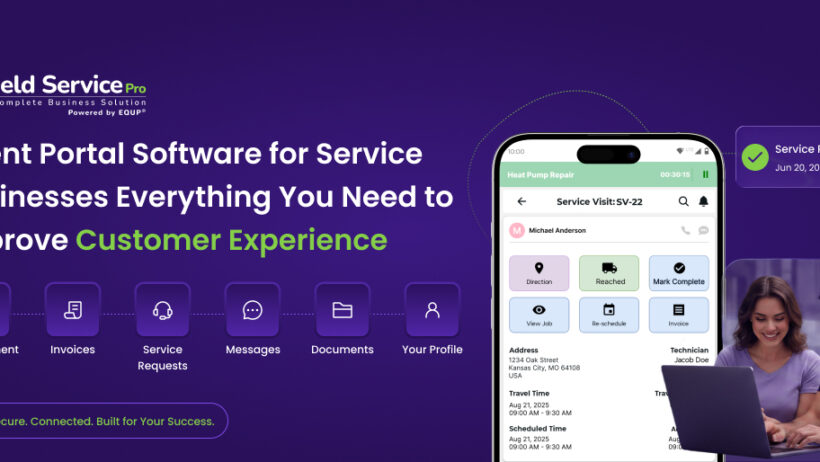
Client portal software is a secure, branded online space where your customers can log in and access everything related to their service account. Think of it as a self-service dashboard built specifically for your clients, connected directly to your field service or work order management platform. This is one of the finest field service management software features.
Rather than calling your office to get a job update or waiting for an email to find out when a technician is arriving, customers log into the portal and see that information themselves. They can view job status in real time, download invoices, review service history, approve quotes, and in many cases book or reschedule appointments without any involvement from your team.
The portal sits between your internal operations and your customers. Your office team manages jobs from the back end as usual. Customers access the relevant information from their end. The two sides stay connected without your staff acting as the go-between for every routine inquiry.
Key Difference: A client portal is different from a customer notification system. Notifications push information to customers (a text saying your tech is on the way). A client portal lets customers pull information themselves, on their own schedule, without needing your team to trigger it.
Customer Portal vs. Self-Service Portal: Is There a Difference?
These terms are used interchangeably in most contexts, and for practical purposes they mean the same thing. A customer portal or client portal is a branded, login-protected space for your clients. A self-service portal emphasizes the functionality, specifically the ability for customers to find answers and complete tasks without staff involvement.
When evaluating software, do not get hung up on terminology. Focus on what capabilities the platform actually delivers and whether those match what your customers need from a self-service experience.
Who Needs Client Portal Software?
Any service business with repeat customers and ongoing job relationships benefits from a client portal. It is particularly valuable for:
- HVAC and plumbing companies managing residential and commercial service agreements
- Facilities management teams handling multi-site or multi-tenant accounts
- IT field service companies with enterprise clients who track SLAs
- Commercial cleaning businesses with recurring weekly or monthly contracts
- Property management companies overseeing maintenance across multiple units
- Electrical and general contracting businesses with long-term project clients
- Medical equipment service providers with compliance documentation requirements
Why Customer Experience Is Now a Competitive Advantage in Field Service
Here is a reality that most service business owners understand intuitively but rarely quantify: customers who feel informed and in control are significantly less likely to cancel, dispute invoices, or leave negative reviews. Transparency is not just good service. It is a business growth strategy.
The problem is that traditional service business operations were not designed for transparency. Jobs get assigned, technicians go out, work gets done, and invoices get sent. The customer is largely in the dark in between. When something takes longer than expected or a part needs to be ordered, the customer finds out only when they call to ask.
That information gap is where trust erodes. And in an industry where most customers choose a service provider based on word-of-mouth and online reviews, trust erosion has a direct impact on revenue.
What Customers Actually Want
Research into customer satisfaction in service industries consistently points to the same themes. Customers are not necessarily bothered by delays or complications. What bothers them is finding out about delays and complications only after they have already waited. They want:
- To know the status of their job without having to call
- To access their invoices and service records when it is convenient for them
- To communicate with your team without playing phone tag
- To approve or schedule services quickly, often from a mobile device
- To feel like their account is organized and their history is tracked
Customers also expect accurate appointment scheduling. If you’re still relying on manual booking, using field service scheduling software can help reduce delays and improve communication.
A well-built client portal addresses every one of these expectations directly. It does not require you to hire more customer service staff. It requires you to make the right information accessible in the right place.
Stat You Must Know: Service businesses that deploy a customer self-service portal report a 35 to 45 percent reduction in routine inbound calls within the first 90 days of rollout. That drop in call volume frees up your office team for the work that actually requires human judgment.
Core Features of Client Portal Software for Service Businesses
Not every client portal is built equally. Some are basic notification hubs dressed up with a login screen. Others are fully integrated self-service environments that connect to your scheduling, invoicing, and communication workflows. Here is what separates a useful portal from a truly valuable one.
| Feature | What It Does for Your Business |
| Real-Time Job Tracking | Customers see the current status of their job, from scheduled to in progress to completed, without calling your office. |
| Technician Arrival Updates | Live or near-live ETA notifications reduce the frustration of not knowing when the tech will show up. |
| Online Booking and Scheduling | Customers can request service, pick available time slots, or reschedule appointments directly through the portal. |
| Invoice Access and Online Payment | Customers view, download, and pay invoices from the portal. Fewer billing questions and faster payment cycles. |
| Quote and Estimate Approval | Send quotes directly through the portal and let customers approve with a click, removing back-and-forth friction. |
| Service History and Asset Records | Complete job history, past invoices, equipment notes, and maintenance records in one place the customer can access anytime. |
| Two-Way Messaging | Customers send messages or questions directly through the portal. Your team responds from the back end without sharing personal contact details. |
| Document Library | Certificates, warranties, compliance reports, and other documentation available for the customer to download when needed. |
| Custom Branding | The portal carries your business name, logo, and colors. Customers interact with your brand, not a generic third-party interface. |
| Mobile-Optimized Experience | Most customers access portals from a phone. A mobile-friendly or app-based portal is essential, not optional. |
Features That Matter More for Specific Business Types
Beyond the core list, certain features carry extra weight depending on the type of service work you do:
- For commercial and facilities clients: Multi-site management within a single portal login, SLA tracking, and the ability to submit and track work orders directly from the customer side.
- For residential service businesses: Appointment reminders, technician photo and bio so customers know who is coming, and easy rebooking for recurring services.
- For businesses with compliance requirements: Automated delivery of certificates of completion, insurance documents, or inspection reports through the portal.
- For businesses running service agreements: Contract visibility, renewal alerts, and usage tracking so customers can see what is covered and when their agreement is up for review.
Real Benefits of Client Portal Software
The business case for client portal software runs in two directions simultaneously. It improves the experience for your customers, and it reduces the operational burden on your team. Both matter. Here is how those benefits show up in practice.
Fewer Routine Interruptions for Your Office Team
Status calls, invoice questions, appointment confirmations, and document requests are all legitimate customer needs. They are also tasks that do not require a human conversation to resolve. When customers can answer these questions themselves through a portal, your office team stops being a relay station and starts being able to focus on exceptions, escalations, and actual relationship-building.
Faster Payment Cycles
One of the most consistent findings among service businesses that implement client portals is that invoice payment times improve. When customers can view and pay an invoice from their phone at 9pm without waiting for a paper statement or an email attachment to arrive, payment friction drops. Some businesses see average payment times cut by a third within the first few months.
Fewer Billing Disputes
Billing disputes often come from one source: the customer does not remember exactly what was done or what was agreed. A client portal gives customers continuous visibility into job notes, technician updates, and approved quotes. When the invoice arrives, it matches what they already saw in the portal. There is nothing to dispute.
Higher Customer Retention
Customers stay with service businesses they trust and find easy to work with. A portal that keeps them informed and gives them control over their account makes your business genuinely easier to work with than a competitor who still operates on phone calls and email attachments. That convenience builds loyalty over time.
Better Reviews and More Referrals
Online reviews and word-of-mouth referrals are driven heavily by the overall experience, not just the quality of the technical work. Customers who feel organized, informed, and respected by your business are far more likely to leave a five-star review and recommend you to a neighbor. A client portal is part of the experience that earns those reviews.
Reduced No-Shows and Last-Minute Cancellations
Automated reminders through the portal, combined with easy rebooking options, give customers a friction-free way to confirm or adjust appointments without canceling entirely. The result is fewer last-minute gaps in your schedule and better technician utilization across the day.
Client Portal Software vs. No Portal: How the Experience Compares
It helps to see the difference concretely. Here is how the same customer journey looks with and without a client portal in place.
| Portal Capability | No Portal | Basic Portal | Full Portal |
| Job Status Tracking | No | Basic | Real-Time |
| Document Sharing | No | Yes | Yes |
| Online Booking | No | No | Yes |
| Invoice and Payment Access | No | Limited | Full |
| Two-Way Messaging | No | No | Yes |
| Service History Access | No | Basic | Full |
| Custom Branding | No | Limited | Full |
| Mobile-Friendly | No | Partial | Yes |
| Automated Notifications | No | SMS + Email |
The gap between a basic portal and a full portal is also significant. A login page that shows only job status still requires customers to call for invoices, quotes, and documents. A fully integrated portal closes the loop on every common customer touchpoint.
How Client Portal Software Connects to Your Wider Operations
A client portal that sits in isolation from your field service platform creates more work, not less. Your team would need to manually update portal information separately from the main system. That defeats the purpose entirely.
The right client portal software connects directly to your work order software, scheduling platform, field service dispatching and invoicing tools. When a technician marks a job complete in the field, the portal updates automatically. When an invoice is generated, it appears in the customer’s portal immediately. No manual steps, no separate data entry, no lag.
Key Integration Points to Look For
- Work order and job status sync: portal status should update whenever the back-end job status changes
- Invoicing and payment: portal should connect to your billing system so customers see accurate, real-time invoice data
- Scheduling: availability shown in the portal should reflect actual technician calendars, not a separate booking system
- Customer record: portal activity, messages, and documents should feed back into the customer record in your main platform
- Notifications: portal events should trigger automated SMS and email alerts using your existing notification workflows
When these integrations work correctly, the portal feels like a seamless extension of your operation rather than an add-on that needs to be managed separately.
Choosing the Right Client Portal Software: A Buyer’s Checklist
Before you start evaluating specific platforms, get clear on what your business actually needs from a client portal. The checklist below covers the questions worth working through before a single sales demo.
Define Your Customer’s Biggest Pain Points First
The most effective portal implementations start by asking customers what they find frustrating about the current experience. Run a short survey or talk to your customer service team about the most common inbound questions. The answers will tell you which portal features to prioritize.
Evaluate These Key Areas When Comparing Vendors
- Integration with your current field service platform: Native integration is always preferable to a separate portal tool that requires manual sync. Ask whether the portal connects directly to your existing work order system or whether it operates as a standalone product.
- Ease of use for customers: A portal your customers cannot figure out will not reduce your call volume. Request a live demo of the customer-facing interface and evaluate it honestly. Would your least tech-savvy client be able to navigate it without help?
- Mobile experience: Most customers will access the portal from a smartphone. Test the mobile version specifically. Does it load quickly? Is the layout clean? Can customers pay an invoice and check a job status in under a minute?
- Custom branding options: Your portal should look like your business, not a generic software interface. Check how much control you have over colors, logos, domain name, and the overall visual identity of the portal.
- Security and data access controls: Customers should only see their own jobs and documents. Check how the platform handles data isolation, user authentication, and what happens if a customer account needs to be locked or closed.
- Onboarding and customer adoption support: A portal only delivers value if customers actually use it. Ask vendors what they provide to help you drive portal adoption among your existing customer base.
- Pricing model: Some platforms charge per active portal user, others charge flat rates per feature tier. Model out what you would actually pay based on your current customer volume before signing anything.
Why FieldServicePro’s Client Portal Stands Out
A client portal should do more than provide a login page, it should simplify communication, improve transparency, and give customers complete visibility into every service request. FieldServicePro’s Client Portal is built specifically for service and field service businesses, making it easy for both customers and teams to stay connected throughout the job lifecycle.
Complete Job Visibility
Customers can view service requests, appointment details, job status, technician updates, and service history from a single dashboard. This eliminates constant follow-up calls and keeps everyone informed in real time.
Estimates, Invoices & Payments in One Place
Instead of searching through emails, clients can access estimates, approve quotes, review invoices, and track payment history whenever they need. The result is a faster approval process and a more professional customer experience.
Self-Service That Saves Time
The portal empowers customers to access important documents, service records, and account information without contacting your office. This reduces repetitive administrative tasks and allows your team to focus on delivering exceptional service.
Better Communication & Customer Trust
Every interaction is stored in one centralized system, ensuring customers always have access to the latest information. Transparent communication builds confidence, improves satisfaction, and strengthens long-term relationships.
Built for Modern Service Businesses
Whether you manage HVAC, plumbing, electrical, cleaning, landscaping, roofing, or pool service operations, FieldServicePro’s Client Portal seamlessly connects customers, office staff, and field technicians. As part of an all-in-one business suite, it helps businesses manage everything from the first service request to the final invoice through a single connected platform.
Looking for software that combines a client portal with scheduling, dispatching, work orders, invoicing, and technician management? Explore FieldServicePro to manage your entire service business from one platform.
Frequently Asked Questions
Client portal software gives your customers a secure, self-service space to view job status, access invoices, approve quotes, review service history, book appointments, and communicate with your team without calling your office. It reduces routine inbound inquiries and improves the overall customer experience.
Yes, the terms are interchangeable. Both refer to a branded, login-protected online space where customers can access information and complete tasks related to their service account. You may also see the term self-service portal used to describe the same type of tool, with an emphasis on the customer’s ability to find answers independently.
Smaller service businesses often benefit the most from client portals because they have fewer staff to handle customer inquiries. Even a business with 100 to 200 active customers can save meaningful time each week by redirecting routine questions to a self-service portal. The key is choosing a platform that does not require a large IT investment to set up and maintain.
Most client portals are accessible via a web browser on desktop or mobile, with no app download required. Some platforms also offer a branded mobile app. Customers typically log in with an email address and password or via a secure link sent to their email. The best portals make the first login as frictionless as possible to encourage adoption.
Yes, and it should. A client portal that operates separately from your field service management platform requires manual data entry to keep portal information current. Look for platforms where the portal is either built into your existing field service tool or offers a deep, native integration that syncs job status, invoices, and customer records automatically.
At minimum, customers should be able to see the status of current and past jobs, view and pay invoices, and access key documents like service reports or warranties. More comprehensive portals also show technician arrival updates, approved quotes, service history, asset records, and a message thread for communicating with your team.
Adoption requires deliberate effort. Start by communicating the portal’s value clearly when you launch it. Train your phone and dispatch teams to direct inbound inquiries to the portal rather than simply answering them. Include portal login links on every invoice and confirmation email. For commercial accounts, offer a brief walkthrough with the account manager. Customers who log in successfully even once tend to continue using the portal consistently.