



Short Answer
If you’re a one- or two-person field service business, the Jobber alternatives worth checking first are FieldServicePro, Housecall Pro, Workiz, vCita and Joist. Each fits a different situation, from flat-rate pricing that doesn’t change when you hire, to a genuinely free plan for two users, to a stripped-down quoting tool for solo contractors.
This guide compares what each one actually costs at 1 and 2 users, what you get for that price, and where each one falls short, so you can pick based on your business today instead of a feature list built for a 20-person crew.
Why Do Solo and Two-Person Teams Look for Alternatives to Jobber?
Jobber’s pricing and packaging are built around businesses that expect to add people. For a business that’s staying at one or two people for a while, that shows up in two places: cost and access to features.
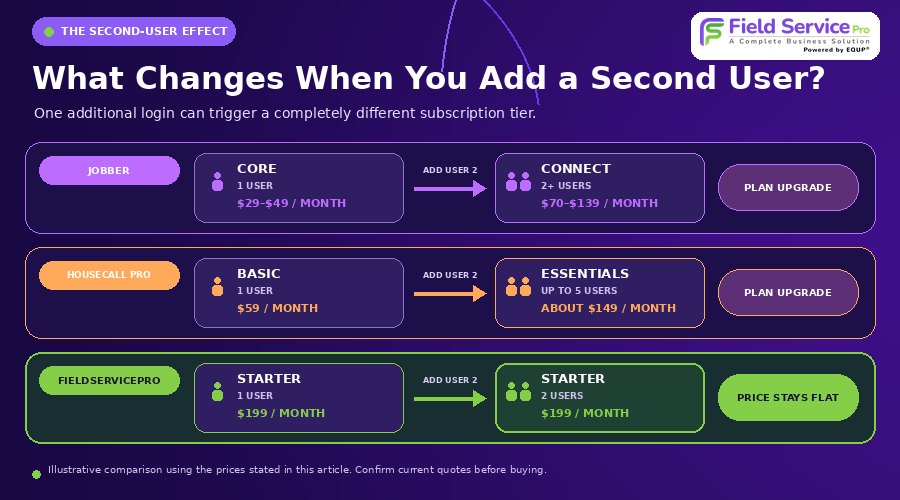
Jobber’s own pricing page runs through a short quiz before showing you a number, so the price you’re quoted can shift depending on the answers you give and any promotion running at the time. Across the versions we checked in September 2026, the entry-level Core plan (1 user) landed between roughly $29 and $49 a month on annual billing. Core covers scheduling, quoting, invoicing and online payments, but it’s capped at one user.
Add a second person and Core no longer works. You move to Connect, which we saw quoted anywhere from about $70 to $139 a month depending on the quiz path, and that’s the plan where QuickBooks sync, automated follow-ups and online booking actually turn on. For the full plan-by-plan breakdown, see jobber pricing. Several independent pricing trackers also report a per-seat charge of roughly $29 a month for users added beyond a plan’s included count, though Jobber doesn’t list that figure on its own pricing page, so treat it as a data point to confirm directly with Jobber rather than a fixed rule.
None of that makes Jobber a bad product. Plenty of small teams use it well. It just means a one- or two-person business ends up paying for a tier built around a 5-person team, and unlocking features like automated reminders or QuickBooks sync often means upgrading a full plan level rather than adding them individually.
What Should a Jobber Alternative for a Solo or Two-Person Team Actually Include?
Before looking for Jobber alternatives and comparing tools by name, it helps to know what separates a good fit from an enterprise platform with a smaller price tag. At this size, five things matter more than a long feature list.
It should work without a learning curve.
You need to schedule a job, get to it, invoice it and get paid. A tool built for solo operators should let you do that in your first hour, not your first week of onboarding calls.
Adding a second person shouldn’t double your bill.
This is the detail most solo operators miss until it costs them. Ask directly: what happens to the price the moment you add one employee? Does it push you into a new tier, or does the plan simply cover you?
It needs to work well on a phone.
If you’re driving between jobs, your phone is your office. Photos, signatures, invoices and scheduling should all work as one-handed tasks, not shrunk-down versions of a desktop screen.
Setup shouldn’t require a consultant.
You’re running a business, not managing a software rollout. A tool built for your size should have you scheduling real jobs within a day, not waiting on a multi-week implementation.
Follow-up and booking tools should be included, not sold separately.
Solo operators often lose more revenue to a missed call or a slow follow-up than to any scheduling inefficiency. A platform that includes basic booking and messaging tools saves you from stitching together two or three extra subscriptions just to stay in touch with leads.
The Best Jobber Alternatives for Solo and Two-Person Teams
Here’s how five real alternatives to Jobber compare on pricing, fit and honest trade-offs. Pricing below reflects publicly listed rates as of September 2026 and can change, so confirm current numbers directly with each vendor before you commit.
1. FieldServicePro
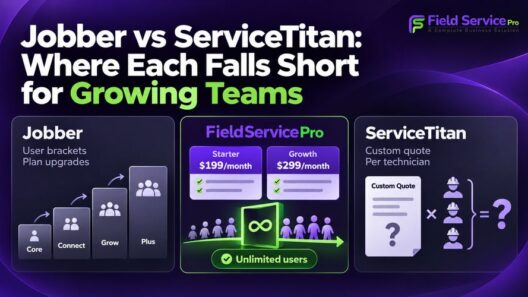
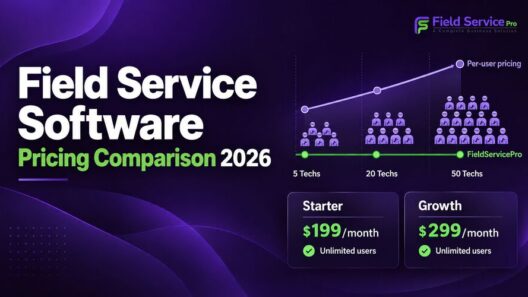
FieldServicePro charges one flat price regardless of how many users you add. The Starter plan is $199 a month (or $1,999 billed annually) and includes scheduling, invoicing, recurring billing, a mobile app, a client portal, and marketing tools (email, SMS, WhatsApp and an AI chatbot) bundled in rather than sold as add-ons, according to field service pricing.
- Good fit if: you plan to hire in the next year, or you’re already paying separately for a CRM, email tool or texting app alongside your scheduling software.
- Trade-off: the starting price is higher than Jobber’s cheapest single-user plan, so a solo operator who never plans to hire and doesn’t need marketing tools may not see the value right away.

2. Housecall Pro
Housecall Pro’s Basic plan starts at $59 a month for one user. QuickBooks sync and GPS tracking are reserved for the Essentials plan, which covers up to five users and runs close to $149 a month based on published rates. For a full breakdown of where Housecall Pro falls short too, see jobber vs housecall pro.
- Good fit if: you want a polished, customer-facing booking experience and don’t mind paying more once you need core integrations.
- Trade-off: the features most small businesses ask for first, QuickBooks and GPS, aren’t available on the cheapest plan.
3. Workiz
Workiz’s Lite plan is genuinely free for up to two users and covers basic scheduling, invoicing and a mobile app, per Capterra’s pricing listing. Paid plans jump quickly from there, starting around $187 a month once you need automations, QuickBooks sync or job costing.
- Good fit if: you’re a true two-person operation, especially a phone-heavy trade like locksmithing or appliance repair, and don’t need job costing yet.
- Trade-off: the free tier is thin on features, and the jump to the first paid tier is a big one.
4. vCita
vCita is built for independent service providers who need booking and a client portal more than dispatching. Pricing is generally positioned for one to two users rather than a crew, though exact current rates should be confirmed directly with vCita since published pricing varies by region and plan.
- Good fit if: you’re a true independent operator (a mobile mechanic, a handyman, a single-operator repair business) who needs client-facing booking more than team coordination.
- Trade-off: it isn’t built for dispatching or crew scheduling, so it won’t scale past one or two people.
5. Joist
Joist is a quoting and invoicing tool, not a full scheduler. Plans start around $10 a month for basic use, with Pro and Elite tiers running roughly $16 to $32 a month.
- Good fit if: all you need is professional quotes and invoices, with no job calendar to manage.
- Trade-off: there’s no scheduling or dispatch at all, so it’s not a real replacement for Jobber if you’re managing a calendar of jobs.
Two smaller names worth a mention if you’ve seen them come up: Workever is a UK-built job management tool priced from about £29 per user a month with GPS tracking and a client portal, a reasonable option if you’re based in the UK, though it’s less established in the US market. Collabit is another field service platform, but it doesn’t publish pricing and has very few independent reviews, so it’s hard to evaluate confidently against the options above. If you’re weighing a more established name-brand competitor instead, our fieldhive vs jobber comparison covers another option some solo operators consider.
Jobber Alternatives Pricing Compared at 1 and 2 Users
Enterprise-style pricing tables don’t mean much at this size. Here’s what each tool costs at the scale that actually matters if you’re solo or about to hire your first person.
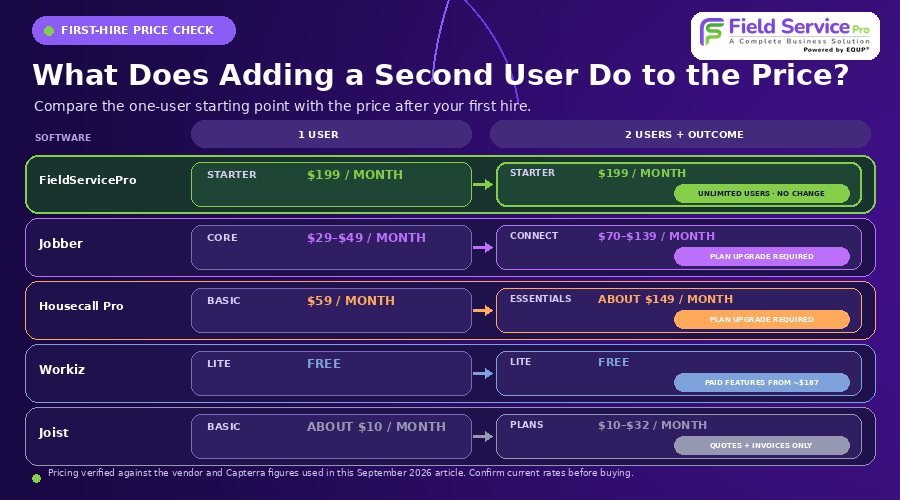
| Software | Starting Price (1 user) | Price at 2 Users | What Changes |
| FieldServicePro | $199/month (Starter) | $199/month, no change | Unlimited users on every plan |
| Jobber | $29 to $49/month (Core) | Moves to Connect, roughly $70 to $139/month | Core is capped at 1 user; a 2nd user requires a plan upgrade |
| Housecall Pro | $59/month (Basic) | Requires Essentials, roughly $149/month for up to 5 users | QuickBooks and GPS unlock only at Essentials |
| Workiz | Free (Lite, up to 2 users) | Free | Automations and QuickBooks need a paid tier, from about $187/month |
| vCita | Varies by plan and region | Varies by plan and region | Priced for independent operators; confirm current rates directly |
| Joist | $10/month | $10 to $32/month | Quotes and invoices only, no scheduling at any tier |
Pricing verified against vendor pricing pages and Capterra listings in September 2026. Jobber’s quote tool shows different numbers depending on the answers you give, so treat the range above as directional and confirm your own quote before deciding.
The pattern that matters most: on Jobber and Housecall Pro, adding one person moves you into a whole new plan tier. On FieldServicePro, the price doesn’t move. On Workiz, you stay free for two users but hit a steep jump right after. Which of those matters more depends on whether you’re hiring soon.
When FieldServicePro Makes Sense, and When It Doesn’t
If you’re solo today and expect to stay that way, Jobber’s Core plan or Workiz’s free tier will be cheaper on paper, and honestly, that’s the right call for that situation. FieldServicePro’s value shows up once you factor in what happens next.
Say you’re on Jobber Core at roughly $39 a month and you hire a helper in six months. You’re not paying $39 anymore, you’re moved into Connect, which we saw priced from about $70 to $139 a month depending on the quiz path, for a single added seat. With FieldServicePro’s flat-rate Starter plan, that same hire costs nothing extra, since unlimited users are included from day one.
The second factor is what’s bundled in. Many solo operators run Jobber or Housecall Pro alongside a separate email tool, a texting app for follow-ups, and sometimes a basic CRM for tracking leads. FieldServicePro includes email, SMS and WhatsApp marketing, an AI chatbot and a sales pipeline in the same subscription, according to FieldServicePro. If you’re already paying for even one of those tools separately, the flat rate looks more reasonable than the sticker price alone suggests.
To be fair about it: FieldServicePro isn’t the cheapest option on the market if your only comparison point is the lowest advertised price. Workiz’s free tier and Jobber’s Core plan both undercut it for a true solo operator with no marketing needs. What FieldServicePro offers instead is a lower and more predictable total cost once your team, or your marketing needs, grow past exactly one person.
What Switching to FieldServicePro Looks Like in Your First Week
It’s one thing to compare feature lists. Here’s a realistic look at what actually happens after you switch.
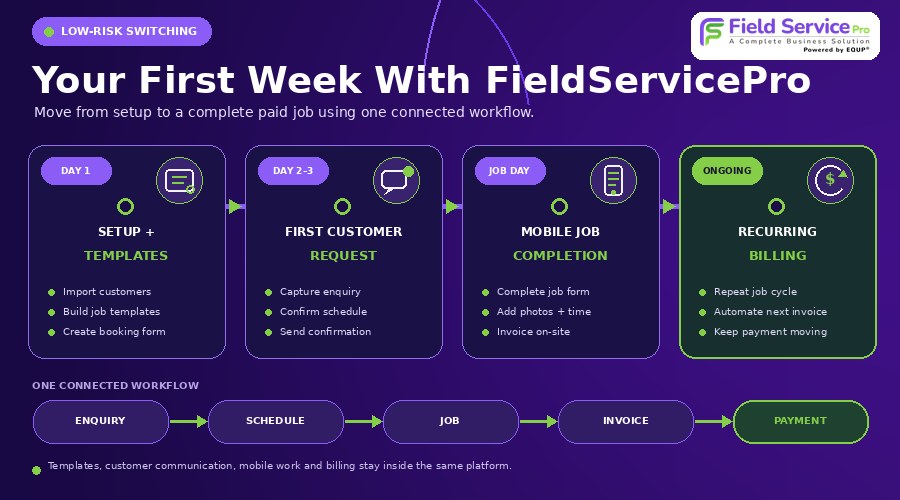
Day one: setup, not a support ticket
You build job templates for the services you run most often (a standard maintenance visit, a callout job) and set up a booking form customers can use to request work directly. Support hours are included in the subscription rather than billed separately, so this is usually when solo operators lean on that included help to get templates and data import right the first time.
Day two or three: the first real job comes in
A customer request comes in through the booking form or the AI chatbot, and it lands in your sales pipeline instead of your inbox. You confirm the job through the scheduler, which checks it against your existing calendar so you’re not manually looking for conflicts. The customer gets an automatic confirmation without you typing one out.
On the day of the job: working from the mobile app
You pull up the job, fill out a job form on-site (useful for anything needing before-and-after documentation, like pest control or HVAC), take photos and log your time as you go. When the work’s done, you generate the invoice from the same screen and take payment before you’ve left the driveway.
For repeat customers: billing on autopilot
If it’s a recurring job, like a monthly lawn visit or a quarterly HVAC check, recurring billing handles the next invoice automatically so you’re not manually rebuilding the same job every cycle. If a customer needs to sign off on an estimate or agreement, the built-in e-sign tool means you’re not chasing a signed PDF over email.
None of this needs a second piece of software stitched in. The whole path from customer inquiry to paid invoice happens inside one login, on one phone screen.
Frequently Asked Questions
The main options are FieldServicePro, Housecall Pro, Workiz, vCita and Joist. FieldServicePro suits businesses planning to add a team member soon, since pricing doesn’t change with user count. Housecall Pro suits businesses that want a polished customer-facing portal. Workiz suits phone-heavy trades that fit inside its free two-user tier. vCita suits independent providers who need booking more than dispatching. Joist suits contractors who only need quotes and invoices.
Workiz offers a genuinely free Lite plan for up to two users, covering basic scheduling, invoicing and a mobile app. Most other alternatives, including Jobber itself, offer a free trial rather than an always-free plan.
Housecall Pro is the closest match in terms of scheduling, invoicing and a customer portal, aimed at a similar residential trade audience. Workiz is similar for phone-driven businesses, with call tracking built in. FieldServicePro covers the same core job management functions but adds marketing and CRM tools in the same subscription instead of selling them separately.
Housecall Pro, Workiz, ServiceTitan, FieldHive and FieldServicePro are among the most commonly compared alternatives to Jobber. ServiceTitan targets larger operations with more complex reporting needs, while Housecall Pro, Workiz and FieldServicePro are more directly comparable in size and pricing for solo and small-team businesses. See our fieldhive vs jobber and jobber vs housecall pro comparisons for a closer look at two of them.
FieldServicePro includes an AI chatbot for capturing and qualifying leads as part of its standard plans, rather than as a paid add-on. Jobber sells a comparable AI receptionist feature separately, and most other alternatives in this comparison don’t currently offer a built-in AI tool.
For a true two-person team that mainly needs scheduling, invoicing and call tracking, Workiz’s free Lite plan is a reasonable starting point. It lacks job costing and deeper project tools, and the jump to its first paid tier is steep, so it fits best as a starting point rather than a long-term fit once you need more than the basics. See our full Workiz comparison for more detail.
It depends on what the contractor needs most. Those who only need quoting and invoicing often use Joist. Those who want a client-facing booking portal lean toward vCita. Contractors planning to grow past one person, or who want marketing tools bundled in, tend to look at FieldServicePro because pricing doesn’t change as the team grows.
Choosing the Right Jobber Alternative for Your Team Size
If you’re staying solo for the foreseeable future and don’t need marketing tools, Jobber’s Core plan or Workiz’s free tier are worth trying first. If you’re planning to hire in the next year, already juggling a separate CRM or email tool, or tired of your bill changing every time your business does, FieldServicePro’s flat-rate model is built for exactly that shift.
You can compare FieldServicePro and Jobber side by side, read the full best Jobber alternatives roundup for larger teams, or start a free trial to see how it handles your specific workflow before committing to anything.