




How Much Does Jobber Cost for a Roofing Crew? The Direct Answer
Small residential roofing crews can expect to pay between $169 and $349 per month for Jobber. The exact cost depends on team size and whether you need job costing. A 3-person crew fits on the Connect Team plan at $169/month. A 5-person crew sits right at that same $169/month cap. As your team grows to 10 people, you’ll likely need the Grow Team plan at $349 per month. This is also the first plan that includes job costing.
Jobber is a genuinely good tool for small residential roofing crews handling retail re-roofing, repairs, and maintenance work. However, it is a poor fit for storm chasing or insurance restoration contractors. These businesses rely on supplement tracking and Xactimate style workflows, which Jobber does not support.
If you’re evaluating Jobber pricing for roofing contractors, look beyond the monthly subscription cost. Consider whether the platform includes the roofing specific workflows your business needs. If it doesn’t, explore Jobber alternatives that better match the way your team works.
What Roofing Contractors Actually Need From Software
Roofing isn’t like most trades Jobber serves. Roofing work is project based, not recurring. It also depends heavily on the weather. Strong documentation is essential. Roofing work takes place about 20 feet above the ground. Customers often cannot verify that it was completed correctly. That combination shapes what software actually needs to do.
The industry itself is dominated by small operators. According to IBISWorld, there were 108,598 roofing contractor businesses operating in the U.S. as of 2026. Together, they generated an estimated $92.5 billion in industry revenue. Despite the industry’s size, average roofing business employs just 2.1 people. This shows that owner operators and small crews still dominate the roofing industry, rather than large corporate businesses.
Roofing’s project-based nature also shows up clearly in trade data. The NRCA’s Quarterly Market Index Survey for Reroofing, conducted with a coalition of roofing trade associations, highlights how common project backlogs have become. As of October 2025, only 27% of roofing contractors reported having no backlog. The remaining contractors had backlogs ranging from one month to more than five months. That’s a business built around discrete, multi-week jobs stacked in a queue, not a rotating weekly service route.
Given that shape, below’s what actually matters in roofing software:
- Estimating and quoting, ideally with a way to feed in accurate measurements without a separate site visit for every bid.
- Project-based job tracking is essential for roofing businesses. A reroofing project often takes several days and moves through tear off, dry in, installation, and cleanup.
- Photo documentation is essential for roofing businesses. Once the work is complete, it is no longer visible. Photos help resolve disputes, support warranty claims, and provide evidence for insurance adjusters.
- Material tracking is essential for roofing businesses. Shingles, underlayment, and flashing account for a significant share of job costs. Track these materials against each job to measure profitability accurately.
- Crew scheduling should adapt to weather changes. Even one rained out day can disrupt every crew and push back multiple jobs.
Jobber Pricing Breakdown for Roofing Team Sizes
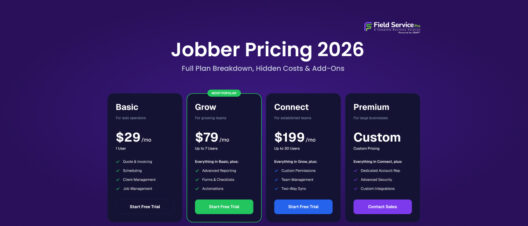
Jobber pricing for roofing contractors runs on a tiered structure with a per-user overage charge once you exceed your plan’s included user count. Below is what that looks like at common roofing crew sizes, based on Jobber’s published monthly (no-commitment) rates.
| Crew Size | Plan Needed | Monthly Cost | What You Get |
| 1 (solo) | Core | $39/mo | Scheduling, invoicing, quoting, no job costing |
| 3 users | Connect Team | $169/mo | Adds GPS tracking, QuickBooks sync, automated reminders |
| 5 users | Connect Team | $169/mo | Same as above, at the plan’s user cap |
| 6-9 users | Grow Team | $349/mo | Adds job costing, two-way texting, custom automations |
| 10 users | Grow Team | $349/mo | Same as above, at the plan’s user cap |
| 15 users | Plus | $599/mo | Adds Marketing Suite, AI Receptionist, premium support, all bundled |
Pricing reflects Jobber’s published monthly rates as of mid-2026 and is subject to change; annual billing typically reduces these rates by 30-40%. Additional users beyond a plan’s cap cost $29/month each.
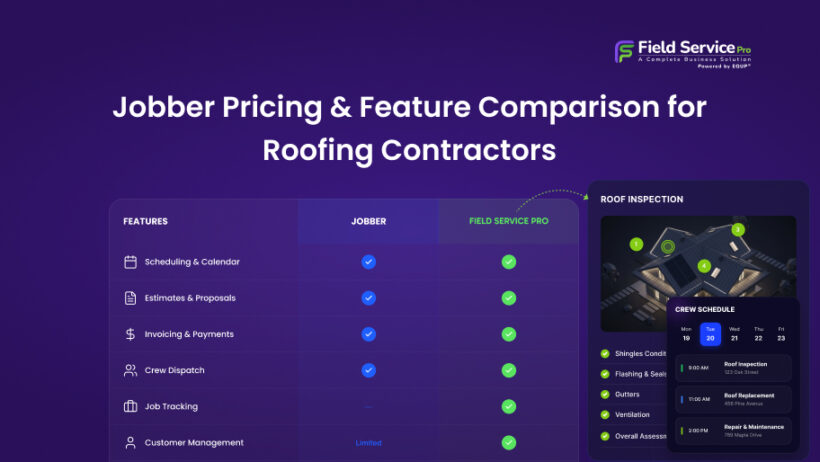
One detail is worth highlighting. Job costing, arguably the most important feature for a materials and labor heavy trade like roofing, is only available on the Grow plan. A three or five person crew on the Connect Team plan gets scheduling, GPS tracking, and QuickBooks sync. However, they don’t get real time visibility into whether a roofing job is actually profitable until they upgrade. If you’re comparing the cost of each plan and what features are included, Jobber’s full 2026 pricing guide provides a complete breakdown of pricing tiers, user limits, and add-on costs.
How Jobber’s Features Map to Roofing Workflows
1. Estimating and Quoting
This is a real strength. Jobber lets you build proposals with line-item images, optional add-ons, and photos pulled directly from a site visit or satellite measurement, and customers can approve, pay a deposit, or request a change directly from the client portal. Jobber also integrates with EagleView for aerial roof measurements, which feeds measurement data straight into a quote. EagleView is a separate subscription on top of Jobber pricing for roofing contractors, typically running $15 to $25 or more per report depending on volume, so the aerial measurement workflow isn’t actually included in your Jobber bill.
2. Project-Based Job Tracking
This is where the mismatch between Jobber’s design and roofing’s actual workflow shows up most. Jobber’s job costing feature, which tracks labor, materials, and miscellaneous expenses against a job’s profit margin, was specifically built with one-off jobs like roofing repairs in mind, and Jobber’s own case studies point to real results. One roofing and skylight company owner, quoted in Jobber’s product announcement, credited the feature with helping increase revenue by 15 to 20% through more accurate job pricing. That’s a genuine win, but it’s only available on Grow Team and above, meaning smaller crews on Connect don’t get it at all. And even with job costing enabled, Jobber has no multi-phase job structure or change order tracking, so a complex commercial re-roof with phased production stages will outgrow what the platform can represent.
3. Photo Documentation
Jobber pricing for roofing contractors includes built-in image messaging and markup tools, which cover basic before-and-after documentation. For contractors who need deeper documentation workflows, Jobber integrates with CompanyCam, letting you tie geo-tagged, time-stamped photos directly to a job. If you’re already running CompanyCam, the integration is smooth. If you’re not, Jobber’s native tools are serviceable but noticeably shallower than a dedicated documentation platform, and you’re again looking at a second subscription to get the depth many roofers want for insurance and warranty disputes.
4. Material Tracking
This is a clear gap. Jobber pricing for roofing contractors has no live supplier pricing integration with distributors like ABC Supply or Beacon Roofing Supply, and no material takeoff tools. You can log material costs manually as line items within a job, which feeds the job costing calculation on Grow and above, but there’s no automated way to order materials or pull current pricing into an estimate. For a trade where shingle and underlayment costs materially affect margin, this means manual entry stays part of your workflow regardless of which Jobber plan you’re on.
5. Crew Scheduling
Another genuine strength. Jobber’s drag-and-drop calendar, five view options including a map view, and real-time crew visibility work well for coordinating multiple crews across job sites, and reviewers consistently name scheduling as one of the platform’s most reliable features. Where it’s untested is weather-driven rescheduling at scale; Jobber will let you move jobs around easily enough, but it doesn’t have roofing-specific tools for managing the cascading effect of a rained-out week across multiple crews and material deliveries.
What’s Missing for Roofing-Specific Work
Stepping back, Jobber’s gaps for roofing contractors cluster around three things: insurance and storm-restoration workflows, material logistics, and project depth on complex jobs.
There’s no Xactimate integration and no insurance supplement tracking, full stop. For a roofing business where a meaningful share of revenue comes from insurance claims, that’s disqualifying on its own; you’d need to run a second system just to manage adjuster contacts, supplement status, and claim documentation. There’s also no native aerial measurement (EagleView is a paid add-on, not a built-in feature), no material ordering integration with roofing suppliers, and no roofing-specific job pipeline stages the way purpose-built roofing CRMs offer.
None of this makes Jobber a bad platform, it’s built for general home service work, and it does that well. But a roofing contractor doing substantial storm or insurance-restoration work, or running complex multi-phase commercial jobs, will hit Jobber’s ceiling faster than a residential HVAC or cleaning business would.
Alternatives Better Suited for Roofing
1. FieldServicePro: Flat-Rate Roofing CRM Without the Per-User Penalty
If your roofing business needs more than Jobber’s Connect or Grow tiers offer, but you don’t want your software bill to climb every time you add a crew member, FieldServicePro’s roofing CRM software is worth comparing directly.
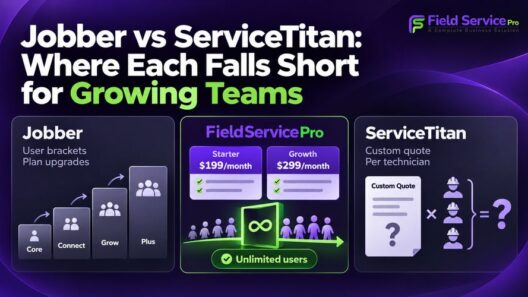
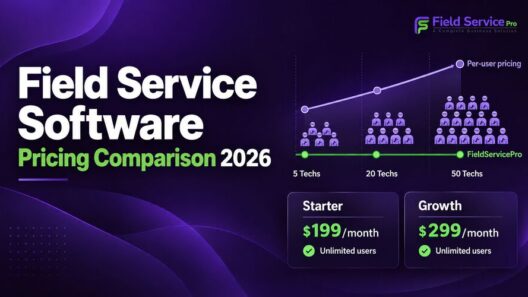
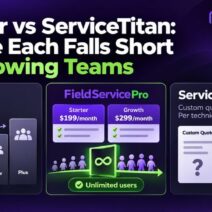
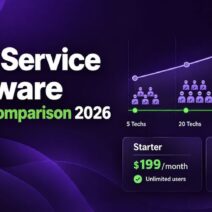
The structural difference matters most for growing roofing crews. FieldServicePro runs a flat $199/month (Starter) or $299/month (Growth), with unlimited users included on both. Run the math against Jobber: a 10-person crew on Jobber’s Grow Team plan already costs $349/month before a single add-on, and every crew member beyond that adds another $29/month. If you’d like a complete breakdown of Jobber’s plans, user limits, and add-on costs, see our detailed Jobber pricing and feature comparison. On FieldServicePro, that same 10-person crew, or a 20-person crew next season, costs exactly the same flat rate.
Day to day, FieldServicePro handles the core roofing workflow: multichannel service requests (calls, web forms, WhatsApp, chat) that route automatically to your team, estimate templates that can be customized per job with cost breakdowns, one-click dispatching, and a job management flow from request through scheduling to invoicing. It also includes marketing tools, email, SMS, WhatsApp campaigns, and an AI chatbot for handling inbound inquiries, bundled into the same subscription rather than sold as separate add-ons, the way Jobber sells its Marketing Suite and AI Receptionist.
FieldServicePro is a win for residential retail roofing crews that want more than Jobber’s entry tiers offer, unlimited users, bundled marketing, project and job management in one place, without per-user costs stacking up as the crew grows.
2. JobNimbus: The Simpler, Published-Pricing Roofing CRM
JobNimbus is a purpose-built roofing and contractor CRM with a starting price of $300/month according to its Capterra listing, and it’s frequently recommended as the more approachable, budget-friendlier option compared to AccuLynx. It offers customizable pipeline stages, a Beacon Roofing Supply integration for live material pricing, and QuickBooks sync. It’s broader than a pure roofing tool, covering general contractor workflows too, which makes it a reasonable fit if your business does roofing alongside other exterior trades. The tradeoff is per-user pricing, which scales the same way Jobber’s does as your crew grows.
3. AccuLynx: The Deepest Roofing-Specific Feature Set, at a Premium
AccuLynx is built exclusively for roofing and exterior contractors, and it shows in the depth of its insurance supplement tracking, adjuster contact management, and native material ordering integrations with suppliers like ABC Supply and SRS Distribution. It’s the strongest option specifically for storm-restoration and insurance-heavy operations. AccuLynx doesn’t publish full pricing on its website, requiring a sales conversation, though industry reporting places its published Essential plan at roughly $250/month, with per-user costs climbing from there on higher tiers. For a small residential crew without heavy insurance claim volume, that depth may be more than you need relative to the cost.
Frequently Asked Questions
For a small crew, expect $169/month (Connect Team, up to 5 users) to $349/month (Grow Team, up to 10 users). A solo roofer can start on Core at $39/month, though that tier doesn’t include job costing. Larger crews of 15 or more move to Plus at $599/month, with additional users beyond any plan’s cap costing $29/month each.
It depends on the type of roofing work. For small residential crews doing retail re-roofing, repairs, and maintenance, Jobber handles scheduling, quoting, invoicing, and client communication well. For storm-chasing or insurance-restoration contractors, Jobber is a poor fit since it lacks Xactimate integration, supplement tracking, and insurance claim workflows entirely.
It depends on your business model. Roofing-specific platforms like AccuLynx or JobNimbus offer the deepest insurance and supplier-integration workflows for storm-restoration contractors. FieldServicePro’s roofing CRM software is a strong fit for retail residential crews that want unlimited users and bundled marketing tools without Jobber’s per-user cost creep. Jobber itself remains a solid, well-reviewed choice for small crews whose work is mostly straightforward residential jobs rather than insurance claims.
Choosing the Right Fit for Your Roofing Business
The decision mostly comes down to one question: how much of your revenue depends on insurance claims and supplements? If that’s central to your business, a purpose-built platform like AccuLynx or JobNimbus will save you real friction. If your work is mostly retail residential roofing and you want scheduling, quoting, and job tracking without your software bill climbing every time you hire, it’s worth testing FieldServicePro’s roofing platform against Jobber directly during a free trial, most crews can tell within a couple of weeks which one actually fits how they run jobs.
Note: Sourced from Jobber’s own pricing and product pages, verified reviews on G2 and Capterra, and industry data from IBISWorld and the National Roofing Contractors Association (NRCA).