


If you’ve ever had a technician call you asking, “Where am I supposed to go next?”, you’ve already felt what poor dispatching looks like.
Think of it like – 3 customers called before 8 a.m. Your technician is driving to a job on the north side of town, but he just got a text telling him to go to a different address, which happens to be 40 minutes in the opposite direction.
Another tech is sitting in his van outside a property nobody told him was rescheduled. Your phone hasn’t stopped ringing, and you haven’t started your day.
This is not a bad day. For a lot of small service businesses, this is just another day.
The root of the problem almost always comes back to the same place, i.e. field service dispatching that isn’t really a system, but a series of improvised decisions made under pressure, communicated through a patchwork of texts, phone calls, and someone’s memory.
The chaos feels manageable when you have 2 technicians. By the time you have 5, it starts costing real money. By the time you have 10, it becomes the single biggest drag on your business’s ability to grow.
What Is Field Service Dispatching?
Field service dispatching is the process of assigning the right technician to the right job at the right time, and making sure they have everything they need to complete that job without having to call the office 3 times to figure out what’s going on.
At its core, dispatching answers a deceptively simple set of questions. These include:
- Who is available?
- Who has the right skills for this job?
- Any technician closest to the customer’s location?
- And how do we communicate the assignment clearly enough that the technician can just go do the work?
Dispatch management in field service sits at the intersection of logistics and communication. It involves:
- Matching job requirements to technician skills: Sending your HVAC specialist to an air conditioning job and not to a plumbing call that requires a different certification
- Coordinating schedules and routes: Grouping jobs geographically to reduce drive time and improve the number of jobs a technician can complete in a day
- Communicating job details: Making sure technicians know the customer’s name, address, problem description, equipment involved, and any relevant notes before they arrive
- Adjusting in real time: Handling cancellations, emergency calls, and jobs that run long without letting the rest of the day’s schedule collapse
So,what is field service dispatching actually? It’s the operational nerve center of any service business. Marketing gets customers in the door. Sales closes the job. Dispatching determines whether your technicians complete jobs efficiently to build the business, or cause chaos that ruins the customer trust your marketing and sales teams worked so hard to earn.
Dispatching vs Scheduling: They’re Not the Same Thing
This distinction matters more than most people in the industry give it credit for. Dispatching vs scheduling in field service is a real difference. Mixing the two creates confusion and leads to mistakes in who is responsible for what.
| Aspect | Scheduling | Dispatching |
|---|---|---|
| Definition | Planning when a job will happen | Assigning the job to a technician and sending them |
| Focus | Time and calendar management | Execution and task assignment |
| Main Goal | Organize upcoming jobs | Ensure the right technician reaches the job on time |
| When It Happens | Before the job day or in advance | Closer to job time or in real-time |
| Involves | Booking appointments, setting time slots | Assigning technicians, sharing job details, updates |
| Example | Booking a service visit for Monday at 10 AM | Assigning John to that job and sending him the details |
| Complexity Level | Relatively simple | More dynamic and requires constant adjustments |
| Depends On | Availability of time slots | Technician location, availability, and job priority |
| Common Issues | Overbooking, poor planning | Delays, miscommunication, wrong assignments |
Scheduling is the planning side of the equation. A customer calls to book, and your dispatcher instantly locks them into an open slot.
Scheduling answers: When will this job happen, and roughly who will handle it? It creates structure. It sets expectations with the customer and tells your team how the day or week is shaping up.
If you’re still relying on manual methods, it’s worth understanding how they impact operations over time. This blog breaks down manual versus automated scheduling and reveals exactly where most businesses leak efficiency.
Dispatching is the execution side. Once the schedule exists, dispatching is what actually gets technicians moving with the right information, in the right direction, at the right time.
Dispatching answers: Who specifically is going, how are they getting there, and do they have everything they need?
Field service scheduling and dispatch need to be treated as connected but distinct functions, especially as a team grows. The schedule is only as good as the dispatch process that executes it.
How Field Service Dispatching Works: Step by Step

When field service dispatching is running well, it follows a clear and repeatable process. Here’s what a functional job dispatching process looks like in practice:
Step 1: Job request comes in
A customer calls, submits an online form, or books through a customer portal. The software instantly captures the request along with every crucial detail: location, problem description, preferred timing, customer history, and special notes. Good dispatch starts with good intake.
Step 2: Job is scheduled
The software instantly slots the job into the schedule, perfectly balancing customer preferences with your daily capacity. This is where scheduling tools earn their keep, like preventing double-booking, flagging gaps, and flagging conflicts before they become problems.
Step 3: Technician is assigned
This is where dispatching begins in earnest. The dispatcher reviews available technicians, their skill sets, their current locations, and what else they have on their plate. The right technician for the job isn’t always the most experienced one — it’s the one who can get there on time, do the work correctly, and get to their next job without the day falling apart.
Step 4: Route is planned and job details are communicated
The technician receives the job assignment, ideally through a mobile app or service dispatch system that pushes all job details directly to their phone. This includes the address, job type, customer notes, required equipment, and any relevant service history. Route planning, whether done manually or by the software, reduces windshield time and keeps the schedule intact.
Step 5: Job is completed and updated
When the technician arrives on site, they update the job status. After finishing the job, technicians log their completion, capture required documentation, and instantly trigger the next step—whether that’s an invoice, a customer follow-up, or their next assignment. The dispatcher sees all of this in real time without having to call to find out what’s happening.
Step 6: Exceptions are handled
Jobs run long. Customers cancel. Emergency calls come in. A well-designed dispatch process handles these interruptions without rippling through the whole day. A poorly designed one means the dispatcher is back on the phone, improvising again.
The whole job dispatching process, when it works this way, becomes something a growing team can actually rely on. And not something that depends entirely on one person’s ability to hold it all together in their head.

Signs Your Dispatching System Is Broken
Most businesses know something is wrong with their dispatching before they can name the specific problem. Below we’ve listed some warning signs that show up consistently when field service dispatching has broken down:
Technicians are calling the office constantly:
If your technicians rely on phone calls to find addresses, confirm appointments, or discover schedule changes, your dispatch communication isn’t working. These constant calls drain time your team could dedicate to revenue-generating work.
Jobs get double-booked:
Two technicians show up at the same property. Or two customers were promised the same technician at overlapping times. This is almost always a symptom of scheduling and dispatching happening in disconnected systems. A calendar here, a spreadsheet there, and some verbal confirmations that never got logged.
The wrong technician goes to the wrong job:
Your dispatcher mistakenly routes a highly specialized job to an uncertified technician, wasting a truck roll and frustrating the customer. Or a highly skilled technician spends the morning on routine maintenance calls because dispatch didn’t factor in their specialty. Mismatched assignments are a skills-gap problem and a scheduling problem, but they surface at the dispatching stage.
Jobs get delayed without customers being notified:
When a job runs late and your team fails to update the next waiting customer, your dispatch communication completely breaks down. Customers don’t expect perfection, but they do expect communication. Delayed jobs that go unacknowledged turn into negative reviews.
This is also one of the biggest reasons service businesses struggle with missed appointments. If this sounds familiar, here’s how you can reduce missed appointments without overloading your team.
You can’t tell where your technicians are:
This one matters at the end of the day, not just during emergencies. If a new urgent job comes in at 2 p.m. and you genuinely have no idea which technician is closest, your service dispatch system has no real-time visibility, and you’re making decisions with incomplete information.
Leads and jobs are getting lost:
When dispatching is manual and hectic, jobs fall through the gaps. Your team forgets to schedule a customer request during the busy morning rush. A technician verbally promises a follow-up job but fails to log it into the system. These process failures, and they add up fast.
How to Improve Field Service Dispatching with Field Service Software

Fixing a broken dispatch process rarely requires hiring more people. It requires building a system that doesn’t depend on any one person’s ability to manually manage every moving piece.
Let’s see what meaningful improvement in field service dispatching actually looks like:
Centralize job information
Every job, its status, location, customer details, assigned technician, and history should live in one place that everyone can access. When the dispatcher, the technician, and the office manager are all looking at the same information, the number of clarification calls drops dramatically.
Automate the communication layer
The most effective way to dispatch jobs is through a mobile app push notification. The moment you assign a ticket, the app delivers the full brief—address, customer name, job type, and notes—directly to the technician’s phone. No calls. No confusion about missed messages. The technician simply opens the app to confirm the job, flag issues, or update their status in real time.
Get real-time visibility into your team
When you can see where each technician is and what job they’re currently on, dispatching exceptions like emergency calls, early completions, and jobs that run long becomes manageable. You’re making decisions based on what’s actually happening, not what you think is happening.
Build a repeatable assignment process
Stop dispatching based on habit or whoever looks least busy. Instead, establish strict rules to assign every job based on exact skill requirements, real-time proximity, and balanced workloads. A platform that surfaces technician availability, current location, and skill set at the point of dispatch makes this fast rather than complicated.
Track completion and close the loop
Dispatching doesn’t end when a technician drives to a site. You only close the loop after your team finishes the work, logs the details, and triggers the next step—whether that’s generating an invoice, scheduling a follow-up, or ordering parts. Platforms that link dispatching directly to billing eliminate the black holes where jobs stall and your team forgets to send invoices.
Dispatching doesn’t work in isolation. It’s part of a larger system that connects scheduling, job management, and communication. If you want a clearer picture, this guide on what field service management actually means breaks it down simply.
FAQs
- What is dispatching in field service?
Field service dispatching is assigning jobs to technicians and sending them the details needed to complete the work efficiently.
- What is the difference between scheduling and dispatching?
Scheduling plans when a job will happen. Dispatching assigns the technician and manages the job in real time.
- Why is dispatching important in field service?
Effective dispatching ensures your team finishes jobs on schedule, maximizes daily productivity, and keeps your customers happy.
- How do small businesses manage dispatching?
Small businesses often start with calls, texts, or spreadsheets, but switch to dispatching software as they grow.
- What are common field service dispatching mistakes?
Common mistakes include poor communication, wrong job assignments, lack of real-time tracking, and no system for handling changes.
FieldServicePro: A Smarter Way to Manage Dispatching

If missed updates, confused technicians, and derailed jobs sound painfully familiar, you don’t have a team problem—you simply lack a system built for how field service businesses actually operate.
FieldServicePro is a field service software designed to solve that. And while it handles dispatching seamlessly, it goes far beyond being just a dispatching tool.
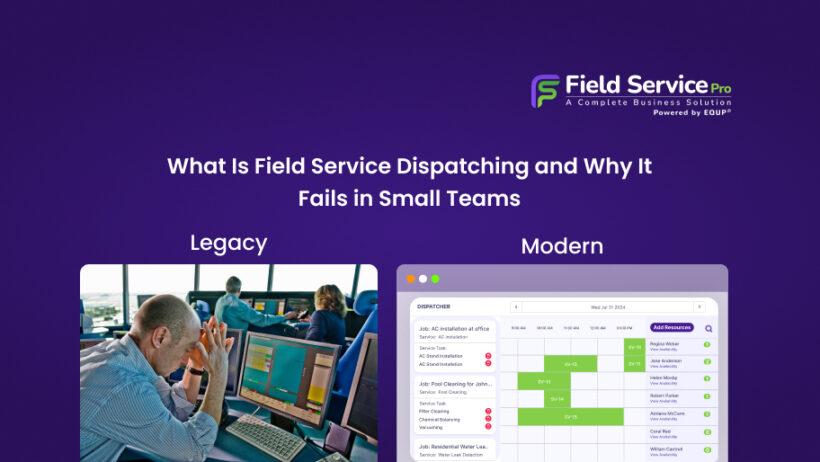
On the dispatching side, it brings scheduling and assignment into one connected workspace. Schedule jobs, assign the ideal technician, and instantly fire every critical detail right to their mobile app. Dispatchers get real-time visibility, make quick adjustments, and keep operations running without constant calls or confusion.
Beyond dispatching, the platform supports your entire workflow:
- Job Management: Estimates, work orders, tracking, and documentation in one place
- Customer Management (CRM): Complete job and communication history for every client
- Marketing Tools: Email, SMS, and WhatsApp campaigns without extra tools
- Business Automation: Reminders, follow-ups, invoicing, and recurring billing handled automatically
- AI Features: Lead capture, instant responses, and smarter customer engagement
- Mobile App: Technicians receive job details, updates, and status changes in real time
For small and growing service businesses, the real value in FieldServicePro is the fact that operations, dispatching, customer management, marketing, billing, and automation all live in one place.
That means no more stitching together 4 different tools and trying to manually bridge the gaps between them. It means your dispatch process connects directly to your job records, which connect directly to your invoicing, which connects directly to your customer communication.
That’s what fixing a dispatching problem actually looks like when it’s done properly. This builds a foundation such that the whole business can run on. If dispatching feels messy, it’s usually a sign your system needs an upgrade. Before choosing any tool, take a look at how FieldServicePro pricing works. View Field Service Pricing→