






Quick Answer
Field service dispatching is the process of assigning the right technician to the right job using dispatch software, real-time tracking, and technician scheduling to ensure efficient job completion. It helps improve job completion rate, reduce delays, and increase overall service productivity.
Introduction
If a technician has ever called you and asked, “Where am I supposed to go next?”, you already know what poor dispatching looks like.
Imagine, it’s early morning. A few customers have already called. One of your technicians is on the way to a job, then suddenly gets told to go somewhere else, much farther away. Another technician is waiting outside a property that was rescheduled, but no one informed him.
Meanwhile, your phone keeps ringing, and you’re trying to figure out what’s going on before the day has even properly started.
For many small service businesses, this isn’t unusual. It happens more often than it should because they don’t have a proper field service dispatching process.
Studies show that inefficient dispatching can reduce technician productivity by up to 20–30%, mainly due to poor routing, miscommunication, and idle time between jobs.
The problem is not the people. It’s how the work is being managed.
In most cases, dispatching is not a clear system. It’s just calls, messages, and quick decisions made in a rush. Dispatching is one of the core operational layers inside field service management, and often the layer where small teams first start losing control as job volume grows.
This might feel manageable when the team is small. But as more technicians and more jobs come in, things start slipping. Delays increase, mistakes happen, and it becomes harder to stay in control.
Key Takeaways
· Field service dispatching connects scheduling, technician assignment, and execution
· Dispatch software improves real-time visibility and reduces manual errors
· Route optimization and automated technician assignment increase efficiency
· Poor dispatching lowers job completion rate and first-time fix rate
· Small teams struggle most without structured dispatch systems
What Is Field Service Dispatching?
Field service dispatching is the process of assigning the right technician to the right job at the right time, and making sure they have everything they need to complete that job without having to call the office 3 times to figure out what’s going on.
At its core, dispatching answers a deceptively simple set of questions. These include:
Which technicians are available?
Which team members have the right skills for the job?
Which technician works closest to the customer’s location?
And how can your team communicate the assignment clearly so the technician can focus on the work?
Modern dispatch software brings structure to this process by combining technician scheduling, availability tracking, and real-time dispatch into one system instead of scattered decisions.
Dispatch management in field service sits at the intersection of logistics and communication.
Field service scheduling software matches job requirements with technician skills through skill-based assignments, such as sending an HVAC specialist to an AC repair instead of a plumbing issue. It also coordinates schedules and routes with route optimization to reduce travel time and increase daily job capacity. Additionally, the software communicates complete job details so technicians arrive with full context. Finally, it adjusts schedules in real time to handle delays, cancellations, and urgent service requests through live dispatching.
So, what is field service dispatching actually? It’s the operational nerve center of your business. It directly impacts your job completion rate, customer satisfaction, and how efficiently your team operates day to day.
Dispatching vs Scheduling in Field Service: Key Differences Explained
This distinction matters more than most people in the industry give it credit for. Dispatching vs scheduling in field service is a real difference. Mixing the two creates confusion and leads to mistakes in who is responsible for what.
| Aspect | Scheduling | Dispatching |
| Definition | Planning when a job will happen | Assigning the job to a technician and sending them |
| Focus | Time and calendar management | Execution and task assignment |
| Main Goal | Organize upcoming jobs | Ensure the right technician reaches the job on time |
| When It Happens | Before the job day or in advance | Closer to job time or in real-time |
| Involves | Booking appointments, setting time slots | Assigning technicians, sharing job details, updates |
| Example | Booking a service visit for Monday at 10 AM | Assigning John to that job and sending him the details |
| Complexity Level | Relatively simple | More dynamic and requires constant adjustments |
| Depends On | Availability of time slots | Technician location, availability, and job priority |
| Common Issues | Overbooking, poor planning | Delays, miscommunication, wrong assignments |
Scheduling is the planning side of the equation. When a customer calls and books an appointment, a job gets placed into a time slot.
Scheduling answers: When will this job happen, and roughly who will handle it? It creates structure. It sets expectations with the customer and tells your team how the day or week is shaping up.
If you’re still relying on manual methods, it’s worth understanding how they impact operations over time. If you’re still relying on manual methods, read our detailed guide on manual vs automated scheduling to understand where efficiency is lost.
Dispatching is the execution side. Once the schedule exists, dispatching is what actually gets technicians moving with the right information, in the right direction, at the right time.
Dispatching answers: Who specifically is going, how are they getting there, and do they have everything they need?
Field service scheduling and dispatch need to be treated as connected but distinct functions, especially as a team grows. The schedule is only as good as the dispatch process that executes it.
Dispatch and scheduling are connected but distinct. If your scheduling process is the upstream problem, our field service scheduling software guide explains where to address it first.
How Field Service Dispatching Works: Step-by-Step Process for Small Teams

When field service dispatch software is running well, it follows a clear and repeatable process. Here’s what a functional job dispatching process looks like in practice:
Step 1: Capture Job Requests with Complete Details
A customer calls, submits an online form, or books through a customer portal. The request gets captured with the relevant details: location, problem description, preferred timing, customer history, and any special notes. Good dispatch starts with good intake.
Step 2: Schedule Jobs Based on Availability and Capacity
The job gets placed into the schedule based on customer preference and operational capacity. This is where scheduling tools earn their keep, like preventing double-booking, flagging gaps, and flagging conflicts before they become problems.
Step 3: Assign the Right Technician (Skill-Based Assignment)
This is where dispatching truly begins. The dispatcher reviews technician availability, current workload, location, and skill set to make the best decision.
In a structured system, this is handled through automated technician assignment, where the software suggests the best-fit technician based on proximity, skills, and schedule.
This reduces guesswork and improves your first-time fix rate, since the right technician arrives prepared the first time.
The most effective dispatch systems use automation to remove the manual assignment step entirely. Our guide to field service automation software covers how AI-powered dispatch works in practice.
Step 4: Optimize Routes and Dispatch Job Details
The technician receives the job through a mobile app or dispatch software that pushes complete details instantly.
This includes address and job type, customer notes and service history, and required tools or parts.
With built-in route optimization, technicians follow the most efficient path, reducing delays and improving productivity across the day.
Step 5: Track Job Progress and Completion in Real Time
When the technician arrives on site, they update the job status. When the work is done, they log completion, capture any required documentation, and trigger the next step, i.e. invoice, customer follow-up, or the next job. The dispatcher sees all of this in real time without having to call to find out what’s happening.
Step 6: Handle Exceptions Without Disrupting the Schedule
Jobs run long. Customers cancel. Emergency calls come in. A well-designed dispatch process handles these interruptions without rippling through the whole day. A poorly designed one means the dispatcher is back on the phone, improvising again.
The whole job dispatching process, when it works this way, becomes something a growing team can actually rely on. And not something that depends entirely on one person’s ability to hold it all together in their head.

Why Field Service Dispatching Breaks as Teams Grow
When your team grows, dispatching gets more complex. With more technicians, more jobs, and more customer expectations, small gaps in coordination quickly turn into bigger problems.
More technicians means more scheduling conflicts, higher chances of miscommunication and less room for delays
What worked with 2 technicians stops working with 5. And with 10, it becomes nearly impossible to manage without a proper system.
This is why many growing businesses feel like operations are getting harder, even when they are getting more customers. At that point, most businesses realise they need a proper service dispatch system to stay in control.
For teams evaluating the cost of a proper dispatch system, FieldServicePro pricing is structured as a flat monthly fee, predictable regardless of how many technicians you add.
6 Signs Your Field Service Dispatching System Is Failing
Most businesses know something is wrong with their dispatching before they can name the specific problem. Below we’ve listed some warning signs that show up consistently when field service dispatch software has broken down:
1. Technicians Constantly Call for Job Details
If your technicians can’t get to a job without calling for the customer’s address, calling to confirm the appointment time, or calling because there was a change nobody told them about. This clearly means your dispatch communication process isn’t working. Every one of those calls takes time away from the dispatcher and time away from the technician that could be spent on billable work.
2. Jobs Get Double-Booked or Overlap
Two technicians show up at the same property. Or two customers were promised the same technician at overlapping times. This is almost always a symptom of scheduling and dispatching happening in disconnected systems. A calendar here, a spreadsheet there, and some verbal confirmations that never got logged.
3. Wrong Technician Assigned to the Wrong Job
A technician who isn’t certified for a specific type of work gets dispatched to a job that requires it. Or a highly skilled technician spends the morning on routine maintenance calls because dispatch didn’t factor in their specialty. Mismatched assignments are a skills-gap problem and a scheduling problem, but they surface at the dispatching stage.
4. Delays Happen Without Customer Communication
When a job runs long and the next customer is left waiting without any update, that’s a field service dispatching communication failure. Customers don’t expect perfection, but they do expect communication. Delayed jobs that go unacknowledged turn into negative reviews.
This is also one of the biggest reasons service businesses struggle with missed appointments. If this sounds familiar, here’s how you can reduce missed appointments without overloading your team.
5. No Real-Time Visibility into Technician Location
This one matters at the end of the day, not just during emergencies. If a new urgent job comes in at 2 p.m. and you genuinely have no idea which technician is closest, your service dispatch system has no real-time visibility, and you’re making decisions with incomplete information.
6. Jobs and Leads Are Getting Lost
When dispatching is manual and hectic, jobs fall through the gaps. A customer request that came in during a busy morning never got scheduled. A follow-up job that was promised verbally never made it into the system. These process failures, and they add up fast.
When these issues stack up, they directly impact key performance metrics like your job completion rate and first-time fix rate, both of which are critical indicators of operational efficiency and customer satisfaction.
How Poor Dispatching Impacts Your Business

Poor field service dispatching is not just an operational issue. It directly affects how much work your team can handle, how customers experience your service, and how your business grows over time.
When dispatching is not managed through a proper system or dispatch software, small inefficiencies start showing up in daily operations.
More travel time means fewer jobs completed per day: Without proper route optimization and real-time dispatch, technicians spend more time driving between locations instead of completing jobs.
Delays lead to unhappy customers and negative reviews: When schedules are not updated in real time, customers are left waiting without clear communication, which impacts trust and retention.
Wrong assignments reduce your first-time fix rate: Without skill-based job assignment or automated technician assignment, the wrong technician may be sent to a job, leading to repeat visits and wasted time.
Lack of visibility slows decision-making: If you don’t know where your technicians are or what they’re working on, handling urgent jobs becomes difficult. This is where a proper service dispatch system makes a big difference.
Missed jobs and gaps lead to lost revenue: When jobs are not tracked properly through work order management, they can get delayed, forgotten, or missed completely.
Over time, these issues directly affect your job completion rate, increase operational costs, and make it harder to scale your business. What starts as small daily inefficiencies eventually turns into a system that slows down your entire operation.
How to Improve Field Service Dispatching with Dispatch Software
Fixing a broken dispatch process rarely requires hiring more people. It requires building a system that doesn’t depend on any one person’s ability to manually manage every moving piece. Modern dispatch software also uses automation to reduce manual decisions. This helps teams respond faster and handle more jobs without increasing workload.
Let’s see what meaningful improvement in field service dispatching actually looks like:
1. Centralize Job and Customer Information
Every job, its status, location, customer details, assigned technician, and history should live in one place that everyone can access. When the dispatcher, the technician, and the office manager are all looking at the same information, the number of clarification calls drops dramatically.
2. Automate Technician Communication
The best way to dispatch jobs to technicians is a push notification through a mobile app that delivers the full job brief, such as address, customer name, job type, and notes, directly to the technician’s phone the moment the job is assigned. No calls. No confusion about whether the message was received. And the technician can confirm, flag issues, or update status from the same app.
3. Get Real-Time Dispatch Visibility
When you can see where each technician is and what job they’re currently handling, real-time dispatch becomes far more effective. You’re no longer guessing. You’re making decisions based on live data, which is essential for improving response times and handling urgent jobs efficiently.
4. Use Skill-Based Job Assignment for Better Efficiency
Instead of assigning jobs randomly or based on habit, build a structured system using:
- Skill matching (skill-based job assignment)
- Location proximity
- Workload balancing
This is where dispatch software with automated technician assignment becomes essential, especially for teams handling multiple jobs daily.
5. Connect Dispatching with Work Order Management
Dispatching doesn’t end when a technician is sent out.
It ends when:
- The job is completed
- Documentation is updated
- Billing or follow-ups are triggered
This is where work order management plays a critical role, connecting dispatch to execution and ensuring no job falls through the cracks.
A purpose-built field service management software handles assignment, notification, and real-time tracking without requiring a dedicated dispatcher to work the phones all day.
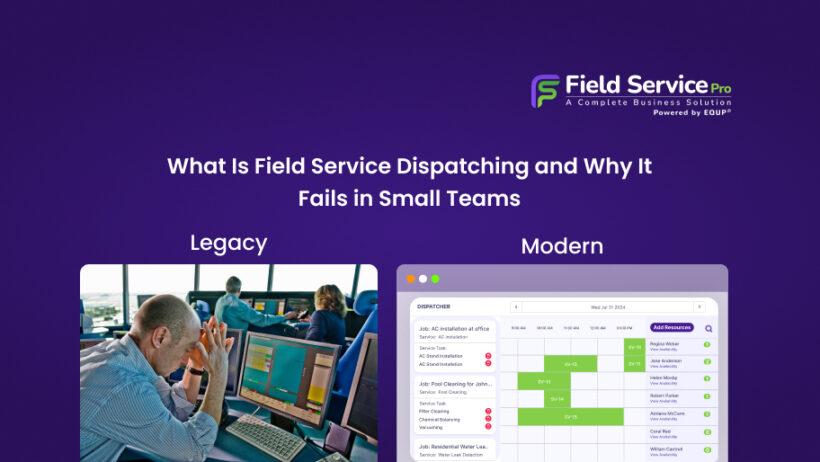
Manual Dispatching vs Dispatch Software
| Factor | Manual Dispatching | Dispatch Software |
| Technician assignment | Manual guesswork | Automated technician assignment |
| Visibility | Limited | Real-time dispatch tracking |
| Efficiency | Low | Optimized with route optimization |
| Errors | High | Reduced |
| Scalability | Poor | High |
Dispatching doesn’t work in isolation. It’s part of a larger system that connects scheduling, job management, and communication. If you want a clearer picture, this guide on what field service management actually means breaks it down simply.
Field Service Dispatch for Small Teams: Common Challenges and Limitations
For small businesses, field service dispatch for small teams often starts informally, through calls, texts, or spreadsheets.
That works when you have 2–3 technicians.
But as volume grows:
- Communication gaps increase
- Scheduling conflicts become frequent
- Manual coordination slows everything down
Without structured technician scheduling, real-time dispatch, and route optimization, even small inefficiencies start compounding quickly.
This is why many growing teams shift to dispatch software earlier than expected, not because they are large, but because manual dispatch simply doesn’t scale.
What to Look for in Dispatch Software
Not all dispatch software is built the same. Some tools only help you assign jobs, while others actually improve how your entire operation runs. When choosing a field service dispatch software, it’s important to focus on features that solve real day-to-day problems, not just basic scheduling. These include:
- Real-time dispatch visibility: You should be able to see where your technicians are and what they’re working on at any moment. This helps you make quick decisions, especially when urgent jobs come in.
- Automated technician assignment: A good service dispatch system should automatically suggest the best technician based on availability, location, and skill set. This reduces manual effort and avoids wrong assignments.
- Route optimization: Without proper routing, technicians waste time traveling. Built-in route optimization ensures jobs are assigned in a way that reduces travel time and increases the number of jobs completed per day.
- Mobile access for technicians: Technicians should receive job details, updates, and notifications directly on their phones. This removes the need for constant calls and keeps everyone on the same page.
- Integrated work order management: Dispatching should not work separately from the rest of your system. With proper work order management, every job is tracked from assignment to completion, so nothing gets missed.
The right dispatch software should do more than just assign jobs. It should help your team work faster, reduce errors, and handle more jobs without confusion.
Field Service Dispatching FAQs
Field service dispatching is assigning jobs to technicians and sending them the details needed to complete the work efficiently.
Scheduling plans when a job will happen. Dispatching assigns the technician and manages the job in real time.
Dispatching ensures jobs are completed on time, improves productivity, and helps maintain customer satisfaction.
Small businesses often start with calls, texts, or spreadsheets, but switch to dispatching software as they grow.
Common mistakes include poor communication, wrong job assignments, lack of real-time tracking, and no system for handling changes.
Dispatch software improves efficiency by automating technician assignment, optimizing routes, and providing real-time visibility into job progress, reducing delays and manual errors.
FieldServicePro: Dispatch Software Built for Small Service Teams

If dispatching feels messy every day, missed updates, confused technicians, or jobs going off track, it’s not your team. It’s the system.
FieldServicePro is a modern dispatch software designed to bring structure, clarity, and speed to your operations.
It combines technician scheduling, real-time dispatch, and automated technician assignment into one platform, so jobs are assigned instantly based on availability, skills, and location.
With built-in route optimization, your technicians spend less time driving and more time completing jobs. And with connected work order management, every job flows seamlessly from assignment to completion to billing.
This directly improves:
- Your job completion rate
- Your first-time fix rate
- Overall team productivity
For small businesses looking for field service dispatch for small teams, this means no more juggling calls, spreadsheets, and guesswork.
Everything runs in one system:
- Dispatching
- Job tracking
- Customer management
- Billing and automation
That’s how dispatching stops being chaotic and starts becoming a growth driver.
👉 Start your free trial
👉 See dispatch features in action
Field service dispatching is about creating a setup where your team can work smoothly, complete more jobs, and grow without constant chaos. If your dispatching still depends on calls, spreadsheets, or memory, it’s a bottleneck.
And that’s exactly what holds most small service businesses back from scaling. If you’re comparing platforms with strong dispatch capabilities, our list of top field service management software for 2026 includes a dispatch-capability comparison.