
When field service businesses start looking for software to manage jobs, scheduling, and customer communication, one name appears almost everywhere: Housecall Pro.
But before committing to any field service software platform, most business owners ask the same question:
How much does Housecall Pro actually cost?
If you’ve searched for “Housecall Pro pricing,” “Housecall Pro plans,” or “how much is Housecall Pro,” you probably noticed something frustrating because clear pricing information isn’t always easy to understand.
Some costs are visible upfront. Others only become obvious after you start adding users, sending customer messages, or enabling payments.
In this guide, we break down Housecall Pro pricing in 2026, including:
- All available plans
- What features each tier includes
- Hidden costs many businesses discover later
- The real monthly cost for a 5-person team
- Whether Housecall Pro is worth the price for small businesses
The information below is based on Housecall Pro’s publicly available pricing details and help-center documentation available in 2026. By the end, you’ll have a clear, realistic idea of what you might actually pay.
Quick Answer: How Much Does Housecall Pro Cost in 2026?
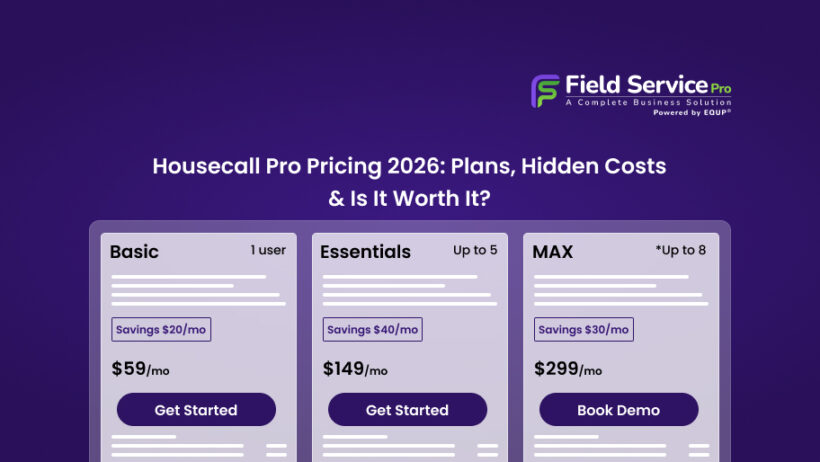
Housecall Pro pricing typically starts around $59 per month for the Basic plan, while the Essential plan starts around $149 per month. Larger teams usually receive custom pricing under the Max plan.
However, the real monthly cost often increases once businesses add technicians, send large volumes of customer messages, or process online payments. Additional users typically cost about $35 per month each, while payment processing fees start around 2.59% for card transactions and about 1% for bank payments.
Housecall Pro Pricing Plans Overview
Housecall Pro offers 3 primary subscription tiers designed for different stages of service businesses.
| Plan | Estimated Monthly Price* | Best For | Key Features |
|---|---|---|---|
| Basic | Starts around $59/month | Solo operators | Job scheduling, customer database, basic invoicing |
| Essential | Starts around $149/month | Small teams | Dispatching, estimates, online booking |
| Max | Custom pricing | Growing teams | Advanced automation, reporting, integrations |
Note: Pricing estimates are based on publicly available information from Housecall Pro’s pricing pages and help center in 2026. Exact costs may vary depending on promotions, billing cycle, add-ons, and sales quotes.
Housecall Pro’s Basic, Essential, and Max plans with additional users priced at $35/month each. Card processing starts at 2.59%, while bank payments carry a 1% fee. Exact subscription pricing can vary based on promotions, billing cycle, and sales quotes.
What’s Actually Included in Each Housecall Pro Plan
The functionality of Housecall Pro expands as you move up the pricing tiers. However, some important features only appear in higher plans.
Let’s look at each tier more closely.
- Basic Plan
The Basic plan is designed for solo service professionals just starting to organize their operations.
It typically includes:
- Service Scheduling Software
- Customer database management
- Basic invoicing
- Payment collection
- Mobile app access
- Job tracking
For a single technician or owner-operator, these tools may be enough to replace spreadsheets and manual scheduling.
However, the limitations become noticeable quickly. Features like advanced reporting, automation, and dispatching tools are restricted or unavailable at this level.
- Essential Plan
The Essentials plan targets small teams managing multiple jobs daily.
Additional features usually include:
- Dispatch board for scheduling technicians
- Estimate creation and approval
- Online booking for customers
- Automated customer notifications
- Route optimization tools
- Basic reporting dashboards
This plan is often where businesses start seeing the operational benefits of a field service platform. Dispatchers can assign jobs more efficiently, and customers can schedule services online.
But even at this level, some automation tools and integrations remain limited.
- Max Plan
The Max plan is the most advanced offering from Housecall Pro and is typically priced through custom quotes.
It often includes:
- Advanced reporting and analytics
- Marketing automation tools
- Customer follow-up automation
- Integration with additional business systems
- Expanded support and onboarding
For larger service teams with dedicated office staff, these capabilities can improve operational visibility and customer communication.
However, many businesses find that pricing becomes significantly higher once add-ons and additional users are included.
Hidden & Additional Costs You Should Know
The biggest surprise for many companies evaluating Housecall Pro cost is that the base subscription does not cover everything.
Several features and operational expenses are charged separately, which can increase the monthly bill.
Below are the most common extra costs businesses encounter.
Additional User Fees
Housecall Pro typically charges about $35 per additional user per month beyond the base plan, according to its published pricing information.
For teams with multiple technicians, this can add up quickly.
Example:
- 1 technician, which is included
- 5 technicians, which means 4 additional users
- Extra cost equals to $140 per month
For service companies with growing teams, user-based pricing becomes one of the biggest ongoing costs.
SMS and Customer Messaging Costs
Housecall Pro includes basic notifications, but high-volume messaging can trigger additional fees.
Businesses often use SMS for:
- Appointment reminders
- Job confirmations
- Technician arrival notifications
- Follow-up requests for reviews
These communication costs may appear small individually, but can increase noticeably for companies managing dozens of jobs daily.
Payment Processing Fees
Like most service software platforms, Housecall Pro charges payment processing fees when customers pay online.
Typical payment processing fees include:
- Card payments starting around 2.59% per transaction
- Bank (ACH) payments typically around 1% per transaction
The exact rate depends on how the payment is processed (card reader, card-on-file, or online payment).For businesses processing large volumes of invoices, these fees become part of the real operational cost.
Add-On Tools and Integrations
Certain features are not included in base subscriptions and may require upgrades or add-ons.
Examples can include:
- Marketing automation tools
- Advanced reporting
- Integration with accounting systems
- Additional automation features
While each add-on might seem reasonable individually, the total cost can rise once businesses start customizing the platform.
How Much Does Housecall Pro Cost for a 5-Person Team?
To understand the real price of Housecall Pro, it’s helpful to calculate a practical scenario. Imagine a service company with five technicians.
Base Subscription (Essentials Plan)
Estimated monthly price:
$149
Additional Users
4 additional technicians × $35 per month
$140
Estimated Messaging and Communication Costs
Approximate monthly messaging usage:
$20–$40
Payment Processing Fees
Payment processing costs depend on how customers pay. For example, $50,000 in card payments at 2.59% would equal about $1,295 in processing fees, while card-on-file payments at 3.49% would cost more.
Estimated Monthly Platform Cost (excluding processing fees)
| Cost Category | Estimated Monthly Cost |
|---|---|
| Essential Plan | $149 |
| Additional Users | $140 |
| Messaging Costs | $30 |
| Total Estimated Cost | ~$319/month |
And this estimate does not include payment processing or additional integrations. For some teams, the cost may be acceptable if the software significantly improves efficiency. But for smaller businesses or startups, this pricing can feel expensive.
Is Housecall Pro Pricing Worth It for Small Businesses?
Whether Housecall Pro is worth the investment depends on the size of your team and operational needs.
Many businesses appreciate the platform for its ability to bring multiple tools together in one place. Advantages often include:
- Organized scheduling and dispatching
- Digital estimates and invoices
- Improved technician coordination
- Customer communication tools
- Mobile access for field teams
These features can save hours of administrative work every week. However, the pricing structure raises concerns for some companies.
Common challenges reported by small businesses include:
- Costs increasing as teams grow
- Additional user fees stacking quickly
- Messaging and payment fees adding unexpected expenses
- Limited features on lower tiers
For companies just starting out, the total cost can become difficult to justify compared with newer alternatives designed for smaller teams.
Housecall Pro vs Competitors (Pricing & Features Comparison)
When evaluating Housecall Pro pricing, it’s useful to compare it with other popular field service management platforms like Saleoid, Jobber, ServiceTitan, and FieldEdge. These tools offer similar scheduling, dispatching, and invoicing features but differ significantly in pricing structure and target audience.
Below is a side-by-side comparison to help you understand how they stack up.
| Software | Starting Price | Best For | Key Features | Pricing Structure |
|---|---|---|---|---|
| Housecall Pro | ~$59/month | Small service businesses | Job scheduling, invoicing, online booking, customer management | Base subscription + user fees + add-ons |
| Jobber | ~$69/month | Growing service teams | Client hub, quotes, scheduling, automated follow-ups | Tiered pricing with per-user limits |
| ServiceTitan | Custom (often $200+/user/month) | Large service companies | Advanced reporting, dispatch optimization, marketing tools | Enterprise pricing + onboarding fees |
| FieldEdge | Custom pricing | HVAC and equipment service businesses | Dispatch board, inventory tracking, QuickBooks integration | Monthly fee + setup cost |
| FieldServicePro | Lower entry pricing | Small and mid-size service teams | Job management, scheduling, automation, customer tracking | Flat pricing with unlimited-user positioning |
One of the most noticeable differences is how pricing scales as teams grow.
Many traditional field service platforms charge per technician or per user, which can significantly increase monthly costs as your business expands.
FieldServicePro takes a different approach.
Its plans include unlimited users, unlimited jobs, unlimited scheduling, and unlimited contacts, allowing service companies to grow their teams without worrying about additional per-user charges.
Why Some Businesses Consider FieldServicePro Instead
While Housecall Pro is widely used, some businesses prefer alternatives that combine field service operations, sales, and marketing tools in one system.
FieldServicePro brings together several core capabilities inside one platform, including:
- Job scheduling and dispatching
- Online booking and estimates
- Sales pipeline tracking
- Email, SMS, and WhatsApp automation
- Automated invoicing and online payments
- Customer CRM and client portal
These tools allow service businesses to manage jobs, customer communication, and payments from a single dashboard rather than relying on multiple software tools.
Another difference is the number of built-in apps included in the platform.
FieldServicePro provides access to 30+ integrated business tools, which can reduce the need for separate subscriptions for CRM, marketing automation, and scheduling tools.
Quick Cost Perspective
For a growing service business, the biggest pricing factor is usually team size.
If your company plans to add technicians or office staff in the future, per-user pricing can significantly increase monthly costs.
Platforms like FieldServicePro avoid this issue by offering unlimited users within their plans, allowing teams to scale operations without adding extra subscription fees.
Which Platform Should You Choose?
Each platform has strengths depending on your business size and operational needs:
- Housecall Pro – popular choice for small service teams starting with field service software
- Jobber – strong for client communication and quotes
- ServiceTitan – designed for large service companies with complex operations
- FieldEdge – commonly used by HVAC businesses
- FieldServicePro – a practical option for teams that want job management, CRM, automation, and billing tools in one platform without per-user pricing
If you’re evaluating costs carefully, it may be worth comparing them side-by-side.
Looking for a more affordable alternative? You can see how FieldServicePro compares on pricing before making your decision: Housecall Pro Alternative
Final Thoughts
Housecall Pro has built a strong reputation as a field service management platform, helping thousands of businesses organize scheduling, dispatch technicians, and manage customer communication more efficiently.
However, when evaluating Housecall Pro pricing, it’s important to look beyond the base subscription. The actual monthly cost often includes additional expenses such as:
- Extra user charges
- SMS or messaging usage
- Payment processing fees
- Optional add-ons or integrations
Individually, these costs may seem small. But as your team grows and job volume increases, they can gradually raise the overall cost of running the platform.
For established service companies with steady revenue, this pricing model may still work well. But for smaller businesses or growing teams trying to keep overhead under control, it’s worth carefully reviewing how field service pricing scales over time.
Before committing to any field service software, take the time to compare platforms, understand what features are included, and calculate the real monthly cost for your team size.
In many cases, businesses discover that newer tools offer similar scheduling, job management, and automation features with simpler pricing structures.
If you’re exploring alternatives, it may also help to see how FieldServicePro compares on pricing and features before making your final decision.
Choosing the right platform isn’t just about software features. It’s about selecting a system that supports your daily operations while remaining affordable as your business grows.
Pricing information is compiled from publicly available vendor websites and independent review platforms including Capterra, GetApp, Tekpon, and SoftwareFinder. Because pricing and features change regularly, businesses should confirm current rates directly with vendors before purchasing.